12 min read
You spent an hour tailoring bullets. You hit submit. The portal spun, then nothing. No interview. No rejection email. Sometimes the break isn't your experience section. It's the file itself. When parsers can't read what you uploaded, you don't enter the ranked list at all. That's fixable in ten minutes if you know which layer broke.
I've opened Greenhouse profiles where the PDF thumbnail looked perfect and every employer field was empty. That's not a keyword problem. That's an upload problem. Before you rewrite your summary, check your resume for free against the posting and confirm parsers can copy your job titles and dates out of the file.
This page walks through six upload failures that kill applications before a human reads bullet one: wrong file type, corrupted PDF, image-only scan, password lock, oversized file, and the wrong document in the slot. You'll learn how to spot which one is yours and what to change before the next apply.
Quick Wins
- Export PDF from Word or Docs with selectable text, not a phone photo.
- Paste PDF text into Notepad before every submit. If it scrambles, fix the file.
- Keep size under two megabytes and remove password protection.
- Name the file LastName_FirstName_ReqTitle.pdf and open the portal preview.
The symptom: your application died before scoring
The portal accepted your click. Maybe you even got a confirmation email. Weeks pass. You assume fit was the issue. Often the ATS never stored readable text. Recruiters sort ranked lists built from parsed fields. Blank employer names mean blank rank. You weren't rejected on merit. You weren't scored.
Job searching is hard enough without guessing whether silence means "not qualified" or "file unreadable." Upload failures feel invisible because nobody sends a note saying your PDF was a JPEG in disguise. You have to diagnose from preview screens and paste tests.
The pattern: instant disqualification at upload means the parser never got text into Workday, Greenhouse, Lever, Taleo, or iCIMS. Keywords inside a locked or corrupted file don't count.
Read why your resume never reaches a human for what happens after a file parses but still loses on rank or knockout answers. This page stops you earlier, at the upload layer.
Six resume upload mistakes that instantly disqualify you
Cause 1: Wrong file type
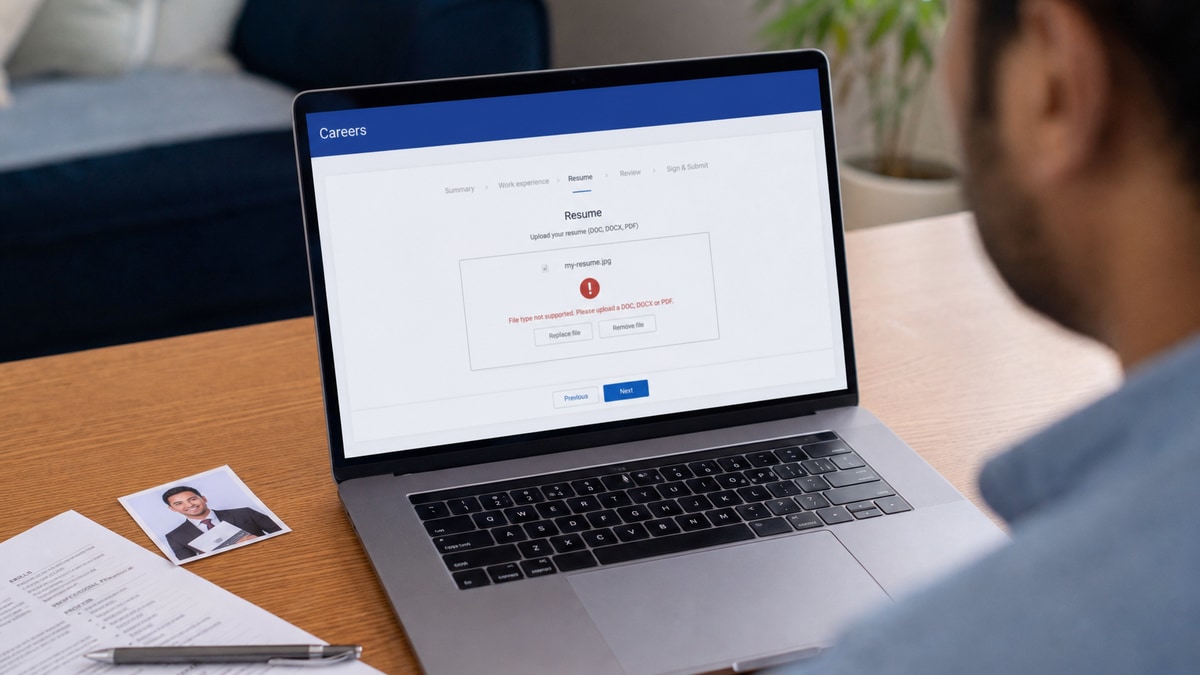
Portals list allowed types for a reason. .pages, .odt, .txt, and image files (.jpg, .png) often fail on the first validator. Old .doc files from pre-2007 Word trip parsers that expect .docx structure. Some government and healthcare portals still demand DOCX only. Sending PDF when they asked for Word can hard-fail before review.
Before: Uploading Resume.pages from a Mac or screenshot.png saved from Canva.
After: Export PDF from Word with "Best for electronic distribution" or Save as .docx when the posting lists Word only.
Fix: Read the upload tooltip. Match it exactly. When in doubt, PDF with selectable text beats exotic formats every time in corporate US hiring.
Cause 2: Corrupted PDF
Corruption shows up as a file that opens on your laptop but breaks in the portal preview. Partial downloads, interrupted email attachments, and "Print to PDF" from a crashing browser produce files with missing font tables. Some exports embed broken links that choke parsers.
You won't always get an error banner. Workday may show a thumbnail while storing garbage text. The Notepad test catches this: Select all text in the PDF, copy, paste into Notepad. If half the employers vanish or symbols replace letters, treat the file as corrupted even if Preview looks fine.
Before: resume_final_v3.pdf that was emailed to yourself three times and re-downloaded from a flaky connection.
After: Fresh export from the master .docx saved locally, opened once, pasted clean into Notepad.
Fix: Re-export from source. Don't repair by re-saving a broken PDF in Preview. Open the Word original, Save As PDF again, run the paste test, then upload.
Cause 3: Image-only scan
Phone photos of paper resumes, flatbed scans saved as PDF without OCR, and Canva "PDF" exports that rasterize text all look readable to human eyes. Parsers see a picture. No employer names. No dates. No skills list. Instant dead file.
This hits career changers who faxed a resume years ago and keep re-scanning the same yellowed copy. It also hits designers who export pretty layouts that are really flattened images. The ATS reads pixels, not your typography.
Before: Scanner PDF where you can't highlight individual words in Adobe.
After: Single-column Word doc with 11-point Calibri, exported to PDF with live text selection.
Fix: Rebuild in Word or Google Docs. If you must scan, run OCR in Adobe Acrobat or Microsoft Lens with "text searchable" enabled, then paste-test before upload.
Cause 4: Password lock or edit restrictions
Password-protected PDFs block extraction. So do "restrict editing" flags some templates add. Recruiters won't call you for the password. Parsers skip the file. Same outcome.
Some candidates lock files after a bad experience with identity theft. Understandable. The apply copy must be unlocked. Keep the protected version in personal storage, not on the submit button.
Fix: File → Export → PDF without security. In Word, remove restrict editing before export. Upload the open copy only.
Cause 5: File too large
Portals often cap between two and ten megabytes. Five megabytes is a common cliff. High-res headshots, embedded portfolio spreads, and press-quality PDF settings balloon size. Upload may fail mid-stream or truncate pages silently.
A mid-level marketing candidate once embedded full campaign PDFs inside the resume file. Greenhouse rejected the upload twice. She assumed the site was broken. The file was twelve megabytes.
Before: Four-page PDF with full-bleed graphics and a three-megabyte photo.
After: Two-page text-forward PDF under one megabyte, portfolio link in the header instead of embedded files.
Fix: Compress images to web resolution. Drop appendix pages from the upload copy. Link to portfolio on LinkedIn or a personal site in the contact line instead of attaching work samples inside the PDF.
Cause 6: Wrong document uploaded
Cover letter in the resume field. Last year's version without the new role title. A blank page exported by accident. Tracked-changes Word doc still showing redlines. Each one wastes the apply and sometimes can't be undone without withdrawing.
Desktop clutter kills here. Downloads folders full of similarly named files make mis-clicks easy at midnight. The wrong-doc mistake is the only one where content quality was fine and the wrong binary went out.
Before: Cover_Letter_Acme.pdf dropped into the resume slot because both were open in tabs.
After: Lee_Jordan_Supply_Chain_Analyst.pdf opened, scrolled, and matched to the req title before submit.
Fix: Open the file. Read the header. Match filename to req title. Use separate folders per active application so cover letter and resume can't swap places.
How to tell which cause is yours
Portal error on submit pointing at format or size: start with Cause 1 or Cause 5. Read the exact error string. "Unsupported file type" is format. "File exceeds maximum size" is weight.
Upload succeeds but preview shows blank experience fields: suspect Cause 2, Cause 3, or Cause 4. Run paste into Notepad. No selectable text means scan or lock. Scrambled text means corruption or multi-column layout fighting the parser.
Recruiter replied asking for your resume after you applied: likely Cause 6. They received something, but it wasn't the file you thought. Re-upload with a clear filename and reference the application date.
Instant auto-rejection email within minutes with no preview ever looking right: often Cause 1 or Cause 3 combined with knockout logic that treats empty parse as failed minimum requirements.
Copy-paste: pre-upload checklist
Run this list before every Workday, Greenhouse, Lever, or iCIMS submit:
1. File type matches portal tooltip (PDF or DOCX).
2. Paste test into Notepad: employers, dates, and skills appear in order.
3. No password prompt when opening the PDF.
4. File size under 2 MB (under 5 MB absolute max).
5. Filename: LastName_FirstName_ShortReqTitle.pdf.
6. Opened the file locally: correct version, correct person's name in header.
7. Portal preview after upload: experience section populated, not blank.
8. Same file saved in an Apply_2026 folder so you can reapply if needed.
Composite: warehouse supervisor re-scan
Before: Flatbed scan PDF from 2019, four megabytes, can't highlight text. Taleo preview empty.
After: Word rebuild with bullet on 18% dock-to-stock improvement, PDF under one megabyte, paste test clean.
Composite: financial analyst wrong slot
Before: Uploaded Morgan_Ellis_Cover_Letter.pdf into resume field on Greenhouse.
After: Ellis_Morgan_Financial_Analyst.pdf in resume field, cover letter pasted into the separate text box.
Edge case: portal allows only DOCX
Export .docx from Word, not "Save as PDF and rename." Some federal contractors parse DOCX natively and fail PDF entirely. Match the tooltip even when PDF is your default everywhere else.
Edge case: Mac Pages user
Pages does not upload to most ATS portals. File → Export to → Word, then PDF if allowed. Keep a .docx master on disk for applications, not the .pages bundle.
Edge case: reapply after a bad upload
Some systems block duplicate applications. Withdraw the broken one if permitted, then submit fresh with the fixed file. If withdraw isn't available, contact recruiting with one corrected PDF and the confirmation ID. Don't upload five versions in one day.
What broken uploads share
Skipping the preview screen. Candidates trust the spinner. Preview is where blank parses show up.
Trusting the thumbnail. A pretty first page hides empty text layers underneath.
Renaming without re-exporting. Changing .pages to .pdf in Finder doesn't convert the file. The portal still sees Apple format.
Using design tools as the source of truth. Canva and InDesign are for visuals. Word or Docs should own the apply copy.
Applying on mobile with camera upload. Phone photos almost always become Cause 3. Wait until you're at a laptop with the real export.
Ignoring size after adding a headshot. One uncompressed photo can push a one-page resume past the portal cap.
Read why your resume looks different after Workday upload when preview looks odd but text is present. That's a formatting fight, not always a dead file.
Verify the file before the portal eats it
Upload fixes only matter when the content inside the file is worth parsing. A clean PDF with weak bullets still loses on rank. A strong resume in a locked scan still dies at upload. Check both layers.
Run a free ATS resume check with the job description pasted. Fix parsing gaps in bullet one, re-export, paste-test, then upload. Build your resume in a plain single-column template if you're rebuilding from a scan or a corrupted export tonight.
When the posting needs a separate cover letter file, generate a cover letter as its own PDF so you don't drop letter text into the resume slot by mistake.
Fix the file before you fix the story
Resume upload mistakes that instantly disqualify you aren't about talent. They're about bytes, text layers, and which PDF you grabbed from Downloads at 11 p.m. Wrong type, corruption, scans, locks, size, and mis-clicks each have a ten-minute fix. Run the checklist, paste into Notepad, read the preview, then worry about keywords.
Tonight: export one clean PDF from your master doc, name it for the req, upload once, confirm the experience fields populated. Stop rewriting bullets when the parser never got your employers. Fix the upload layer first.
This won't land you roles you're not qualified for. It stops qualified files from dying before anyone reads them. That's worth ten minutes before every submit.
Read more
Frequently asked questions
Yes. Some portals accept the file then fail parsing silently. Always open the post-upload preview in Workday, Greenhouse, or Lever. If experience fields are blank or garbled, the file failed even though the spinner finished.
PDF exported from Word or Google Docs with selectable text is the default safe choice. DOCX works when the posting asks for Word. Avoid PDFs built from image scans, Canva exports with locked layers, or old .doc files unless the portal explicitly allows them.
Stay under two megabytes when you can. Many corporate portals reject or truncate above five megabytes. Compress embedded photos, drop decorative graphics, and export print-quality PDF instead of press-quality if size balloons.
Yes. Passwords and edit locks block parsers and recruiters from copying text into the ATS profile. Export an unprotected copy for applications. Keep a separate locked archive at home if you worry about edits, not on the apply button.
Withdraw and reapply if the system allows it, or email recruiting with the correct PDF named LastName_FirstName_ReqTitle.pdf. Do not send three different versions in one thread. One corrected file beats a pile of duplicates that recruiters cannot reconcile.