6 min read · ATS Resume
Your Canva resume wins compliments at a coffee chat. It loses in a Workday upload when the parser reads your skills column before your job title and dumps dates into the wrong field. Pretty and parseable aren't the same bar.
Before you run the checklist, check your resume for free on the exact PDF or DOCX you'll attach. Don't trust how Word looks on your screen.
Tonight's job: walk the grouped checklists below, fix anything that fails the plain-text test, then upload. Pair with PDF vs Word for ATS when the posting specifies a format.
Formatting won't turn a stretch role into a fit. It stops a qualified file from dying before a recruiter opens it.
Quick Wins
- Single column only on files you upload to employer portals.
- Paste into Notepad: contact first, then current job, then bullets.
- Use Experience, Skills, Education headers. Skip creative labels.
- Name the file Firstname-Lastname-Resume.pdf, not resume-final-v4.
Pretty on screen, broken in the parser
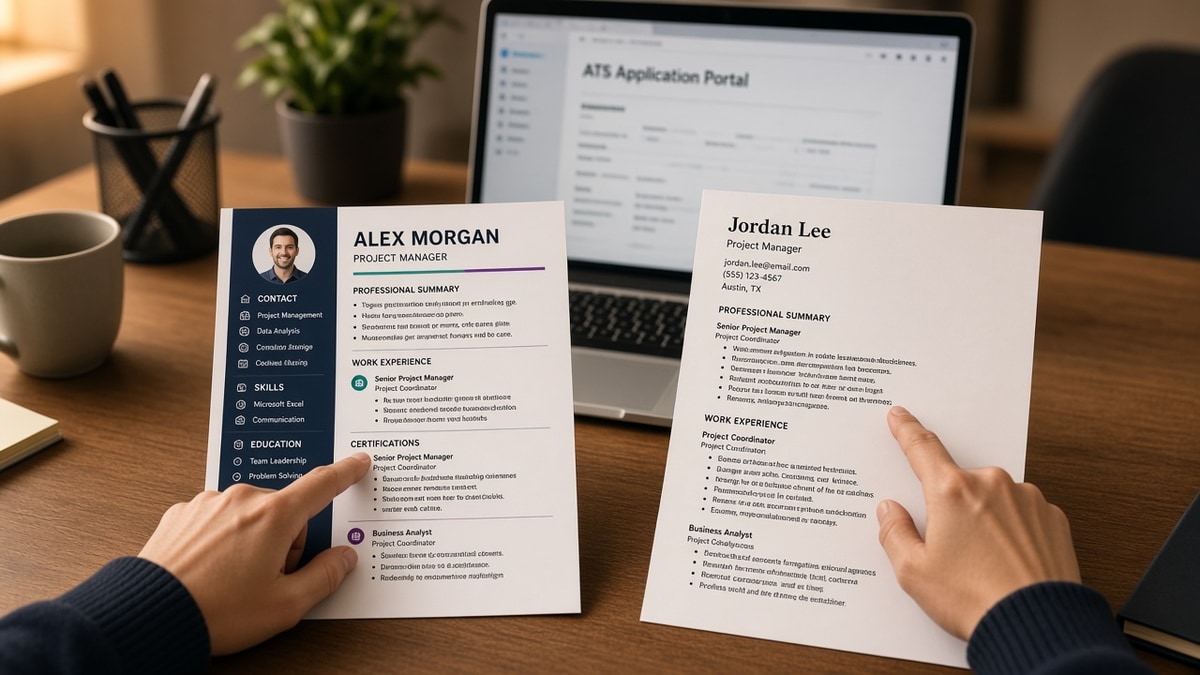
Design tools sell visual hierarchy: color bands, icon skills, photo headers. Applicant tracking systems sell structured fields: employer, title, start date, end date, body text. When those models collide, the parser wins and you lose visibility.
The contrast: a magazine layout impresses a friend. A boring stack of plain headings gets imported into Greenhouse so a recruiter can filter on Salesforce admin without opening your attachment.
Recruiters often see a parsed summary before the PDF. If that summary shows the wrong employer order or blank dates, they move on. The attachment might look perfect. The profile row doesn't.
Before: Two-column Canva export with skill icons and a photo header.
After: Single-column Word doc with Calibri 11 pt, standard headers, bullets only.
You don't need to abandon design forever. You need two files: one pretty for humans who asked, one parseable for portals you'll never charm with font choice.
ATS resume formatting rules you must follow: checklists
Work through each group in order. Don't skip the copy-paste test at the end because you're tired. That's when bad exports slip through.
Layout and structure
Why it matters: parsers read top to bottom, left to right. Columns and text boxes scramble that order.
- Single column for every employer upload.
- No tables, text boxes, or floating shapes for job blocks.
- Contact name, phone, email, city in the document body, not the header/footer band.
- Standard headers: Summary or Profile, Experience, Skills, Education, Certifications if needed.
- Bullets for roles, not dense paragraphs.
Typography and spacing
Why it matters: exotic fonts and light weights disappear in preview panes and sometimes fail embedding on export.
- Fonts: Calibri, Arial, Helvetica, Georgia, or Times New Roman.
- Body 10.5 to 12 pt; headings one step larger, consistent throughout.
- Month-year dates on the same line as title when possible: Jan 2021 – Mar 2024.
- One blank line between roles, not random double spacing mid-bullet.
- No white text, no keyword footers, no decorative lines made of symbols.
File export and naming
Why it matters: the wrong export type turns a readable Word file into an image PDF the parser can't search.
- Submit DOCX when the form allows it; otherwise text-based PDF from Word or Docs.
- Never upload phone photos, scanned paper, or password-protected files.
- File name: Firstname-Lastname-Resume.pdf (or .docx).
- If the portal auto-fills fields wrong after upload, fix the source file before reapplying.
| Check | Pass signal | Fail signal |
|---|---|---|
| Plain-text paste | Employers in order, dates beside titles | Skills before first job, gibberish symbols |
| Column count | One vertical stack | Sidebar rail or split page |
| Section labels | Experience, Skills, Education | My Journey, Core Powers |
| PDF search | Ctrl/Cmd+F finds job titles | Search finds nothing |
Copy-paste block: plain role header
Copy-paste formatting skeleton (edit brackets)
[Full name]
[City, ST] | [phone] | [email]

Experience
[Employer]
[Job title] | [Mon YYYY] – [Mon YYYY or Present]
• [Verb] + [tool from posting] + [outcome]
• [Second bullet, max 2 lines]

Skills
[Tool], [Tool], [Tool] (plain commas, no icons)

Education
[Degree], [School], [Year]
I've imported thousands of resumes into Lever and Taleo where the template looked sharp and the parsed row showed blank tenure. The plain-text test catches that before you spend an hour tailoring bullets nobody will see.
For section-order rules beyond layout, see why resume sections should follow standards .
Template traps that fail the upload checklist
Headers and footers for contact info. Many parsers ignore repeated regions. Your phone number vanishes while skills duplicate on page two.
Skill bars and star ratings. They're images or shapes, not text. Replace with a one-line list of tools you've actually used on the job.
Before: "Professional Journey" heading with logo watermark.
After: "Experience" heading, plain text, no background image.
Hyperlinks on every tool. Some parsers strip URLs and leave punctuation gaps. Plain tool names parse cleaner unless the posting asks for portfolio links in a dedicated field.
Compressing font to 9 pt to fit a design. If you need tiny type, you have too much content for a parse-friendly one-page file. Trim bullets instead.
More parsing failures and fixes live in resume rejected by ATS: common reasons and fixes .
Verify formatting before the portal stores your file
Checklists only work when you test the same bytes you'll submit. Keep two windows open: Notepad paste and a checker result.
Run the free ATS checker after the plain-text paste passes. It flags missing headings and order problems keyword tweaks won't fix.
Rebuilding from scratch? Use the free resume builder for a single-column export, then tailor bullets. Don't reintroduce columns after export.
Do this now: Paste your resume into Notepad. If your current employer isn't visible before your university name, fix section order before you run any keyword tool.
Run the checklist, then upload
Open your export file. Walk layout, typography, and file checks. Paste into Notepad. Fix anything out of order before you touch keywords.
- Single column, standard headers, bullets not tables.
- Contact in the body, dates consistent, plain fonts.
- Correct file type for the form, professional file name.
- Checker pass on the exact upload.
Generate a cover letter when required, then run a free ATS check on both attachments. Formatting and message should use the same employer names and titles.
Save the parseable version as your default upload. Pretty files are for humans who already asked to see your work, not for midnight mass applies.
Read more
Frequently asked questions
Most corporate systems rank or filter rather than auto-delete, but a file that won't parse often never surfaces in recruiter search. Humans still decide, yet they frequently work from a parsed summary first. If that summary is scrambled, you effectively didn't apply even when the portal says received.
Only when the PDF contains selectable text exported from Word or Google Docs. Image-only PDFs, scans, and design-tool exports often fail the plain-text test. When a posting accepts DOCX, that format usually maps headings more reliably in Workday and Greenhouse. Match what the form requests.
Not for ATS uploads. Two-column layouts read left to right and merge unrelated blocks. Skills in a sidebar can import before your current job title. Keep the pretty version for networking PDFs a human asked for. Upload the boring single-column file to employer portals.
Yes, but placement matters. Put Skills after Experience with plain comma or line lists, not icon rows. Matchers still weight keywords inside experience bullets higher, so mirror posting terms in bullet one first, then repeat accurate tools in Skills without stuffing.
Copy the file text into Notepad or TextEdit. If order matches what you see in Word and contact lines aren't duplicated, parsing will likely hold. Then run a free checker on the exact bytes you'll upload. Fix layout before you chase keyword scores.