12 min read
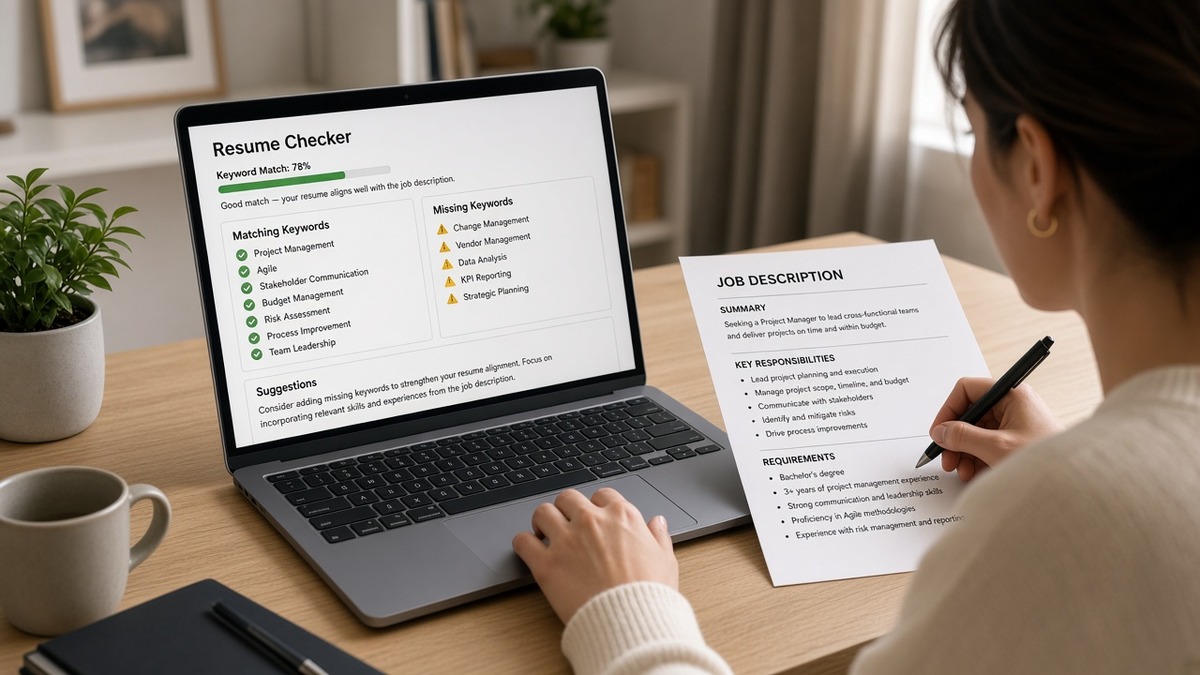
You've run the checker, got a strong keyword score, and Greenhouse still shows your current job under Skills. That's not a bug in your hustle. An ATS resume checker for US jobs measures overlap with the posting and parse risk as separate signals. Most candidates optimize the number that feels good and ignore the one that blocks import.
Check your resume for free with the job description pasted in. You're looking for whether employer lines survive a plain-text read, not whether you hit every synonym in the posting. A two-column file can score high on keywords while the portal never attaches those terms to the right job block. It isn't fair. It's how import works on most US corporate stacks.
Below you'll see what checkers can and cannot measure, before/after pairs across roles where keyword score and parse outcome diverge, what weak files share, and a copy-paste rerun order you can use before every US corporate apply. Job searching through Workday and Greenhouse is already slow. This page is about reading the report correctly, not chasing a single percentage.
If you've been rewriting bullet verbs while the checker still flags columns, flip the order. Parse warnings are blocking. Keyword gaps are secondary until the export reads top to bottom in Notepad. Don't trust a green headline until you've pasted the same file into plain text once.
And when the portal asks for a cover letter after you fix layout, don't paste a block that repeats scrambled employer names. Generate a cover letter from the corrected resume text so the note matches what the checker finally read as plain text.
Quick Wins
- Fix parse flags before you chase keyword percentage.
- Paste export into Notepad; employer order is your ground truth.
- Run the checker with the exact posting text, not a generic job title.
- Match upload format: DOCX in checker if you will upload DOCX.
What an ATS resume checker for US jobs scores (and what it cannot)
Checkers approximate two problems employers face on every req: can we read the file, and does the readable text mention what the posting asks for. They are not a copy of Workday's internal rank for your profile. They do not know whether a recruiter will forward you. They flag patterns that correlate with import failure and term overlap with the job description you pasted in.
What they usually measure: keyword and phrase overlap with the posting, formatting risk like tables, columns, headers, and text boxes, and sometimes whether standard section labels appear. Some tools split those into separate scores. Others bury parse warnings under a single headline number.
What they cannot measure: whether this specific employer's Greenhouse instance maps your sidebar before Experience, whether a referral bypasses the queue, whether your salary band fits, or whether a human will like your tone. They also cannot see graphics, portfolio spreads, or scanned PDF text the employer's OCR misread.
I've screened US stacks where the candidate's checker report looked green and the Greenhouse preview showed three employers merged into one block. The keywords were in the file. They were not attached to dated jobs the recruiter could ctrl-f.
Treat parse risk as a gate. Treat keyword overlap as tuning after the gate opens. When both flags fire, flatten layout first, rerun on the plain export, then tailor bullet one to the posting.
Edge case: internal acronyms in the posting. If the req says GTM or PMP, mirror the exact spelling in bullet one when you truly held that scope. Checkers match strings. They do not infer that go-to-market in your summary equals GTM in the req.
Edge case: federal or clearance language. Checkers may flag missing terms you cannot put on a resume. Fix layout anyway. Recruiters still need a readable timeline before they ask what you can share on a call.
For how employers match posting language after import, read how ATS matches resumes to job descriptions . Checker scores approximate that match only on text the parser kept.
Before/after pairs where keyword score and parse outcome diverge
Each pair shows a composite US candidate, what a checker tended to report, and what Greenhouse or Workday import did with the same file. Illustrative scores describe checker behavior, not guaranteed percentages on every tool.
Pair 1: Product manager, two-column template
Posting lists roadmap, stakeholder management, and SQL for a Greenhouse employer in Chicago.
Before: Left rail Skills holds roadmap, SQL, Jira, and Agile. Right column Experience. Checker keyword overlap: strong. Parse flag: two-column layout.
After: Single column. Bullet one under current employer: Owned Q3 roadmap for payments squad; ran stakeholder reviews with 8 leads; wrote SQL queries for funnel diagnostics. Checker keyword overlap: moderate. Parse flag: clear. Greenhouse preview shows four employers in order.
The before file felt winning on keywords. Import put SQL and roadmap under Skills with no dates. Recruiters ctrl-f inside Experience, not inside a rail the parser read first.
Pair 2: Software engineer, keyword-stuffed Skills footer
Posting wants Python, AWS, and CI/CD for a Workday employer in Denver.
Before: Plain layout. Skills footer repeats Python, AWS, Docker, Kubernetes, Terraform, Jenkins twenty times. Checker keyword overlap: very strong. Parse flag: clear. Recruiter view: tools present, no proof in dated bullets.
After: Skills holds six terms. Bullet one: Built Python ETL on AWS Lambda; cut batch runtime 22% in Q1 2025. Same checker keyword overlap: strong. Parse flag: clear. Difference is human skim, not checker headline.
Checkers reward term presence. Recruiters reward terms next to the employer that used them. Both scores can look green while only the after file survives a ten-second ctrl-f.
Pair 3: UX designer, designed PDF upload
Posting lists usability testing, Figma, and accessibility for a Greenhouse employer in Seattle.
Before: Portfolio-style PDF with grids and icons. Checker keyword overlap: strong when text strips cleanly. Parse flag: tables and text boxes. Greenhouse preview: one employer block, methods missing.
After: Plain Word upload. Bullet one: Ran moderated usability tests on checkout with 20 participants; shipped hi-fi flows in Figma; WCAG AA fixes cut support tickets 9% in Q2. Checker keyword overlap: strong. Parse flag: clear. Preview matches timeline.
Pair 4: Registered nurse, lower keyword score, clean parse
Posting lists Epic, ACLS, and med-surg for a hospital Workday req in Phoenix.
Before: Designed template with certification icons. Checker keyword overlap: moderate. Parse flag: images and columns. Preview drops ACLS dates.
After: Single column. Bullet one: Staff RN on 32-bed med-surg unit; Epic documentation for 6-patient load; ACLS certified 2024. Checker keyword overlap: moderate. Parse flag: clear. All three terms sit in dated Experience.
Lower keyword percentage on a readable file often outperforms a high score on a scrambled import. The checker is not the employer. The parsed profile is what many recruiters open first.
Pair 5: Marketing manager, metrics in sidebar
Posting lists HubSpot, demand gen, and pipeline for a Greenhouse employer in Atlanta.
Before: Metrics table beside Experience. MQL and pipeline totals in cells. Checker keyword overlap: strong. Parse flag: tables. Greenhouse attaches metrics to wrong employer.
After: Bullet one: Ran demand gen in HubSpot; delivered 380 MQLs in Q2 at $41 CPL; grew pipeline $1.8M. Checker keyword overlap: strong. Parse flag: clear. Metrics stay on the job that earned them.
Pair 6: Customer support lead, scan PDF
Posting lists Zendesk, CSAT, and WFM for a Lever employer in Austin.
Before: Scanned PDF from a phone photo of a printed resume. Checker keyword overlap: weak to moderate depending on OCR. Parse flag: not machine-readable.
After: DOCX from Word. Bullet one: Led 12-agent Zendesk team; held CSAT 96% across Q4; WFM adherence 98%. Checker keyword overlap: strong. Parse flag: clear.
OCR failures look like low keyword scores in some tools. The fix is not more keywords. The fix is a born-digital file the portal can chunk without guessing characters.
Pair 7: Data analyst, header contact in Word footer
Posting lists SQL, Tableau, and stakeholder reporting for a Workday employer in Charlotte.
Before: Phone and email in footer on every page. Checker keyword overlap: strong. Parse flag: clear on some tools. Workday preview maps phone into summary field; first job title drops below Education.
After: Contact on line two under name in body. Bullet one: Built Tableau dashboards for revenue ops; automated SQL pulls that cut weekly reporting time 6 hours. Checker keyword overlap: strong. Parse flag: clear. Preview keeps employer blocks intact.
Copy-paste checker rerun order
Copy-paste before every US corporate apply:
1. Export the file you will upload (DOCX when allowed)
2. Paste into Notepad; confirm employer lines top to bottom
3. Run checker with full job description text pasted in
4. Fix every parse/table/column flag before keyword tweaks
5. Tailor bullet one so three posting terms land in dated Experience
6. Rerun checker; only submit when parse warnings are clear
See why your resume looks different after Workday upload when preview and checker disagree on the same PDF.
What high keyword scores hide on US uploads
Chasing one headline percentage. A single score blends parse risk and term overlap. A file can look winning while columns still scramble employers. Read sub-scores or warnings line by line.
Stuffing Skills after a green keyword report. More undated terms inflate overlap without helping ctrl-f inside Experience. Move terms into bullet one under the job that used them, then rerun.
Checking a different file than you upload. Running the checker on a plain export while submitting a designed PDF produces false confidence. Match format and content on check day and apply day.
Ignoring the posting paste field. Generic title checks miss acronyms and internal tool names in the req. Paste the full description from the portal.
Assuming checker equals employer ATS. Workday and Greenhouse configs differ by company. The checker approximates common failure modes. The portal preview, when available, is the tiebreaker.
Skipping Notepad because the checker scored parse as clear. Plain-text paste catches reorder bugs some tools miss, especially footer contact blocks and duplicated headers.
Treating a low keyword score as fatal before fixing layout. A readable file with three matched terms in bullet one often beats a high score on scrambled import. Fix order first, then tune language.
Rerunning only after keyword edits. If you changed bullet verbs but not columns, you optimized the wrong signal. Flatten layout, paste into Notepad, rerun parse checks, then tailor terms.
Rerun the checker after layout, not before
Start on the free ATS checker with the posting pasted in. Note parse warnings separately from keyword gaps. Fix columns, tables, and header contact blocks. Paste the export into Notepad. Rerun only when employer lines read in order.
Then score your job match on the same plain-text order. You're confirming terms sit in dated bullets, not chasing every synonym in the posting. A moderate match on a clean import beats a strong match on a file Greenhouse cannot chunk.
Read both scores before submit
An ATS resume checker for US jobs tells you two stories: whether your language overlaps the posting and whether your file layout survives a parser-first read. A high keyword score with a two-column layout still fails Greenhouse import before a human opens the attachment. Fix parse order, rerun on the export you will upload, then tune bullet one.
Pick the next US req on your list. Paste the copy-paste rerun order. Run a free ATS check with the full description. Open the Greenhouse or Workday preview when the portal offers one. Submit when warnings are clear and terms sit in dated Experience.
This won't bypass referral politics or fit calls you cannot see. It does stop qualified candidates from trusting a green checker headline while their best bullet imported under the wrong employer.
Save the posting text and your last plain export together. Rerun the checker after every layout change, not only after keyword edits. Same workflow every apply beats chasing a new score without fixing the file underneath.
Read more
Frequently asked questions
Not by itself. Most checkers score keyword overlap against the job description separately from whether your file will parse cleanly. A two-column layout can score 90% on terms while Greenhouse imports your Skills rail as your first employer. Fix parse order first, then chase keyword match on the plain-text export.
Typically three buckets: keyword and phrase overlap with the posting, formatting flags like tables and columns, and sometimes section label recognition. They do not replicate every employer's Workday or Greenhouse configuration. They approximate what a parser can read and what language matches the req. Treat the parse warning as blocking and the keyword score as secondary.
Layout first. Rewriting bullet one does not help if bullet one imports under the wrong employer. Flatten to single column, paste into Notepad to confirm employer order, then rerun the checker with the posting pasted in. Tailor keywords only after the plain-text read matches your timeline.
Yes when the file parses cleanly and bullet one names scope the posting asks for. A readable resume with three matched terms in dated bullets often beats a keyword-stuffed sidebar that scrambles import. Recruiters ctrl-f inside the parsed profile. They cannot ctrl-f text the parser dropped.
They read the text you give them, which may differ from what Greenhouse extracts from the same PDF. A designed PDF can score well in a checker that strips formatting while the employer portal chokes on hidden tables. Upload DOCX to the checker when possible and match that format on apply day.