11 min read
You've rebuilt your resume three times because one posting runs on Workday, the next on Greenhouse, and a third on Lever. That's wasted hours. The parsers don't want three templates. They want one plain file they can read top to bottom without sidebars, tables, or graphics scrambling your employer order.
Check your resume for free with the posting pasted in. You'll often see matched keywords in Skills while your current job title imported under Education because a two-column Canva export shoved blocks out of order. The fix isn't a Lever-specific font. It's a single-column layout you reuse on every portal.
Below you'll get five steps to build that master file, before/after pairs across roles, two edge cases, where uploads still break, and tools to test before you hit submit again. Job searching is hard enough without reformatting from scratch per employer. This page keeps layout boring so you spend time on bullet one, not margins.
Pull up your latest export before you read on. We're going to flatten it once and stop guessing which ATS wants which template.
Quick wins
- Default to clean DOCX when the portal allows Word upload.
- Strip sidebars and icon rows so Experience imports in reading order.
- Put job title, employer, and Month Year dates on one strip per role.
- Paste your export into Notepad before you tailor bullet one tonight.
What Workday, Greenhouse, and Lever parsers actually share
Employers pick different ATS brands. The import step still follows the same rough pattern: read contact fields, map employer blocks, pull dates, then scrape bullets and Skills text. None of them reward design flair in the upload file. They reward predictable order.
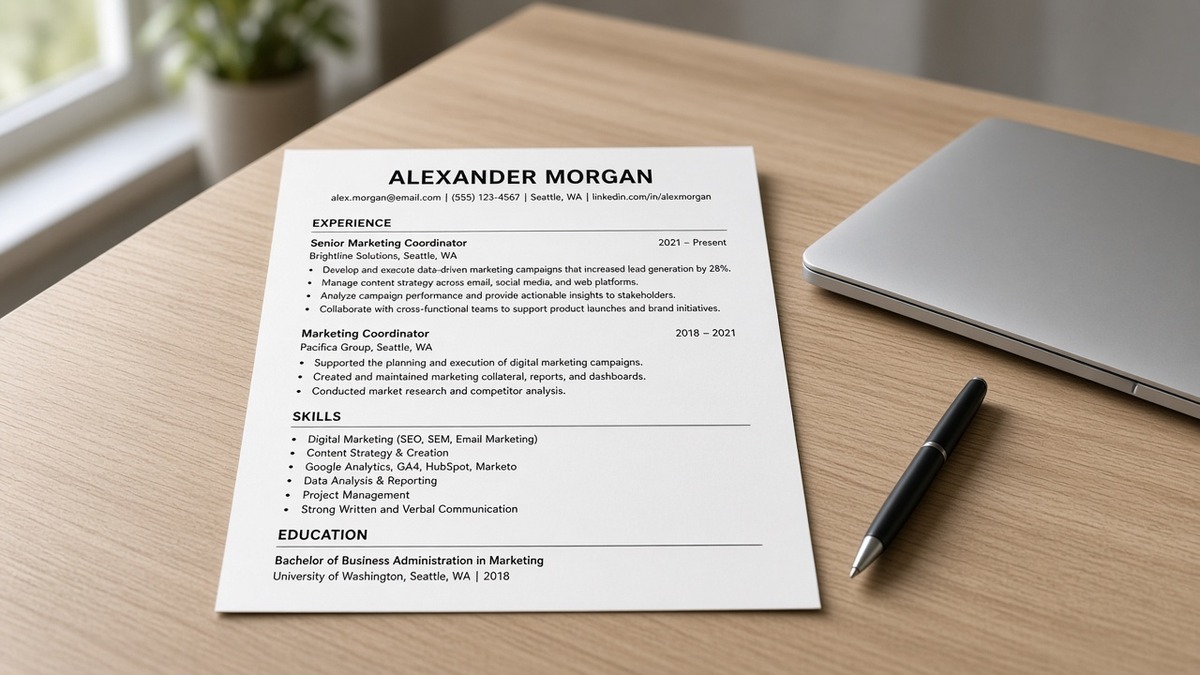
The cross-platform bar: one column, left-aligned text, standard section labels, Month Year dates beside each employer, and bullets sitting directly under the role they belong to. When that strip is clean, the same file usually survives Workday corporate reqs, Greenhouse startup boards, and Lever growth-team postings without a rebuild.
Where files diverge is not the ATS logo on the careers page. It's layout choices you made in Word, Docs, or a template shop. Two-column resumes push Skills into the import stream between jobs. Header/footer contact lines sometimes duplicate or vanish. PDF exports from design tools embed text as shapes the parser skips.
A composite operations analyst whose Greenhouse upload shows Salesforce in Skills but no employer name on the strip still loses to a plain file where bullet one reads owned Salesforce pipeline hygiene for 42 enterprise accounts under a dated title block. Same keyword. Different field mapping.
Font choice matters less than column count. Arial, Calibri, or Times New Roman at 10.5 to 11.5 point is fine on all three when the structure is single column. Fancy typefaces and color bands are where imports get creative in the wrong direction.
Read why your resume looks different after Workday upload when the preview screen scares you even though your source file looked fine. This page prevents that drift before you upload anywhere.
Five steps to an ATS-friendly resume format that works everywhere
Run these steps in order on your master file. Don't open a new Canva template between portals. Fix structure once, then tailor wording per posting.
Step 1: Choose DOCX or text PDF once per master file
When Workday, Greenhouse, or Lever offers Word upload, start with DOCX exported from Microsoft Word or Google Docs. Parsers usually pull employer strips and bullets reliably from native text. Switch to PDF only when the posting requires it or when your paste test shows DOCX order breaking.
Avoid image PDFs, scanned photos, and design-tool exports that draw text as vectors. If the portal rejects PDF, convert to DOCX before you rewrite bullets. File type fights waste time when the real issue is a sidebar.
Before: Canva PDF with icon headers and color bands saved for every application.
After: Single-column DOCX master; PDF export only when the req box says PDF required, using Save as PDF from Word with embed fonts enabled.
Step 2: Flatten layout to one column
Delete sidebars, tables, text boxes, and skill meters. Move contact info to the top as plain lines: name, city and state, phone, email, portfolio URL if relevant. Experience comes next, then Education, then a short Skills echo at the bottom if you need it.
Before: Two-column template with Skills rail on the left and jobs on the right.
After: One column top to bottom: Contact, Experience with four to six bullets per recent role, Education, Skills list of tools already proven in bullets.
Step 3: Lock standard headers and Month Year employer strips
Use plain section labels parsers recognize: Experience, Education, Skills. Under each job, put job title, employer name, and Month Year dates on one strip. Jan 2022 to Present beats 2022 alone. Avoid merging three contract clients into one paragraph without dates.
I've screened uploads where Workday pulled dates from a footer while Greenhouse grabbed them from a sidebar. Same candidate, same week, two broken previews. One strip per role stops most of that.
Before: Dates in a right column; section titled Professional Journey with emoji dividers.
After: Operations Coordinator | Northwind Logistics | Mar 2021 to Present as one line, followed by bullets on the next lines.
Step 4: Run the Notepad paste test
Export your master file. Paste into Notepad on Windows or plain TextEdit on Mac. You should read contact info first, then employer blocks in reverse chronological order, then Education, then Skills. If a Skills cloud appears between two jobs, fix layout before you tailor keywords.
This test catches Greenhouse and Lever quirks as well as Workday. Parsers don't see your margins. They see character order. When paste order matches screen order, you're close.
Before: Paste shows icon labels and table cells as gibberish between employers.
After: Paste reads like a plain outline: Name, phone, email, then each job block with bullets indented by simple hyphens or dots.
Step 5: Tailor bullet one without rebuilding layout
Open the posting on your screen. Pull the top must-have into the first eight words of bullet one under your current role. Swap tool names inside existing bullets. Do not add columns, charts, or keyword footers to chase a Greenhouse req when Workday rejected that layout last week.
Save a copy named for the employer if that helps you stay organized. Keep the column structure identical. Only wording moves.
Before: Rebuilt resume in a new template per ATS with Skills moved to the top for keyword density.
After: Same single-column master; bullet one under current role opens with HubSpot CRM pipeline for 38 accounts when the posting repeats HubSpot twelve times.
Copy-paste universal layout skeleton
[Full Name]
[City, ST] · [Phone] · [Email] · [Portfolio URL if relevant]
EXPERIENCE
[Job Title] | [Employer] | [Mon YYYY] to [Mon YYYY or Present]
• [Must-have from posting in first eight words]; [scope and outcome].
• [Second proof bullet with tool from posting].
• [Third bullet; older roles can carry fewer lines].
[Prior Job Title] | [Employer] | [Mon YYYY] to [Mon YYYY]
• [Bullet with dated proof].
EDUCATION
[Degree], [School] · [Graduation Year if recent grad]
SKILLS
[Tools already named in Experience bullets, comma-separated]
Paste this skeleton into Word or Docs and fill it before you hunt for a prettier template. The boring version uploads cleanly on Workday, Greenhouse, and Lever on the same night.
Before/after: customer support lead
Before: Two-column Canva file; Skills sidebar lists Zendesk and Salesforce; Experience bullets say helped customers.
After: Single column; strip reads Customer Support Lead | Apex SaaS | Jun 2020 to Present; bullet one: Managed Zendesk queue of 220 daily tickets across Salesforce CRM accounts; cut first-response time from 6.2 to 3.8 hours in Q1 2025.
Before/after: registered nurse, med-surg
Before: Header graphic with hospital logo; dates missing months; bullet one: Provided compassionate patient care.
After: Registered Nurse, Med-Surg | Riverside Medical Center | Mar 2021 to Present; bullet one: Precepted 4 orientees on a 32-bed med-surg unit while maintaining 1:5 patient ratios on day shift.
Edge case: career change without inventing a new layout
You're pivoting from retail management to project coordination. Keep the single-column structure. Use an honest title on the strip. Let bullet one carry transferable tools: Jira, stakeholder updates, budget tracking. Do not add a functional Skills-first page layout that parsers read before Experience.
Before: Functional resume with Skills on page one and jobs on page two in a table.
After: Reverse-chronological strip stays true; bullet one: Coordinated 5 cross-functional workstreams in Jira for store rollout; delivered on schedule with $900K scoped spend.
Edge case: stacked contract roles in one year
Short contracts need separate strips, not one merged block. Parsers assign bullets to the nearest employer line. Three clients in one paragraph becomes one mystery job in Workday and a date gap in Greenhouse.
Before: Independent Consultant 2024 to 2025 listing four clients in prose.
After: Marketing Analyst | Beta Retail Group | Jan 2024 to Aug 2024 with two bullets; Marketing Analyst | Gamma Brands | Sep 2024 to Present with its own strip and tailored bullet one.
See resume upload mistakes that instantly disqualify you when the portal rejects the file before parsing even starts.
Where universal ATS formats still break on upload
Candidates often chase keywords while the column structure stays broken. That sends you tuning Skills clouds when the employer strip never imported. These four mistakes show up on Workday, Greenhouse, and Lever the same way.
Mistake 1: Building a new template per portal
Workday didn't reject your font because it hates Arial. It scrambled a sidebar. Rebuilding in Lever's favorite template next week repeats the failure. One master column, wording swaps only.
Mistake 2: Headers, footers, and text boxes for contact info
Contact details tucked in a Word header sometimes duplicate or drop on import. Put name, phone, and email as body text lines one through four. Parsers read the body stream first on most corporate configs.
Mistake 3: Skills sidebar before Experience
A left rail of tools looks modern on screen. On import, Greenhouse and Workday often attach that rail before your current job block. Recruiters ctrl-f a duty and find it orphaned in Skills while Experience still says supported projects.
Mistake 4: Skipping the paste test because the preview looked fine
Portal previews lie politely. They show you a cleaned view while the stored parse differs. Paste into Notepad anyway. When order breaks, fix layout before you apply on the next ATS brand.
Before: Trusted Greenhouse preview; Workday import dropped last employer block.
After: Paste test caught scrambled order; removed table wrapper; both portals imported the same strip on re-upload.
Test layout before you upload again
After the five steps, run your master file against the posting on your screen. You're checking whether must-have terms sit inside dated Experience lines, not only in a Skills footer. Layout fixes come first. Match scoring comes second.
Score your job match on the same PDF or DOCX before you upload to Lever or Greenhouse tonight. It flags keyword gaps in bullets while your column structure stays fixed.
Rebuilding from a scrambled export? Build a plain single-column resume once, run the paste test, then tailor bullet one per req instead of hunting templates per ATS logo.
Ship one master file, then tailor words
An ATS-friendly resume format that works everywhere is not three templates. It's one single-column DOCX or text PDF with standard headers, Month Year strips, and bullets under the right employer. Workday, Greenhouse, and Lever differ on the careers URL, not on what a readable upload looks like.
Flatten your layout tonight. Run the paste test. Swap bullet one per posting while the column structure stays fixed. You'll still see silence when reqs close or teams pause. You won't lose as often to a sidebar that imported your Skills above your job title.
Run a free ATS check on the next posting before you upload. Fix structure on your side. Let queue timing explain the rest.
When a posting still asks for a letter, mirror the same duty terms you put in bullet one so the recruiter sees fit twice. Generate a cover letter from the posting text after your paste test passes.
Read more
Frequently asked questions
When the portal accepts both, a clean DOCX from Word or Google Docs export usually parses most reliably across Workday, Greenhouse, and Lever. Use a text-based PDF only when the posting requires PDF or when your paste test shows the DOCX scrambled employer order. Skip image PDFs, Canva exports, and scanned photos. If a portal rejects PDF, switch to DOCX before you rewrite content.
No. You need one boring master layout: single column, standard section headers, Month Year dates on the employer strip, and bullets under each role. Tailor bullet wording per posting. Do not rebuild columns, icons, or sidebar Skills rails because the employer runs Greenhouse instead of Workday. Layout stays fixed. Keywords move inside dated Experience lines.
Sidebars and split columns often import out of reading order in Workday and can shove Skills between job blocks in Greenhouse and Lever. A qualified file can look like a keyword cloud with scrambled dates. Single column with Skills echoed at the bottom after Experience is the cross-platform default. Fancy design belongs in a portfolio link in contact info, not in the upload file.
Prove tools inside dated bullets first. Echo the same terms once in a plain Skills section after Experience if you still have room. A Skills sidebar that parsers read before your current job title is a common reason Workday imports your tool list above your employer name. Humans and parsers both weight Experience over a footer cloud when the layout is clean.
Run one paste test: export your file, paste into Notepad or plain TextEdit, and confirm contact info, employer strips, and bullets appear top to bottom. Then run a free match scan with the posting pasted in to see whether must-have terms land inside Experience, not only in Skills. Fix layout once. Tailor bullet one per req. Re-upload the same column structure everywhere.