14 min read

7 ChatGPT Resume Mistakes That Trip Up ATS Scans (2026)

August 15, 2026

Reviewed by a certified professional resume writer (CPRW) with US corporate recruiting and ATS screening experience

ChatGPT resume mistakes ATS systems reject: markdown symbols, two-column layouts, generic phrasing, and banned buzzwords. Fix each one before you apply.

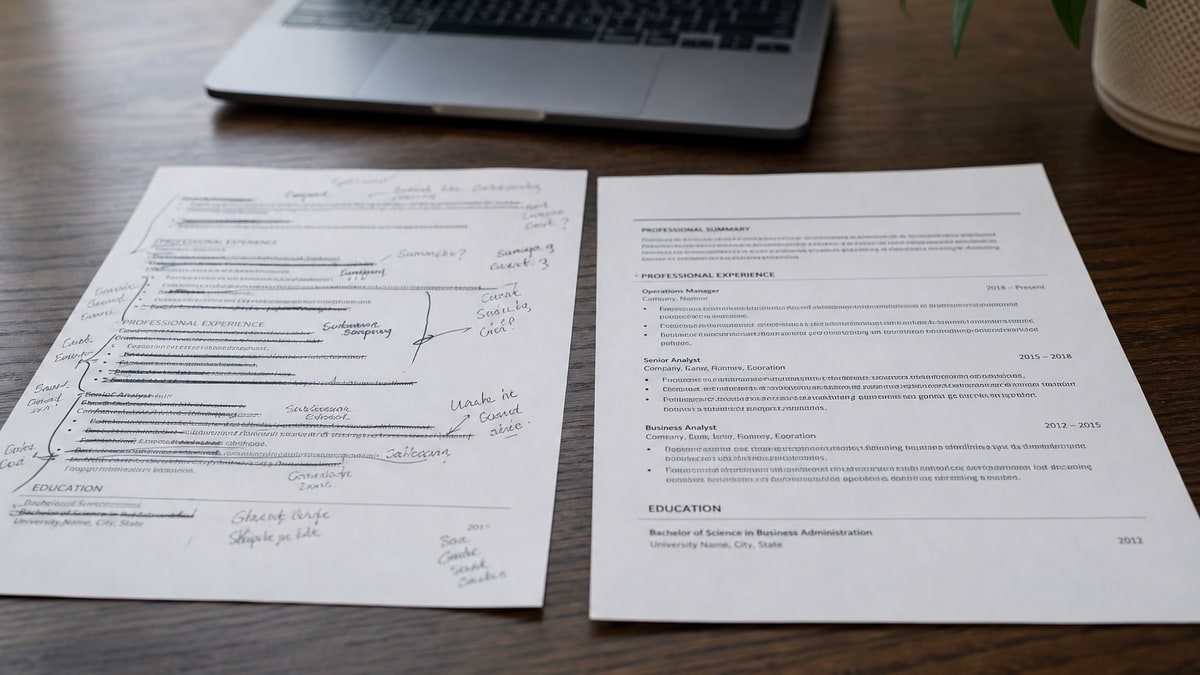
Split screen showing a raw ChatGPT resume draft full of markdown symbols next to a cleaned-up ATS-safe resume

The biggest ChatGPT resume mistake for ATS parsing is pasting raw chat output straight into your document. Markdown symbols, two-column layout suggestions, and generic phrasing that doesn't mirror the job posting all survive the paste and quietly break how Workday, Greenhouse, and similar systems read your file.

ChatGPT is genuinely useful for beating blank-page paralysis on a resume. It is not, on its own, an ATS-safe output engine. The chat interface renders formatting for humans to read on screen, not for parsers to extract into structured fields. When you copy that output directly into Word or Google Docs, the visual formatting can translate into literal symbols, broken headers, or layout choices that were never built with applicant tracking software in mind.

This guide walks through seven specific, fixable mistakes: the ones that show up again and again when a resume was drafted with ChatGPT and uploaded without a hand-edit pass. Each section includes a before-and-after example so you can see exactly what to change, plus a practical framework for using ChatGPT as a drafting assistant rather than a final export tool. If you're also weighing whether AI tools help or hurt resume quality overall, see our broader look at whether ChatGPT writes good resumes and how the tools have evolved in how AI tools are changing resume optimization . This piece stays narrowly focused on the parsing failures themselves.

Key Takeaways

  • Markdown symbols (**, #, em dashes, smart quotes) can garble text on paste
  • Two-column and table layouts break field extraction in Workday and Greenhouse
  • Generic AI phrasing scores lower on keyword match than exact posting language
  • Repeated sentence patterns across bullets read as unoriginal to recruiters
  • Buzzwords like leverage and spearheaded are on most banned-word lists for a reason
  • ChatGPT can't invent real metrics — feed it numbers, don't let it pad instead

Mistake 1: Pasting markdown symbols straight into your resume file

ChatGPT writes in markdown by default. Headings come out as pound signs, emphasis comes out as double asterisks, and long dashes and curly quotation marks replace plain hyphens and straight quotes. On screen, the chat interface renders that markup into clean-looking bold text and bullet points. The underlying characters, though, are still markdown syntax — and when you select the text and paste it into Word, Google Docs, or directly into an application portal's text box, that syntax doesn't always convert the way you expect.

Depending on where you paste, you can end up with literal asterisks bracketing your job titles, stray pound signs in front of section headers, or smart quotes and em dashes that some older or more rigid parsers choke on and render as boxes or question marks. None of that reads as intentional formatting to an ATS text extractor — it reads as noise sitting inside a field the system is trying to categorize as your job title, company name, or skill.

The fix is a two-step habit: paste ChatGPT output into a plain-text editor first (Notes, Notepad, or a plain-text mode in your editor of choice), confirm the markdown characters are gone, and only then move the cleaned text into your actual resume template. Apply bold, headings, and bullets manually using your word processor's real formatting tools, not by leaving ChatGPT's asterisks in place.

ChatGPT default output ATS-safe fix
## Professional Experience — **Senior Analyst**, Acme Corp Senior Analyst, Acme Corp (formatted as a real heading and bold style, no literal symbols)
**Key Skills:** Excel, SQL, "stakeholder management" Key Skills: Excel, SQL, stakeholder management — plain text, straight quotes removed
Reduced processing time — from 6 days to 2 days — using automation Reduced processing time from 6 days to 2 days using automation (em dash replaced with plain punctuation)

Common Mistake: copying directly from the ChatGPT chat window into your resume file without an intermediate plain-text pass — the fastest way to carry stray markdown characters into a document a parser will read literally.

Mistake 2: Following ChatGPT's layout advice for "visual appeal"

Ask ChatGPT to make your resume look more professional or eye-catching, and it will often suggest a two-column layout, a skills sidebar, or a table to organize experience by date and category. Those choices genuinely look sharper to a human skimming a PDF. They are also a well-documented way to break parsing in several major applicant tracking systems.

Workday and Greenhouse both extract resume content in a reading order that assumes a single, linear column. When a parser hits a two-column layout, it frequently reads left to right across both columns line by line instead of down one column and then the other — which can interleave your job titles with unrelated skills or dates, scrambling the fields it feeds into the applicant record. Tables cause a related problem: text inside table cells is sometimes skipped entirely or dumped into a single unstructured block, stripping out the structure a recruiter or hiring manager would see when the record loads.

Older or more conservative parsers — the kind still running inside some Taleo and iCIMS configurations — are especially prone to this. Even systems that have improved their parsing in recent years can behave inconsistently depending on how a specific employer configured their instance, so a layout that parses cleanly at one company can still scramble at another. Our Workday resume format guide goes deeper on which layout choices are safe inside that specific platform.

The safest default for any ATS upload remains a single column, top to bottom: contact information, summary, experience, education, skills. Save the two-column, designer layout for a version you hand to a person directly — a printed leave-behind at a career fair, or a PDF you attach in a cold email to a hiring manager who will open it in a normal PDF viewer, not run it through a parser first.

Quick Check: if ChatGPT's suggested layout uses the words "sidebar," "two-column," or "table" for your work history, treat that as a rejection for the ATS-bound version — keep it single column instead.

Mistake 3: Generic AI phrasing that fails keyword-match scoring

Many ATS platforms and the recruiters who use them score resumes partly on how closely the language matches the job description — not just whether a related skill is present somewhere on the page, but whether the exact or near-exact term appears. ChatGPT, prompted with a generic instruction like "improve this bullet," tends to paraphrase around a skill instead of naming it precisely. It swaps "Salesforce reporting" for "CRM tools," or "Python scripting" for "programming languages," which reads fine to a human but can quietly drop your match score against a posting that specifically asked for Salesforce or Python.

The fix is mechanical rather than clever: open the actual job posting next to your draft and check each bullet against the language the employer used. Where you genuinely have the exact skill, use the exact term the posting uses, not a ChatGPT synonym. This isn't about stuffing keywords you don't have — it's about not letting an AI paraphrase cost you credit for something true.

It also helps to feed ChatGPT the actual job description as context and ask it to tailor bullets to that specific posting, rather than asking for a generic improvement. A tailored prompt still needs a human pass afterward, but it starts much closer to the language an ATS is actually scoring against.

Pro Tip: paste the job description into the same ChatGPT conversation before asking for bullet edits — generic prompts produce generic paraphrases that drift away from the terms a parser is matching against.

Mistake 4: Repeated sentence structures that read as unoriginal

This mistake doesn't block parsing directly, but it costs you at the next stage: once a resume clears the ATS and a recruiter or hiring manager actually opens it. ChatGPT tends to default to the same sentence skeleton across an entire bullet list — action verb, object, result clause, repeated with only the nouns swapped. Six bullets in a row that all start with a strong verb and end with "resulting in improved efficiency" are technically well-formed and still read as machine-generated the moment a recruiter skims past the second one.

Recruiters who review resumes for a living notice pattern repetition quickly — it is one of the more common tells that a document went through minimal editing after an AI draft. The fix is to vary structure deliberately: lead one bullet with the result, lead another with the scope of the project, lead a third with the tool you used. Read the bullet list out loud; if every sentence has the same rhythm, rewrite at least half of them to break the pattern.

Varying structure is also a chance to fix a related problem — length. AI drafts tend to run long, restating the same accomplishment with extra qualifying clauses. Cut each bullet to one clear idea. If a sentence needs two commas and a semicolon to make its point, it is very likely doing the job of two separate bullets.

Key Takeaway: passing the ATS scan gets your resume in front of a person — repeated AI sentence patterns are what lose that person's attention once it's there.

Mistake 5: Leaning on the exact buzzwords ChatGPT defaults to

Ask ChatGPT for resume bullets without heavy guidance, and a predictable vocabulary shows up: leverage, spearheaded, crucial, pivotal, testament, game-changer. These words appear constantly in its training data because they show up constantly in existing resumes and cover letters — which is exactly the problem. Recruiters who screen dozens of resumes a week have seen these terms so often they function as noise rather than evidence. Several of them sit on HireFlow's own banned-word guidance for resume content, precisely because they describe nothing measurable.

The irony is worth naming directly: the same words that flag a resume as formulaic-sounding to a recruiter are, disproportionately, the ones an AI drafting tool reaches for first. If you let a ChatGPT draft go out unedited, you are more likely to end up with this exact vocabulary problem, not less.

The fix is a straightforward substitution rule: every time you see one of these words, delete it and replace the sentence with a specific action plus a real number or concrete outcome. "Leveraged data to drive crucial improvements" becomes "Analyzed weekly sales data and flagged a pricing error that recovered $40,000 in lost margin." The second version is longer in characters but shorter in vague words, and it gives both the ATS keyword engine and the human reader something specific to match against.

Buzzword-heavy ChatGPT draft Metric-driven, ATS-safe rewrite
Spearheaded a crucial initiative that leveraged cross-functional synergy. Led a 5-person cross-functional team to launch a returns process that cut refund turnaround from 9 days to 3.
Served as a testament to strong leadership in a pivotal company transition. Managed a 12-person support team through a CRM migration with zero missed SLA targets over the 6-week rollout.
Leveraged best practices to drive game-changing results for the department. Rebuilt the onboarding checklist, cutting new-hire ramp time from 6 weeks to 4 across 30 hires per year.

Common Mistake: assuming a strong-sounding verb equals a strong bullet — words like leverage and spearheaded carry no information on their own without a number or a concrete outcome attached.

Mistake 6: Letting ChatGPT fill metric gaps with fluff instead of facts

ChatGPT does not know your actual sales numbers, team size, or percentage improvement — it cannot look them up, and it should not invent them. When you ask for a bullet and don't supply a number, one of two things tends to happen: it either leaves the claim vague ("significantly improved team performance") or, worse, it generates a number that sounds plausible but that you never verified and cannot defend in an interview. Both outcomes hurt you. Vague language scores poorly on both ATS relevance signals and human review; a fabricated or unverifiable metric creates real risk if a hiring manager asks you to walk through it.

A related failure mode is vague or inconsistent dates and titles — ChatGPT will sometimes smooth over an employment gap or round a start date in a way that reads cleanly but doesn't match your actual records, which can create a mismatch during a background check well after the resume already did its job.

The fix is sequencing: gather your real numbers first — team size, budget, percentage change, time saved, revenue, customer counts — from performance reviews, project summaries, or your own notes, and then bring those numbers to ChatGPT as input, not as something you expect it to produce. Treat it as a sentence-tightening tool working from facts you supply, not a source of the facts themselves. Where you truly don't have a number, describe the scope instead ("managed a queue of roughly 40 open tickets weekly") rather than reaching for an adjective.

Pro Tip: before opening ChatGPT, spend fifteen minutes pulling three to five real numbers from old performance reviews or project files — feeding facts in produces far better output than asking it to sound impressive without any.

Mistake 7 and the fix-it framework: draft with ChatGPT, edit for ATS by hand

The seventh mistake is really a summary of the first six: treating ChatGPT's output as a finished resume instead of a first draft. Every problem above — markdown symbols, risky layouts, generic phrasing, repeated patterns, buzzwords, and metric-free filler — survives specifically because the draft goes straight from the chat window to the application portal with no dedicated editing pass in between.

A short, repeatable framework fixes this without slowing you down much. Before you upload anything, run your draft through the checklist below. It takes fifteen to twenty minutes and catches the vast majority of parsing and quality problems this guide has covered.

ATS-safe ChatGPT resume checklist

  1. Paste ChatGPT output into plain text first and strip markdown symbols.
  2. Reject any two-column, sidebar, or table layout suggestion for the ATS copy.
  3. Compare every bullet against the real job posting for exact keyword matches.
  4. Read the bullet list aloud and rewrite any three bullets with identical rhythm.
  5. Search for leverage, spearheaded, crucial, pivotal, and testament — remove each one.
  6. Confirm every metric is one you personally verified, not one the AI supplied.
  7. Double-check dates, titles, and employer names match your actual records exactly.
  8. Export as a single-column PDF or DOCX and run an ATS parse check before submitting.

This is also a good moment for a mid-article gut check: if you have not tested your file against a real parser yet, do that before you send out five more applications. HireFlow's free ATS resume checker scans the exact PDF or DOCX you plan to upload and flags formatting risks like the ones covered in mistakes one and two, before an employer's system does it for you silently.

It's worth noting that AI use in hiring is under active scrutiny from a policy standpoint, not just a formatting one. The EEOC's Artificial Intelligence and Algorithmic Fairness Initiative tracks how automated tools affect employment decisions, and SHRM's reporting on AI in HR covers how employers are adjusting screening practices as AI-assisted applications become more common. None of that changes the mechanics in this guide, but it's a reminder that both sides of the hiring process are adapting to AI-drafted content at the same time.

If you want a deeper walkthrough of general ATS screening mechanics beyond ChatGPT specifically, our guide to passing ATS screening systems covers the broader set of formatting and content rules these platforms apply.

Quick Check: if you can't point to the specific number, tool, or scope behind a bullet ChatGPT wrote, it isn't ready to submit — fill the gap with a real fact or cut the line.

Frequently asked questions

Most failures trace back to formatting, not content: ChatGPT often outputs markdown symbols like ** and # that render as stray characters when pasted into Word, or it suggests two-column layouts that scramble field order in Workday and Greenhouse. The fix is pasting as plain text into a single-column template, then re-adding formatting by hand.

Most applicant tracking systems don't run AI-detection software on resumes; they extract and score text. What actually hurts you is the side effect of AI drafting: repeated sentence openers, generic phrasing that doesn't mirror the job description, and vague skills lists that score poorly on keyword match, not a stylistic fingerprint the parser flags as AI.

Direct paste is risky. ChatGPT's chat interface renders markdown, so asterisks, pound signs, and smart quotes can carry over as literal characters or convert into symbols that a parser reads as garbage text. Paste into a plain-text editor first, strip the markdown, then move the cleaned text into your resume template.

No, not for an ATS submission. ChatGPT will often suggest tables, sidebars, or two-column layouts because they look better to a human eye. Those structures are exactly what break field extraction in Workday, Taleo, and iCIMS. Save visual polish for a version you hand-deliver at a networking event, and keep the ATS upload single-column.

Keyword presence alone doesn't guarantee a strong match score. Generic AI phrasing tends to paraphrase around a skill instead of naming it exactly as the job description does, and many ATS keyword engines reward exact or near-exact matches. Pull the real terms from the posting and insert them verbatim where they're true.

ChatGPT defaults to words like leverage, spearheaded, crucial, pivotal, and testament because they appear frequently in its training data as resume-sounding language. Recruiters have seen these so often they read as filler rather than evidence. Replace them with a specific action and a number: what you did, and what changed because of it.

ChatGPT cannot know your actual results, so when you don't supply metrics it either omits them or fills the gap with vague language such as significantly improved. Feed it your real numbers first, or better, write the metric yourself and only ask ChatGPT to tighten the sentence around a number you already verified.

Yes, if you treat it as a drafting tool, not a finished product. Use it to generate options and overcome blank-page paralysis, then hand-edit every bullet for formatting, exact keyword matches, real metrics, and varied sentence structure before exporting to a single-column DOCX or PDF and running an ATS parse check.

Tags

chatgpt resume mistakes atschatgpt resume atsai resume mistakesdoes chatgpt resume pass atschatgpt resume formatting problemsats safe chatgpt resumeai generated resume atschatgpt resume buzzwordsworkday resume parsing chatgptgreenhouse ats chatgpt resumechatgpt resume checkerfix chatgpt resume for ats