11 min read
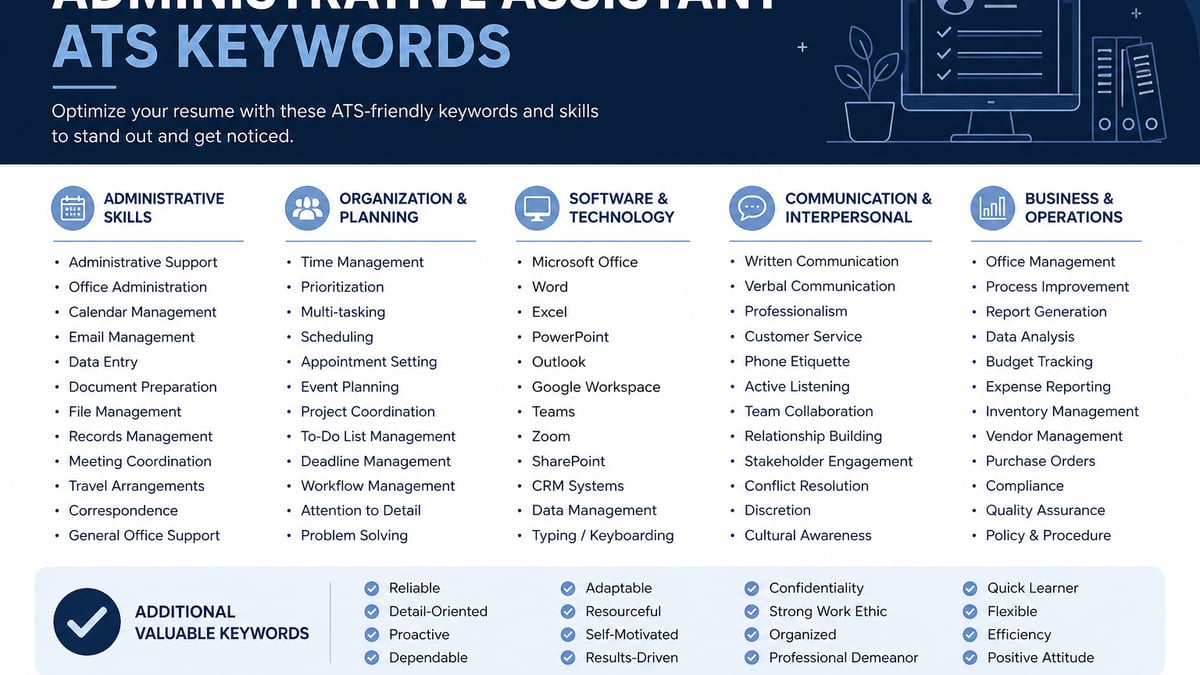
The administrative assistant resume keywords US employers search are calendar management, travel coordination, expense reporting, and the exact software named in the posting, placed inside dated Experience bullets with team or executive scope, not repeated in a Skills footer. Parsers in Workday and Greenhouse match the words. Hiring managers ctrl-f for Outlook, Concur, or meeting volume and find organized professional instead.
Check your resume for free with the admin or executive assistant posting pasted in. You'll likely see Microsoft Office flagged as matched while calendar management, travel coordination, and invoice processing won't appear in Experience. That's the gap this page closes tonight.
You're not copying a generic word bank. You're mirroring how US corporate reqs describe admin scope, then proving each phrase in plain text a machine can read. Job searching in office support roles is draining. I've screened admin stacks in Workday where Outlook matched in Skills and calendar management never appeared in Experience. This page is about changing lines on the page, not pep talks.
Quick Wins
- Circle calendar, travel, and software terms in the posting before you edit.
- Put the top keyword in the first eight words of bullet one.
- Echo Skills only after Experience proves each term.
Why administrative assistant resume keywords belong in bullets first
Most advice tells you to paste every tool you've touched into Skills. US hiring teams and parsers in Workday, Greenhouse, Lever, and iCIMS weight dated Experience bullets higher than a keyword cloud. They search for proof you owned calendars, travel, expenses, or office operations at real volume. Not that you once opened Outlook.
The standard your file is scored against: bullet one names scope (executives supported, team size, offices, or records processed), names the software or task when the posting asks for it, and ends with an outcome recruiters can ctrl-f: meetings coordinated per week, travel bookings without errors, expense reports processed on time, or supply costs reduced.
A composite admin assistant whose top bullet still reads handled office duties loses to a file that opens with managed executive calendars for three VPs across US and UK time zones in Outlook; coordinated 40+ domestic trips per quarter in Concur with zero missed board meetings in 2025.
General admin reqs search office operations, vendor coordination, and front-desk coverage. Executive assistant reqs search C-suite calendar depth, board materials, and confidential correspondence. Legal or medical admin reqs search records management and compliance language. Pull phrases from the specific ad tonight, not a generic organized word cloud.
Read impact-first resume bullets US hiring teams prefer for the general placement rule. This page applies it to calendar, travel, expense, and office software proof specifically.
When the keyword list rules bend
Contract or temp admin roles. Stack each client or assignment with Month Year dates. Put the strongest calendar or travel win in bullet one for that engagement. One merged block with every tool from three years of contracts and no per-employer dates scrambles in Workday imports.
Reception plus admin hybrid. When the posting blends front-desk coverage with calendar work, lead bullet one with whichever duty the ad repeats most. If the req is 70% reception, visitor management and phone triage lead. If it is 70% executive support, calendar management leads. Do not pretend full EA scope when you covered the lobby four days a week.
NDA blocks on executive names. You cannot write supported the CEO. You can write supported calendars for three C-suite executives or a six-person leadership team. Honest scope beats a title drop a reference check cannot confirm.
Soft skills as keywords. Communication and multitasking are searched terms, but they fail as bare adjectives. Show them through volume in a bullet instead of excellent communicator in Skills.
See how to write resume bullets with no metrics when your employer blocks exact figures but you still have defensible ranges for meetings, trips, or invoices processed.
What to do now: map keywords from the posting into proof
Step 1: Highlight admin language from the posting
Open the req. Circle calendar management, travel coordination, expense reporting, data entry, correspondence, event planning, vendor management, and every software name: Outlook, Google Workspace, Concur, Salesforce, Zoom, or Teams. Those strings belong in bullet one under the employer where you ran them. Nice-to-have terms wait until must-haves show up in dated lines.
Before: Skills lists Microsoft Office, calendar management, travel, and multitasking; bullets say handled administrative tasks and supported the team.
After: Bullet one under Administrative Assistant | Brightline Legal | Mar 2022 to Present: Managed partner calendars for four attorneys in Outlook; scheduled 25+ client meetings weekly across two offices with zero double-booked depositions in 2025.
Step 2: Pull one honest volume metric per role
Check your last performance review, travel log, or expense queue. You need one number you can defend: executives supported, meetings per week, trips booked per quarter, invoices processed, or supply spend reduced. If exact figures are blocked, use honest ranges with team or office scope.
Before: Coordinated travel and meetings for senior staff using company systems.
After: Booked domestic and international travel for eight directors in Concur; processed 120 expense reports monthly with less than 2% return rate for missing receipts across FY2025.
Step 3: Put the posting's top keyword in the first eight words
Recruiters skim bullet one under each title in Workday. If travel coordination only appears in bullet four, many first passes never see it. Lead with the term the posting repeats, then scope, then outcome.
Before: Responsible for office operations including scheduling and vendor contact.
After: Coordinated vendor contracts and office supply ordering for 90-person HQ; cut supply spend 14% in one year by consolidating three stationery vendors while maintaining same-day restock SLA.
Step 4: Split calendar, travel, expense, and ops proof across bullets
One bullet that lists Outlook, Concur, Salesforce, event planning, data entry, and invoice processing reads like keyword stuffing. When you did each piece of work, give it a line. Cap at four to six strong admin bullets under your current role.
Before: Single bullet mentions scheduling, travel, expenses, events, filing, and customer service in one sentence.
After: Three bullets: managed executive calendars in Outlook for three partners; coordinated quarterly board logistics including catering and AV vendors; maintained client filing system with 2,400 active matters updated within 48 hours of court filings.
Step 5: Echo Skills only after Experience proves the term
Skills still matters for literal string match. List calendar management after a bullet about executive schedules. List Concur after a bullet about expense volume. Drop terms you cannot explain in a phone screen. A twenty-line office software footer without matching bullets is the fastest way to look qualified on paper and vague on a call.
Before: Skills block leads the resume with Microsoft Office, Google Workspace, Outlook, Teams, Zoom, Concur, Salesforce, and multitasking before any employer name.
After: Experience carries calendar management and travel coordination in bullets; Skills lists those themes plus Outlook and Concur as echoes below dated roles.
Before/after pair: executive assistant scope
Before: Provided administrative support to executives and managed busy schedules.
After: Supported two C-suite executives; managed complex calendar management across US and EU time zones in Outlook with 15-minute buffer rules that eliminated same-day conflicts for board prep weeks.
Before/after pair: office operations admin
Before: Maintained office supplies and helped with daily operations.
After: Ran front-desk and office operations for 60-person branch; triaged 70+ visitor and vendor check-ins weekly while keeping conference room utilization above 85% through Outlook room booking standards.
Core keyword buckets to map from any admin req
Calendar and travel buckets cover calendar management, meeting coordination, travel coordination, and Concur with platform names. Expense and ops buckets cover invoice processing, vendor coordination, and office supply management. Software bucket covers Microsoft Office, Google Workspace, Outlook, Teams, and CRM tools only when you used them at the scope the req describes. CAP or MOS belongs near your name when you hold it. You need every required bucket from the posting once in dated proof, not every bucket on every application.
Copy-paste admin keyword and bullet skeleton
"[Verb] [task from posting: calendar management, travel coordination, expense reporting] for [scope: executives, team size, offices, or records]; [outcome: meetings without conflicts, trips booked, reports processed, or cost reduced] using [software from posting: Outlook, Google Calendar, Concur]."
Example fill: "Managed calendar management for four directors in Outlook; coordinated 35 domestic trips per quarter in Concur with zero missed leadership offsites in FY2025."
Read executive assistant resume bullets that show impact (US) when the posting reads more EA than general admin. After your pass, ctrl-f the posting's top three admin terms in your pasted PDF text. If calendar management only lives in Skills, move it into the bullet where you owned schedules at real volume.
Where admin keyword resumes still go wrong
Organized without specifics. Organized professional and detail-oriented in Skills while Experience only says assisted with office tasks tells a recruiter nothing they can verify or search. Replace with calendar management, travel coordination, or invoice volume in bullet one.
Office software without platform names. Proficient in office software is weaker than Microsoft Outlook, Google Workspace, or Concur named in the same line as the work you did in that tool.
Keyword stuffing. Repeating calendar management six times across Summary, Skills, and every bullet reads unnatural to a human reviewer and rarely fixes a parser miss when the terms sit outside Experience.
Same file for EA and general admin reqs. Executive assistant ads lead with C-suite calendar depth and board prep. General admin ads lead with office operations and vendor work. Fork bullet one per posting type instead of sending one generic admin cloud.
Two-column resume templates. Sidebars scramble employer order in Workday imports so your best travel coordination bullet lands under Education. Single column, 11-point Calibri or Arial, Month Year dates.
Read resume upload mistakes that instantly disqualify you when formatting drops your keywords from the parsed record entirely.
Verify admin keywords against the posting
After you rewrite pairs, run the same PDF against the admin or executive assistant req on your screen. You're checking whether calendar management, travel coordination, and software names appear inside dated bullets, not only in Skills. Must-haves from the posting should match parsed Experience text.
When expense reporting language still misses, add it to the role where you processed invoices or Concur queues, not as a twelfth Skills comma. When the posting names Salesforce or HubSpot, put the term in the bullet that carries records updated or correspondence logged.
Run a free ATS check with the description pasted, then score your job match on the same file before you upload to Workday or iCIMS tonight.
Rewrite bullet one, then apply
Administrative assistant resume keywords (US ATS list) work when calendar management, travel coordination, and software names sit inside dated Experience lines with executive count, meeting volume, or expense scope in the same sentence. Skills is an echo. The coordination proof is the screen.
Open the req tonight. Rewrite bullet one with scope and a volume metric in the first eight words. Move Outlook and Concur proof out of Skills. Export a single-column PDF and run a free ATS check before you upload again. When the portal wants a letter, generate a cover letter that repeats the same calendar or travel scope from bullet one.
This won't fix applying to executive assistant roles when your scope was front-desk coverage only. It does stop qualified admin assistants from losing to a footer full of Microsoft Office while the travel coordination win sat in bullet five.
And if you're targeting both EA and general admin reqs this week, fork the file. Executive calendar depth leads for EA ads. Office operations and vendor metrics lead for general admin ads. Same career, different bullet one.
Read more
Frequently asked questions
Put calendar management, travel coordination, and software names inside dated Experience bullets first. Microsoft Outlook, Google Workspace, or Concur in a Skills row without executive count, meeting volume, or expense scope reads like someone who opened the apps once. One bullet that says you managed calendars for four executives across three time zones in Outlook with zero double-bookings in 18 months beats twelve tools with no coordination proof. Echo each term once in Skills only after it appears in Experience.
Use defensible proxies: executive or team count, meetings per week, travel bookings per quarter, invoice volume, or response-time bands. Write coordinated domestic travel for a six-person leadership team instead of naming a CFO you cannot reference. Name scope: offices supported, departments served, or records processed per month with the software from the posting.
Yes. Executive assistant reqs weight C-suite calendar ownership, board prep, confidential correspondence, and complex travel. General administrative assistant reqs weight office operations, vendor coordination, supply ordering, and front-desk coverage. Same person can apply to both, but bullet one should mirror the ad: executive calendar depth for EA roles, office-wide coordination metrics for general admin roles.
Aim for four to six bullets under your current role and three to four on older ones. Lead with the term the posting repeats: calendar management, travel coordination, expense reporting, or data entry with honest volume. Recruiters skim the first two bullets under each title in Workday. If Outlook only appears in Skills, you look like you used email without owning anyone's schedule.
If you hold Certified Administrative Professional or Microsoft Office Specialist, list it near your name or in a Certifications line with the full credential spelled out. Parsers and recruiters search CAP and MOS as literal strings when the posting asks. Do not list a certification you are studying for or let it replace proof of calendar or travel work in bullets.