11 min read
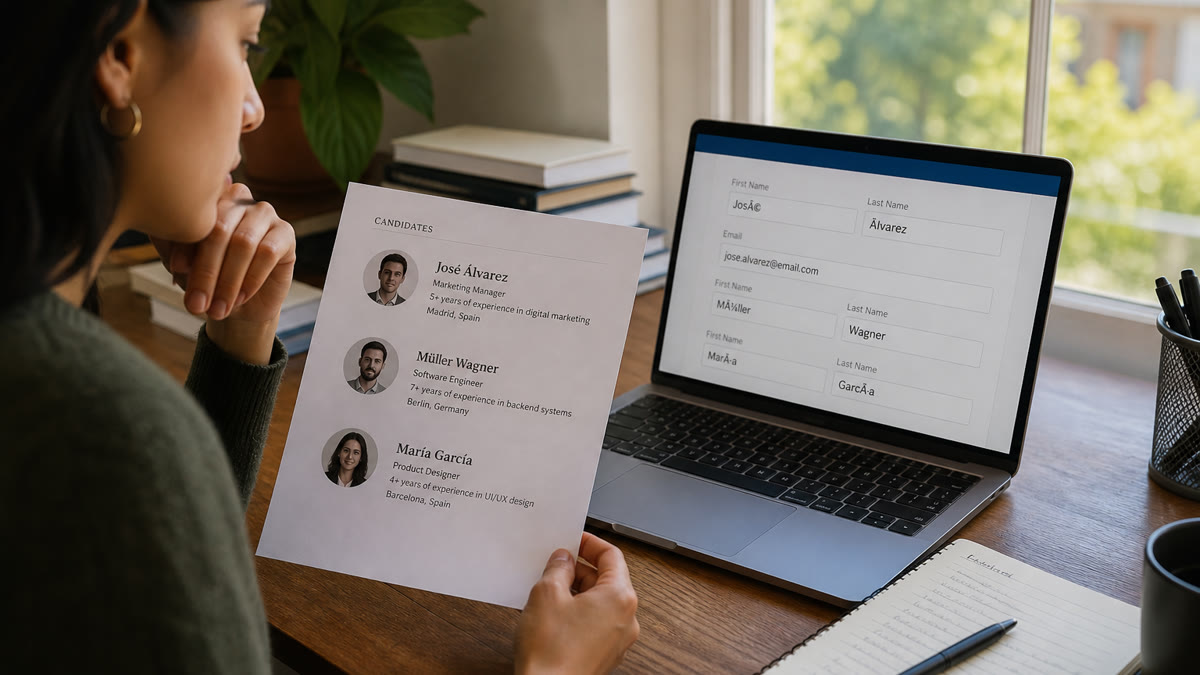
Accented characters on a resume break ATS parsing when the file loses UTF-8 encoding, turning José into Jos?, Renée into Renee, or Müller into M ller, so Workday, Greenhouse, and Taleo autofill the wrong name and recruiters can't search your profile until you've tested the upload and fixed the export.
Check your resume for free before you submit tonight's application. If the contact block shows question marks, no amount of keyword tailoring will save the file. Encoding comes first, and it's faster to fix than you'd think.
This isn't the same problem as a hyphenated surname splitting across first and last fields . Diacritics fail at the character layer: the parser never receives é or ñ as readable text. US employers hire international graduates and bilingual workers every week, but many stacks still assume ASCII names in autofill. You're not doing anything wrong when José becomes Jos? in a preview pane. Job searching's hard enough without your legal name turning into punctuation in a recruiter's inbox.
Quick Wins
- Save as UTF-8 DOCX or a text-selectable PDF with standard fonts.
- Copy-paste the full resume into Notepad and confirm every accent survives.
- Search the PDF for é, ñ, and ü with Ctrl/Cmd+F before you upload.
Where accented characters resume ATS parsing actually fails
After you upload a resume, the ATS extracts plain text and maps tokens into structured fields: first name, last name, email, phone, education, employers. That pipeline assumes each character in the file maps to a Unicode code point the database can store. When the file uses a display font without embedding, exports through a graphics tool, or saves in a legacy Windows encoding, the importer receives replacement characters instead of é or ñ.
Recruiters search with ASCII keyboards. A profile stored as "Jos?" will not match a search for José. Some systems treat ? as a wildcard or discard the row. The failure is almost always your file, not the employer rejecting your name.
Accents in university names (Université de Montréal), prior employers (Nestlé, São Paulo office), or bilingual skill lines (Español nativo) fail the same way. A missing tilde on "Espanol" is not just a typo. It can drop your language keyword when the posting requires Spanish fluency.
Platform behavior depends on instance age and your export, not just the logo on the career site. Workday usually handles clean DOCX and text PDFs but loses accents when the PDF is image-based. Greenhouse on current cloud instances preserves UTF-8 from Word exports. Older Taleo builds at large enterprises strip diacritics in autofill more often. iCIMS and ADP Recruiting sit in between: encoding often works, but sidebar layouts can separate accented names from email lines. You can't assume one clean upload on Lever means the next Workday portal will behave the same way.
Before: a composite marketing coordinator exports a Canva resume with script typography for José Martínez. Workday autofill shows Jos? and leaves first name blank on half the fields.
After: José Martínez (Jose Martinez) in Calibri 11 pt on a single-column DOCX. Same person, same jobs. UTF-8 text the parser can read and a searchable alias recruiters can type.
Before: a composite data analyst lists Université de Montréal on a design-tool PDF. Greenhouse extract reads Universit de Montr al and drops the school from education parsing.
After: Université de Montréal (University of Montreal), B.A. Economics in a Word export. Accents preserved, English alias aids US recruiter search.
Layout compounds encoding issues. A name in a header text box or sidebar column may never reach the contact parser even when accents are fine in the body. Read how ATS reads contact info if only your email extracts and your accented name does not.
This won't fix applying to roles you're not qualified for. It stops a qualified file from dying because José became Jos? in the database.
When a plain-ASCII alias is the right call
Your resume should show the name you use professionally and that matches government ID where possible. Four cases where simplifying characters is reasonable, not erasure.
Exception 1: autofill blocks the character. Some Taleo first-name boxes reject ü or ñ even when the resume PDF contains them. Enter ue or n in the form field if required, but keep the accented spelling on the resume attachment.
Exception 2: one parenthetical alias after a failed test. André Silva (Andre Silva) helps recruiter search without hiding legal spelling. Use it once in the header, not three different spellings across sections.
Exception 3: non-Latin script on a US corporate req. Greek or Cyrillic names may need romanization on the resume line (Δημήτριος to Dimitrios) while the ATS keyword layer stays Latin. Keep original script in a cover letter if culturally appropriate.
Exception 4: background-check fields that enforce ASCII. I-9 and vendor portals sometimes accept only basic Latin. Enter legal spelling where Unicode is allowed; use the form's accepted characters only where the system blocks input.
Edge case: German ü, ö, ä in forms that block extended Latin. ue, oe, ae in the field is acceptable when the resume PDF still shows ü. Do not anglicize the resume file itself without a failed upload test first.
Edge case: French ç and é in Québec employer names on US applications. Preserve accents in UTF-8 DOCX; add an English alias in parentheses only when search tests fail.
International applicants should also read international candidate resume tips for US ATS . Phone format and address lines fail parsing for the same encoding reasons accents do.
Fix accented name parsing before you upload
You don't need to strip your identity. You need a boring, parser-safe file and five minutes of testing per employer stack. Block one application tonight and run the full sequence before you click Apply.
Step 1: audit the source file. Confirm the resume is UTF-8 DOCX or a text-based PDF with embedded fonts, not a Canva image export or scanned paper. Standard fonts only: Calibri, Arial, Helvetica, Times New Roman.
Step 2: run the copy-paste test. Select all text, paste into Notepad or TextEdit plain mode. Every diacritic should survive. If accents vanish, fix the source before you export again.
Step 3: search the PDF. Open the export and run Ctrl/Cmd+F for é, ñ, ü, ç, and any character in your name. Each search should return a match. If Ctrl/Cmd+F cannot find ñ, no ATS instance can search that character in your profile.
Step 4: place contact info in the body column. Name, email, and phone belong in the main single-column flow, not a header footer or sidebar text box. For Workday-specific layout traps, see Workday resume format rules for 2026 .
Step 5: upload and compare autofill. After upload to Workday, Greenhouse, Taleo, or iCIMS, compare every name and contact field to your resume header line by line. Manually fix garbled fields before submit.
Step 6: add one ASCII alias only if mangling persists. Renée Dubois (Renee Dubois) in the header once. Do not alternate José, Jose, and Josè across documents.
Copy-paste encoding test block:
ACCENTED NAME TEST (fill with your characters):
Legal header line: _______________________
Plain-text paste result (Notepad): _______________________
PDF search é/ñ/ü/ç (Y/N each): ___ ___ ___ ___

IF PASTE OR SEARCH FAILS:
1. Re-export from Word/Google Docs as DOCX (standard font)
2. Retype accents with keyboard input, not web copy-paste
3. Move name/email/phone to body column, single layout

IF AUTOFILL STILL MANGLES:
Header: [Accented Name] ([ASCII alias]) · email · phone
Application fields: legal spelling where Unicode allowed

BEFORE SUBMIT:
□ Every autofill field matches resume header
□ Background-check fields carry legal spelling
□ ATS contact extraction shows readable name
Paste that block into a scratch doc beside your resume. Fill it before you touch the employer portal. Copy-paste once, upload once, log the result in a tracker so the next application inherits a clean file.
Before: Zoë Müller exports a Figma PDF. Taleo autofill reads Zo? M ller and splits the email domain wrong.
After: Zoë Müller (Zoe Mueller) in a Word DOCX with [email protected] on the same line. Accents verified via copy-paste test, alias added only after the failed upload.
High-risk exports to avoid: Canva PDF print, Mac Preview from a screenshot, LaTeX with unembedded font packages, and OCR from scanned paper. Safer paths: Word Save As DOCX, Google Docs download to Word, then PDF only after the search test passes.
What still breaks accented name parsing
Fixing encoding helps only if you stop these four habits that recreate the same garbled profile after every edit.
Mistake 1: assuming the form fixes a bad file. Recruiters often see the parsed profile first. Many systems never re-sync after you manually correct autofill. Fix the export, then fix the fields.
Mistake 2: switching to DOCX while keeping a two-column Canva layout. Encoding improves nothing if your name sits in a text box the parser reads last.
Mistake 3: three spellings across documents. Header says José, email signature says Jose, application says Josè. Pick one primary form and one searchable alias, then use them the same way every time.
Mistake 4: dropping accents for speed without a legal-name check. Background vendors match government IDs. If you simplify characters, keep legal spelling on the resume file and in required ID fields.
Another pattern: substituting n~ for ñ or a~ for ã manually. Some parsers treat the tilde as punctuation and split the token. Type the single code point or use your OS accent keyboard. Pasting accents from random websites can also drag hidden formatting into DOCX XML that breaks on the next save.
Spanish ñ and Portuguese ã are single code points. German ü, ö, and ä often survive in the file but fail in ASCII-only form fields. Czech ř and Polish ł fail more often in older ADP instances. Know which character is in your name before you blame the whole platform.
A composite nurse applicant keeps a perfect UTF-8 file but leaves the name in a Word header band Workday strips. The accents were never the problem. Layout was. Move contact lines into the body before you blame the characters.
If extraction looks clean and you still hear nothing, the issue may be fit or volume, not encoding. This guide solves the parser layer only.
Tools that catch encoding failures early
You need contact-block extraction feedback and a clean base file, not another design template that hides your name in graphics.
Run the ATS checker after you re-export. It flags whether your accented name extracted as readable text before you burn a live application on a silent parse failure.
Generate a cover letter with the same header spelling as your resume so humans and parsers see one consistent name line across attachments.
Pair those checks with the ATS-friendly resume guide when you rebuild from a broken template. Structure first, then accent verification.
Before you click Apply
Accented characters belong on your resume when that is your legal and professional name. The work is making sure UTF-8 text survives export, upload, and autofill on Workday, Greenhouse, Taleo, and iCIMS, not stripping your identity to appease a broken parser.
Run the copy-paste test, fix the file, verify autofill, then confirm extraction with HireFlow's free ATS resume checker before you submit. Accented characters resume ATS issues almost always trace back to one bad export. Fix encoding once and every future application inherits it.
I've screened stacks of these in Workday and Greenhouse, and the file that wins is boring and specific: standard font, single column, legal name readable in plain text. Your name deserves that same clarity.
Read more
Frequently asked questions
Keep your legal name with accents on the resume file, but verify how each employer's ATS displays it after upload. If Workday or Taleo replaces José with Jos? or splits the string, add a plain-ASCII version in parentheses once, like José García (Jose Garcia), or mirror the exact spelling in the application's name fields. Never drop accents entirely without checking whether background checks require a legal-name match.
Modern systems built on UTF-8 databases generally support common Latin diacritics (é, ñ, ü, ç, ã). Support breaks at the file layer: scanned PDFs, legacy Taleo instances, custom fonts, and copy-paste from certain design tools strip or mangle encoding before the ATS ever sees your name. The platform may support Unicode while your specific upload does not.
Question marks and empty boxes mean the importer lost character encoding, often a non-embedded font, a PDF exported as images, or a DOCX saved in an older encoding. Workday's candidate-profile importer reads whatever text the file actually contains; garbled symbols are almost always a document problem, not Workday rejecting your name.
Only text-based PDFs with embedded Unicode fonts do. Canva, Photoshop, or print-to-PDF exports often flatten names into images, so parsers return nothing or gibberish. Export from Word or Google Docs, then run Ctrl/Cmd+F for each accented letter in the PDF before uploading to Greenhouse, iCIMS, or Workday.
Copy-paste the full resume into a plain-text editor and confirm accents survive, search the PDF for each special character with Ctrl/Cmd+F, upload to a test application when possible, and compare every autofill name field to your resume header. An ATS checker that flags contact-block extraction helps catch issues before a live submission.