5 min read
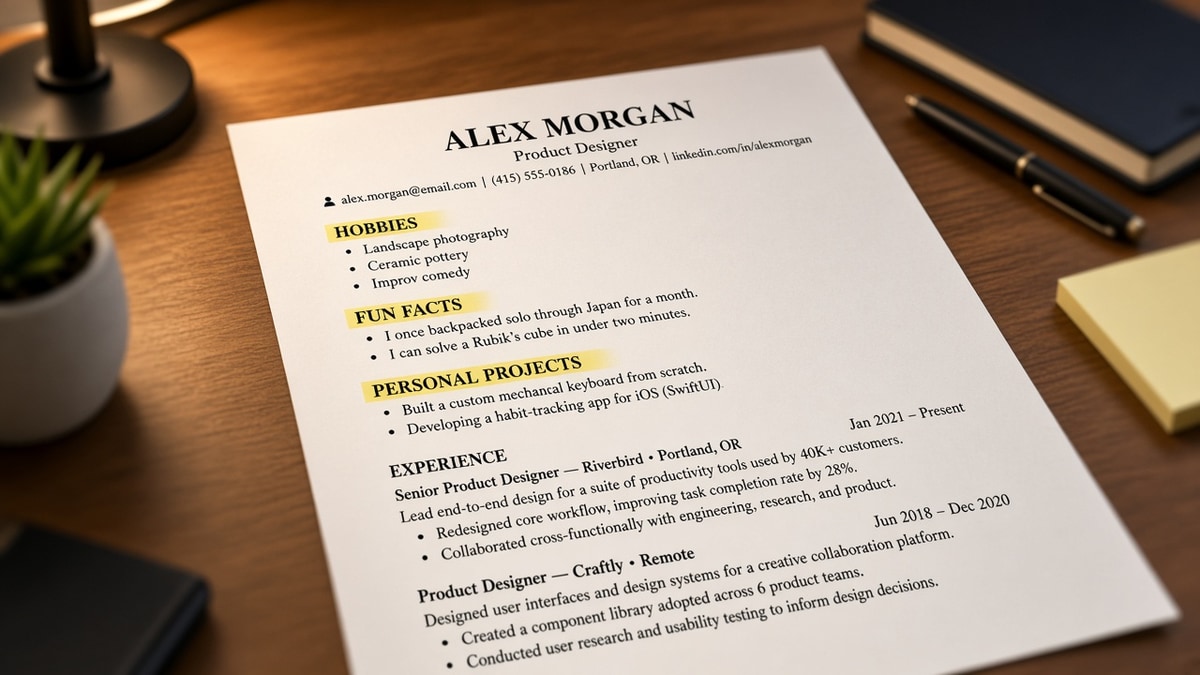
You're staring at a resume that felt complete until someone said to cut the Hobbies block. It doesn't feel fair. Those lines took time and they show personality.
But if you're applying through an ATS tonight, the question isn't whether the section is interesting. It's whether a parser can find your last job title in the first screen a recruiter opens.
Check your resume for free after you move or delete odd sections. If Experience imports below a skills chart, you'll see it in the preview before you waste an apply click.
Below: what parsers do with custom headers, which sections to keep, and a short delete-or-merge list you can finish in one sitting.
Quick Wins
- Delete Hobbies, Fun Facts, and References available upon request.
- Rename creative headers back to Experience, Education, and Skills.
- Move volunteer and project proof into dated Experience bullets.
What parsers do with non-standard headers
Applicant tracking systems do not read your resume like a person flipping pages. They scan for labeled blocks: employer, title, dates, degree, skills list. Standard headers act like signposts.
Unusual sections reduce clarity because they sit where Experience should start. A Personal Projects block above your current role tells the parser your freelance work matters more than your last salary job. Recruiters who skim in six seconds see the same signal.
Custom labels also miss field mapping. A section called Impact Metrics may never attach to the work-history table. Bullets under Passion Projects can import with blank employer names. You look underemployed on screen even when the PDF looks full.
Job searching is already heavy. You're not vain for wanting a fuller page. You're competing against files that lead with one boring column and a clear timeline.
Keep or delete: a tonight decision list
Open your file and walk top to bottom. For each non-standard header, pick delete, merge, or keep. Most land in merge.
Before: Page one shows Hobbies, then Skills stars, then Experience starting mid-page.
After: Contact, three-line Summary, Experience with current role first, Education, Skills as plain text.
Delete outright: Hobbies, Fun Facts, Quotes, References upon request, Objective paragraphs that repeat the summary.
Merge into Experience: Volunteer roles, side projects, freelance gigs, board seats. Give each a title, organization, Month Year dates, and two bullets.
Merge into Skills or bullets: Certifications with one line each under the job where you earned them, or a short Skills list without star ratings.
Keep only with a standard label: Publications or Speaking if you're in academia or a speaker-heavy field. Rename to Publications and place after Experience, not before.
I've screened stacks of these in Workday, and the file that wins is boring: Experience on page one, dates that match HR records, no sidebar hobbies eating the first third.
Copy-paste standard header order once you've cut the extras:
Copy-paste section order
[Name] | [Phone] | [City, ST or Remote] | [Email]

SUMMARY
[Two lines: role + scope + one proof point]

EXPERIENCE
[Job Title] | [Employer] | [Month Year] to Present
• [Outcome bullet tied to this employer]

EDUCATION
[Degree] | [School] | [Month Year]

SKILLS
[Comma-separated tools and methods, no graphics]
For how file layout affects what gets read first, see resume formatting errors that break ATS parsing .
Sections that look harmless but break mapping
Core Competencies instead of Skills. Same words, wrong field. Many parsers only tag a block labeled Skills.
Highlights under each job. Subheaders inside a role split bullets across orphan rows. Keep one title line and bullets directly under it.
Before: Awards sit in a standalone section with no dates.
After: One award line inside the Experience bullet where you earned it.
Languages with flag icons. Icons do not paste as text. Write Languages: Spanish (professional), French (conversational) on one line under Skills.
Interests used to show culture fit. Recruiters rarely hire on hiking. They hire on whether your last title matches the req. Culture fit shows up in the interview, not in a Hobbies header.
This won't fix applying to roles where you lack core requirements. It stops a qualified timeline from hiding under decorative sections.
Confirm section order before you apply
After you delete or merge sections, upload the same file you plan to send. Parsers show their mistakes in preview, not on your PDF thumbnail.
Run the free ATS checker and confirm Experience appears before Skills in the parsed view. If your current role is missing or listed last, a custom header is still stealing the mapping.
Rebuilding from scratch? Build your resume in a single-column template, then paste your merged bullets in. Fewer surprise sections than editing an old design file.
Default headers beat creative labels
Why unusual sections reduce clarity comes down to order and mapping. Parsers and recruiters both want your current role near the top with plain labels they have seen a thousand times.
Tonight, delete the sections that do not prove hireability. Merge volunteer and project work into dated Experience lines. Rename anything cute back to Skills or Experience.
Save one version with the trimmed structure and use it for every apply this week. Tailor bullet one per posting, not the section list.
For what belongs in a skills block after you cut the extras, read how to write a resume recruiters can skim in 10 seconds .
When a posting asks for a letter, generate a cover letter that names the same title as line one of Experience. Mismatched seniority across files creates the same doubt a buried timeline does.
Read more
Frequently asked questions
Yes, unless you are a student with almost no paid experience and the hobby directly proves a job skill. Hobbies sit above Experience on many templates and push your last role off page one. Move any relevant detail into a bullet under the job where you used it.
Stick with Skills or Technical Skills. Creative headers like Core Competencies or Areas of Expertise do not always map to the skills field in Workday or Greenhouse. The parser may drop the list or file it under notes where keyword search never looks.
List it under Experience with the organization name, title, dates, and bullets in the same format as paid roles. A separate Volunteer Impact section often imports as an orphan block with no dates attached, which makes tenure look shorter than it is.
Only when you lack full-time roles and the projects are the main proof of ability. Even then, fold each project under a heading like Freelance or Contract Work with Month Year dates. A standalone Projects block above Experience tells parsers your paid jobs are secondary.