9 min read

Why Simple Resumes Perform Better Online: ATS Optimization Guide

HireFlow Editorial Team
August 19, 2026

Learn why simple resumes perform better online with ATS systems. Get practical tips to optimize your resume for job boards and recruiters.

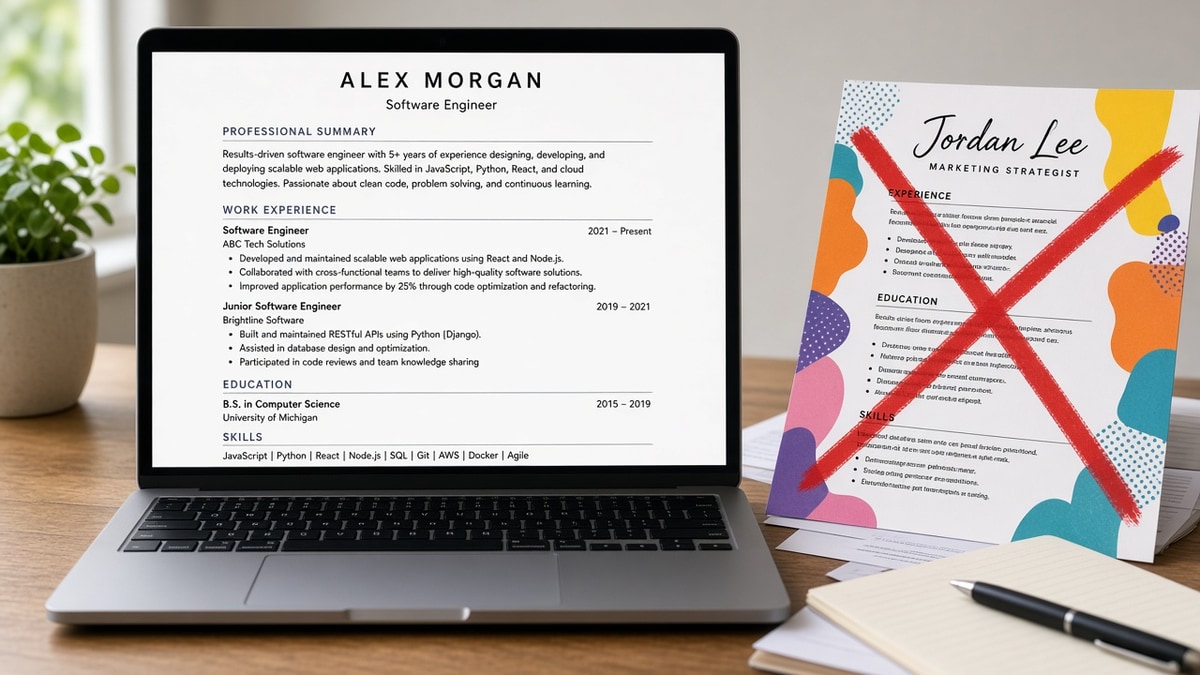
Why simple resumes perform better online is a question that puzzles many job seekers. You've spent hours crafting the perfect resume, adding colors, graphics, and creative formatting—yet your applications disappear into the void. The answer lies in how modern hiring systems actually work. Most companies use Applicant Tracking Systems (ATS) to screen resumes before a human ever sees them, and these systems struggle with complexity.

When you apply for a job online, your resume doesn't go directly to a hiring manager. Instead, it passes through automated screening software that parses your document, extracts information, and assigns a score. Complex designs, unconventional fonts, and elaborate layouts confuse these systems, causing qualified candidates to be rejected instantly.

In this guide, you'll learn:

  • How ATS systems read and rank resumes
  • Why simplicity improves your screening chances
  • Key formatting rules that matter most
  • Common mistakes that hurt your job search
  • Practical steps to optimize your resume for online applications

Understanding Why Simple Resumes Perform Better Online

The primary reason simple resumes perform better online is technical compatibility. ATS software was designed to extract text from documents in a predictable, standardized format. When your resume contains complex elements—two-column layouts, text boxes, images, unusual fonts, or colored headers—the parsing engine often fails to read the information correctly or skips entire sections.

Beyond parsing, simplicity improves keyword matching. ATS systems search for specific skills and experience mentioned in the job description. A cluttered resume makes it harder for the system to identify and weight relevant keywords. Simple, well-organized resumes with clear section headers and straightforward bullet points allow the ATS to quickly locate and match your qualifications against the job requirements.

Recruiters also prefer simple resumes when they do review applications. After the ATS filters candidates, hiring managers spend seconds scanning each resume. A clean, organized layout helps them quickly assess your fit for the role, while complex designs waste their time and create a negative first impression.

Key Elements of a Simple, High-Performing Resume

Clear Section Headers

Your resume should include standard sections: Contact Information, Professional Summary or Objective, Experience, Education, and Skills. Use simple formatting for headers—bold text or slightly larger font size works best. Avoid decorative lines, icons, or colored boxes around headers. These visual elements often don't parse correctly in ATS systems, and they add unnecessary complexity. Each section should be immediately recognizable and easy to scan.

Consistent Formatting Throughout

Consistency signals professionalism and helps ATS systems understand your document structure. Use the same font throughout (Arial, Calibri, or Times New Roman are safest). Maintain uniform spacing between sections and bullet points. If you bold job titles in one position, bold all job titles. If you italicize company names, italicize all company names. This consistency helps both ATS algorithms and human readers follow your career progression logically.

Standard Fonts and Single Column Layout

Multi-column layouts, while visually appealing, confuse ATS parsers. They often read columns in the wrong order or miss information entirely. A single-column, left-aligned layout ensures your resume is read top-to-bottom, left-to-right—exactly how ATS systems process documents. Stick to standard fonts; decorative or stylized fonts may not render properly when uploaded to job portals or forwarded by email.

Bullet Points Over Paragraphs

Bullet points are easier for ATS systems to parse and for recruiters to scan quickly. Each bullet should start with a strong action verb and clearly describe a responsibility or achievement. Avoid dense paragraphs; they're harder to parse and less likely to be read thoroughly. Aim for 3-5 bullets per role, focusing on quantifiable results and relevant skills.

Why Resume Complexity Fails Online

Complex resumes fail online for several interconnected reasons. First, ATS systems have parsing limitations. When a resume contains text boxes, the ATS may extract text from the wrong location or skip it entirely. Colored text, especially light colors, may be invisible to the parser. Logos, graphics, and images are typically ignored by ATS software, wasting valuable space and potentially causing parsing errors.

Second, many job application systems require you to upload a resume file. Some platforms automatically convert your file to plain text, stripping away all formatting. If you've relied on visual design to communicate your value, that message is lost in the conversion. Even when formatting is preserved, different systems display resumes differently, and your carefully designed layout may appear broken or unreadable.

Third, complexity slows down human review. Recruiters spend an average of 6-7 seconds reviewing each resume. If they have to hunt for key information because of a complex layout, they'll move to the next candidate. Simple resumes make it easy to find your most relevant qualifications in seconds.

Common Mistakes to Avoid

  • Using two-column or multi-column layouts: ATS systems read left-to-right, top-to-bottom. Multi-column designs cause text to be read out of order or skipped entirely, resulting in missing or misplaced information.
  • Embedding images, logos, or graphics: While these may look professional, ATS systems ignore images. They also increase file size and can cause parsing errors. Your qualifications must be communicated through text alone.
  • Applying decorative fonts or unusual typefaces: Fonts like Comic Sans, script fonts, or highly stylized typefaces don't render consistently across different systems. Stick to standard fonts that every computer recognizes.
  • Using colored text or background colors: Some ATS systems can't read colored text, especially light colors on white backgrounds. Colored headers or highlighted sections may become invisible during parsing.
  • Adding text boxes, shapes, or borders: These design elements confuse ATS parsers and often cause information to be skipped or misread. Keep your resume as a simple text document with basic formatting.
  • Excessive use of special characters or symbols: While some symbols are fine, excessive use of decorative elements (★, ●, →) can confuse parsers. Use standard bullet points instead.

Best Practices for Simple, Effective Resumes

  1. Use a clean, readable template: Start with a basic resume template from Word or Google Docs. Avoid overly designed templates; simplicity is your advantage. Your template should have clear section headers and consistent spacing.
  2. Optimize for keywords naturally: Include keywords that match the job description, but don't force them unnaturally. Use industry-standard terminology and skills relevant to your target role. ATS systems look for exact or near-exact keyword matches.
  3. Keep it to one page (if possible): For early-career professionals, one page is ideal. For those with 10+ years of experience, two pages is acceptable. Anything longer dilutes your strongest qualifications and tests the ATS parser's limits.
  4. Use standard section headers: Stick to recognizable headers like "Professional Experience," "Education," "Skills," and "Contact Information." Avoid creative alternatives like "Work History" variations that might confuse ATS systems.
  5. Format dates consistently: Use the same date format throughout (e.g., "January 2020 - Present" or "01/2020 - Present"). Inconsistent date formatting can confuse ATS systems and make your timeline unclear.
  6. Save as PDF or Word: PDF and Word formats are most compatible with ATS systems. Avoid unusual file formats. When in doubt, check the job posting for file format requirements.
  7. Test your resume: Before submitting, copy and paste your resume into a plain text editor (Notepad). If it looks garbled or unreadable, your ATS will have trouble parsing it too. Adjust formatting until the plain text version is clear and organized.
  8. Tailor for each application: While your resume should remain simple in structure, customize the content for each job. Highlight the skills and experience most relevant to that specific role, using language from the job description when appropriate.

How to Build a Simple, ATS-Optimized Resume

  1. Start with a blank document or simple template: Open Word or Google Docs and create a new document. Choose a basic template with clear sections and minimal design elements. Avoid templates with multiple columns or heavy graphics.
  2. Add your contact information at the top: Include your name, phone number, email address, and LinkedIn URL (optional). Keep this section simple and professional. No photos or decorative elements.
  3. Write a brief professional summary: 2-3 sentences highlighting your key qualifications and career goals. This helps both ATS and recruiters quickly understand your fit for the role.
  4. List your work experience in reverse chronological order: For each position, include the company name, job title, dates, and 3-5 bullet points describing your responsibilities and achievements. Use action verbs and quantifiable results when possible.
  5. Add your education section: Include your degree, field of study, university name, and graduation date. If you have relevant certifications, add them here or in a separate section.
  6. Create a skills section: List relevant skills separated by commas or as a simple bulleted list. Focus on skills mentioned in the job description. Avoid rating your proficiency level (e.g., "Intermediate" or "Expert") unless the ATS specifically requests it.
  7. Review formatting consistency: Check that fonts, spacing, and formatting are consistent throughout. Bold headers should all be the same size and style. Bullet points should align properly.
  8. Save and test in plain text: Save your resume as a PDF or Word document. Then copy all the text and paste it into Notepad or a plain text editor. If it's readable and well-organized in plain text, it will parse correctly in ATS systems.

Conclusion: Simplicity Wins in Online Job Applications

Why simple resumes perform better online comes down to technology and human behavior. ATS systems are designed to parse straightforward, well-organized documents. Complex designs, multiple columns, images, and unusual formatting confuse these systems, causing qualified candidates to be filtered out before a recruiter ever sees their application. Even when ATS systems successfully parse complex resumes, recruiters prefer simple layouts that let them quickly assess your fit for the role.

The good news is that building a simple, high-performing resume is straightforward. Stick to standard fonts, single-column layouts, clear section headers, and consistent formatting. Use bullet points instead of paragraphs. Test your resume in plain text to ensure ATS compatibility. By following these principles, you'll dramatically improve your chances of passing automated screening and landing interviews.

Your resume's job is to communicate your qualifications clearly and efficiently. Simplicity doesn't mean boring—it means focused, professional, and effective. Start optimizing your resume today, and watch your application success rate improve.

Frequently asked questions

It's best to avoid color entirely or use it sparingly. While a single accent color for headers might work, it's not worth the risk. Many ATS systems don't process colored text reliably, and some job portals strip color during conversion. Stick to black text on a white background to ensure compatibility across all systems and platforms.

No. Photos are ignored by ATS systems and often skipped by recruiters in the U.S. (though they're more common in some international markets). A photo takes up valuable space and can introduce bias into the screening process. Save your professional photo for LinkedIn instead, where it's expected and appropriate.

One page is ideal for ATS compatibility and recruiter preference, especially for candidates with less than 10 years of experience. Longer resumes can cause parsing issues and dilute your strongest qualifications. If you have extensive experience, two pages is acceptable, but avoid three or more pages. Focus on quality over length—include only your most relevant experience and achievements.

PDF and Word (.docx) are the most ATS-compatible formats. PDF preserves your formatting across different systems, while Word allows for easier editing. Avoid .doc (older Word format), .rtf, .odt, or other unusual formats unless specifically requested. Always check the job posting for file format requirements and follow them exactly.

Tables are risky in resumes. Some ATS systems parse table data incorrectly, reading cells out of order or missing information entirely. If you need to organize information, use simple bullet points or line breaks instead. Tables might look organized visually, but they're a common cause of ATS parsing failures.

The easiest test is to copy and paste your entire resume into a plain text editor like Notepad. If it looks readable, organized, and complete in plain text, it's ATS-friendly. Check that all text is present, spacing is reasonable, and formatting is clear. You can also use free ATS resume checkers online, though they vary in accuracy. When in doubt, simplicity is always the safest choice.

Done for you

Turn this advice into an interview-ready resume

Professional writers rebuild your resume for ATS + recruiters — unlimited revisions, interview guarantee.

Job match tool·Free builder

Tags

simple resumesATS optimizationresume formattingjob applicationonline resumesATS-friendly resumeresume structureresume design