7 min read
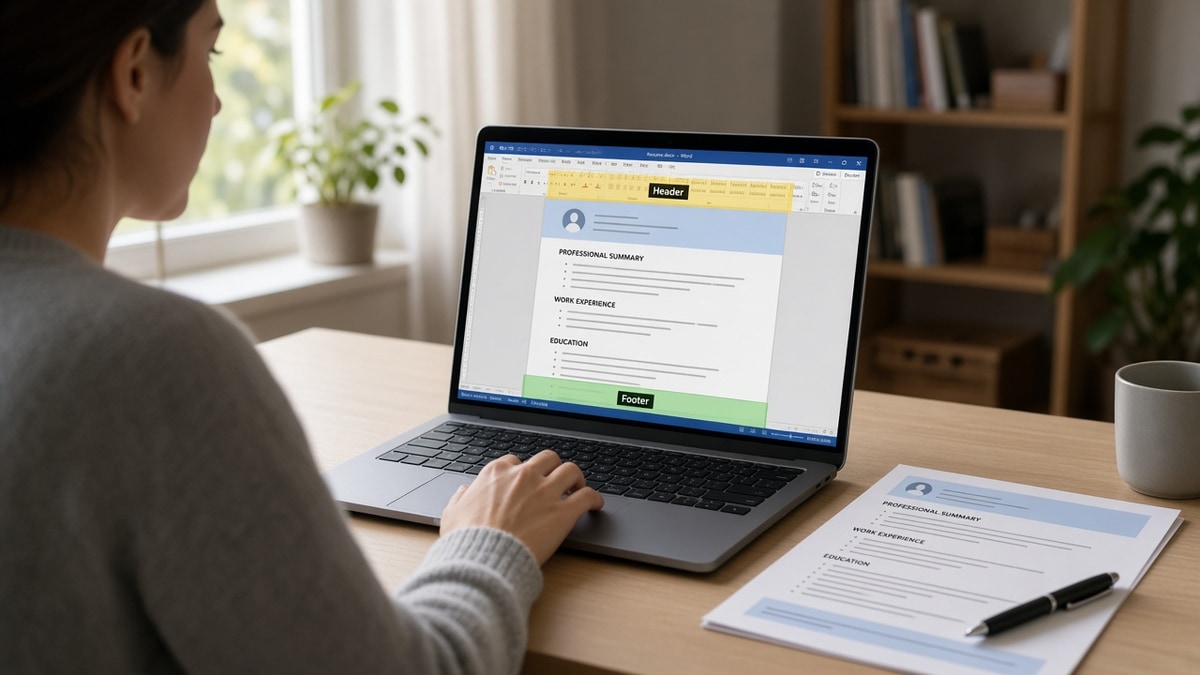
The template looked professional. Name centered in the header band. Phone and LinkedIn tucked in a slim footer on every page. On screen it's tidy. In Workday or Greenhouse the import preview sometimes shows an empty phone row and your latest title sitting under Education.
That's the mismatch this page names. Before you rewrite bullets, confirm whether the parser ever received your contact block. Check your resume for free on the same DOCX or PDF you upload so you're not tuning keywords on a profile with missing fields.
Below you'll match symptoms to causes, run four checks on one export, and fix the layout band that broke your import. This won't rescue applications where you're genuinely underqualified. It stops qualified files from dying because email lived in a footer the software skipped.
Quick wins
- Clear Word headers and footers completely, then rebuild contact on line one of the body.
- Paste the export into plain text and read contact before your first job title.
- Delete page numbers from footers before you submit a multi-page file.
Symptoms when header/footer contact never imports
Workday, Greenhouse, Lever, Taleo, and iCIMS build a candidate profile from one ingest pass. They expect a linear stream: name, contact, sections, jobs with dates. Word treats headers and footers as separate regions. Some parsers read them first, some last, some not at all.
Instant or template rejections with a clean PDF. Knockout rules often require email, phone, or work authorization fields on the application record. When the parser leaves those blank, the req closes before a recruiter sorts the queue. The attachment can look perfect while the profile is incomplete.
Scrambled order in plain text. Footer phone numbers can land after your last bullet. Header names can appear twice if you also typed them in the body. Page numbers import as random digits inside Skills. Each artifact lowers match quality even when nothing formally "rejected" you.
Before: You assume silence means weak keywords because the design template came from a career site.
After: You open plain text preview and see email missing while "Page 2" sits between two employers.
Why ATS rejects resumes with headers and footers usually comes down to field mapping, not a hidden penalty on pretty files. The software never received contact where the matcher expects it.
For the broader parser failure list, read resume formatting errors that break ATS parsing after you fix header and footer bands.
Four checks to find your failure mode
Run these on the exact file you submit. You're diagnosing import order, not your career story.
Check 1: Header band only
Symptom: Name shows in PDF preview but phone field stays empty in the portal.
Cause: Contact lives only in the Word header.
Fix: Insert → Header → Remove header content. Type name on line one of the body, email and phone on line two, city on line three.
Check 2: Footer contact or page numbers
Symptom: Plain text shows digits or "Page 1" between job blocks.
Cause: Footer holds page numbers or a repeated email line.
Fix: Delete the footer region entirely. Never park critical contact in a footer because some imports skip that band.
Check 3: Different header on page two
Symptom: Recruiters see page two without your name when they print or split files.
Cause: You relied on a repeating header instead of body text on continuation pages.
Fix: Put your name as the first body line on page two. Keep headers empty on every page.
Check 4: PDF exported from a designed template
Symptom: DOCX plain text is fine but PDF import scrambles contact.
Cause: PDF flattened a header graphic or text box outside the body stream.
Fix: Rebuild from a single-column DOCX with no header/footer content, then Save As PDF from Word instead of printing to PDF from a browser.
Copy-paste contact block (body only, 11-point Calibri or Arial):
Alex Rivera
[email protected] | (555) 234-8890 | Austin, TX | linkedin.com/in/alexrivera

PROFESSIONAL SUMMARY
Operations analyst with 6 years in SaaS billing and Salesforce reporting...
I've screened Workday imports where the PDF header showed a bold name and the profile stored "Unknown" because the parser never mapped the header band into the name field. The candidate wasn't underqualified; the contact block was in the wrong document region.
Before: Email and phone sit in a gray footer on each page because the template looked corporate.
After: One contact block under the name in the body, headers and footers empty, plain text reads name then email then first job title.
Workday-specific reordering is common enough that Workday resume upload formatting fixes for US applicants is worth reading when your preview diverges from the file you designed.
| What you see | What plain text often shows | First fix |
|---|---|---|
| Name in header | Name missing or duplicated | Move name to body line one |
| Phone in footer | Phone after last bullet | Delete footer, phone on line two |
| Page numbers in footer | Stray "1" or "2" in Skills | Remove all footers |
Layout habits that look fine on screen
Duplicating contact in header, footer, and body. Parsers pick one instance or merge them into the wrong field. Pick a single body block and delete the rest.
Using "Different First Page" headers. Page one contact in the header and page two jobs in the body splits what humans read as one file into regions software handles inconsistently.
Styling the header as a logo bar. Images and shapes in header bands rarely become text. Recruiters still need a selectable email, not a graphic of your initials.
Before: You keep a footer email "so every page has contact" when managers print packets.
After: You submit a footer-free digital export to the ATS and keep a print layout as a separate file if you need it offline.
This won't fix applying to roles where years or authorization don't match. It stops strong candidates from getting filtered out because the parser never saw a phone number that was sitting in a footer band the whole time.
Test the export the portal ingests
Upload the header-free version to HireFlow's free ATS resume checker with the posting pasted in. Confirm must-have terms still sit in Experience after you moved contact into the body.
If you're rebuilding from scratch, build your resume as a single-column base with no header regions, then tailor bullets per req instead of fighting inherited template bands nightly.
Optional cover letters won't replace a missing phone field. If the portal marks the letter optional, fix export integrity first, then generate a cover letter only when you have one fact the resume fields cannot hold.
Treat empty fields as a layout signal
Headers and footers are document regions, not resume sections. When contact lives there, parsers that skip those bands leave knockouts with nothing to validate. Empty phone rows aren't a comment on your experience; they're a read-order problem you can fix in one editing pass.
- Clear header and footer content in Word before export.
- Keep one contact block under your name in the body.
- Run plain text preview before the next batch apply.
- Rebuild PDF from the clean DOCX, not from a designed print view.
Run a free ATS check on tonight's export before you assume the template rejection email meant your bullets failed a human review.
Read more
Frequently asked questions
Not every upload fails, but headers are unreliable. Many imports read the body first and skip the header band, so your name and phone never land in profile fields. Move name, email, and phone into line one of the body and leave headers empty.
Yes on the body, not in a repeated header. If pages separate, put your name on the first line of page two in the main document. Do not rely on the same Word header on every page; parsers often drop or duplicate that block unpredictably.
PDFs flatten layout, which can hide where contact lines live. A footer email in a PDF may parse as part of your last job bullet. Safer pattern: build a header-free DOCX with contact in the body, then export PDF from that clean file if the portal requires it.
Page numbers often import as stray digits in Experience or Skills. Recruiters rarely need them on digital files. Delete footers entirely. If you print, use a version for printing only and submit the footer-free export to the ATS.