7 min read
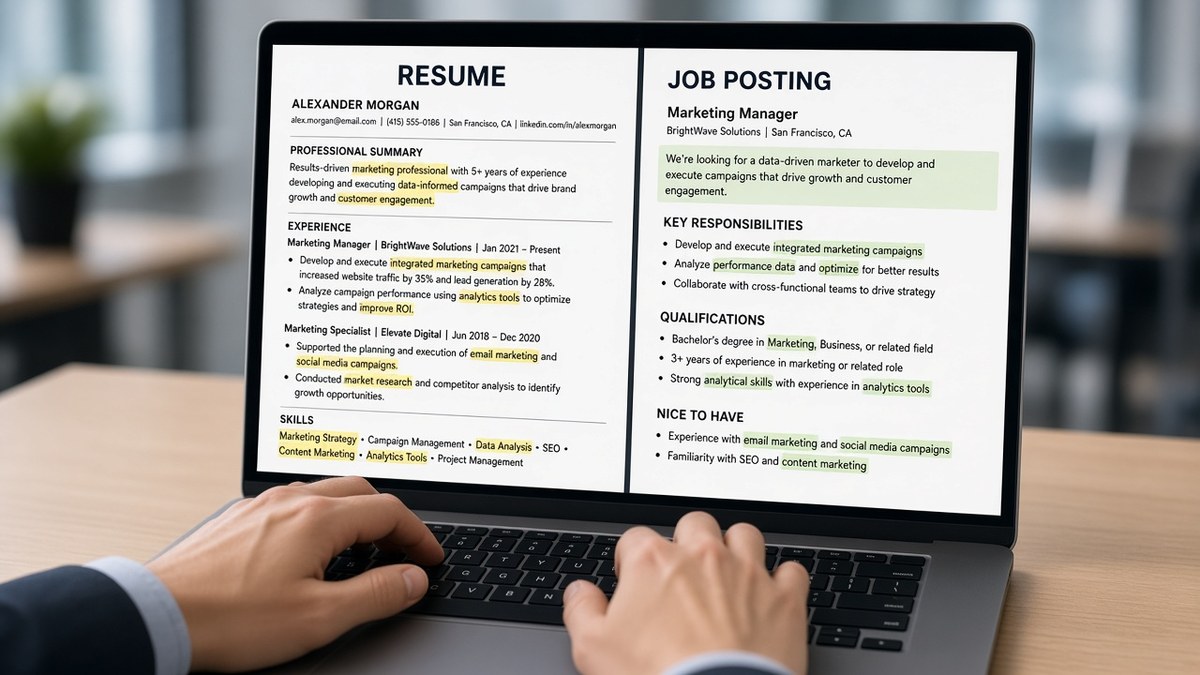
You did the work. Your master resume still says improved processes while the posting asks for SOX testing and audit walkthroughs. That's not a mystery rejection. It's a language mismatch the screen can see in seconds.
Check your resume for free against the live posting before you tweak another line. If must-have terms only sit in Skills, you're sending tags without dated proof.
Below you'll see why parsers favor posting-shaped bullets over polished generic copy, the exceptions where one master file still works, a short reframe pass for tonight, and traps that make tailored files look fake.
Job searching on top of a full job is exhausting. This isn't a lecture about trying harder. It's how to say what you already did in words the req actually searches for.
Quick Wins
- Highlight five phrases on page one of the posting and mirror them in bullet one under your current role.
- Replace Responsible for with a verb plus object drawn from the req.
- Export a PDF and confirm must-haves appear inside Experience text, not only Skills.
Why ATS prefers job specific framing over generic duty lines
Framing is where the words live, not how many times they repeat. Most corporate ATS stacks extract employer, title, dates, and body text into fields, then match those strings to the job req. Generic lines like supported cross-functional initiatives do not map cleanly to filters built from the posting. Customer onboarding in bullet one under a 2025 employer row does.
Recruiters running Boolean in Workday or Greenhouse often search exact tokens from the req: tool names, compliance frameworks, ticket volumes. Your file wins when those tokens sit in Experience with dates attached. A Skills cloud alone looks unverified even when the words match.
I've screened queues where the candidate clearly owned the work but wrote it like an annual review. The parser scored keywords while the human filter on title never opened the file because the headline still read Specialist for a Manager req.
Exception: internal transfers or close replays of the same family sometimes pass with light edits if your title already matches. Exception two: niche reqs with rare acronyms need one honest line defining scope, not ten repeats of the acronym in Skills.
For how fit signals stack after parsing, read how ATS detects role fit . This page stays on wording that makes fit visible in the first screen of text.
What to do now: reframe bullet one in fifteen minutes
Open the posting in one window and your resume in another. You are not rewriting history. You are swapping generic wrappers for req-shaped objects you can defend on a call.
Pull phrases, not paragraphs
Mark five nouns or verbs the employer repeats: platform names, compliance terms, customer segments, ticket types. Those are your framing targets. Ignore boilerplate culture copy unless it names a method you truly used.
For choosing which lines to steal legally, see how to pick the right keywords from a job description . Pull tools and scope, not adjectives.
Rewrite the top bullets
Before: Improved customer satisfaction through proactive communication.
After: Resolved Tier 2 Zendesk tickets within SLA for 180 enterprise accounts, cutting reopen rate on billing disputes.
Before: Worked with data team on reporting needs.
After: Built Looker dashboards for weekly churn reviews used by six product managers in Q3 planning.
Copy-paste skeleton for bullet one
• [Verb from posting] [object from posting] for [scope: team, accounts, volume]
  using [tool named in req], [outcome with number or cycle time]

Example after you edit tools:
• Onboarded mid-market SaaS customers through 30/60/90 plans in Gainsight,
  reducing time-to-first-value for 24 accounts in H1
Mirror each must-have once in Skills only after it appears in a dated bullet. Order Skills to match the posting's top tools, not alphabetical habit.
Save the export with the employer name in the file name so you do not upload the generic master by mistake. One framed PDF per posting family beats fifty identical uploads with different cover letters.
When framing backfires
Stuffing the summary with every req line. Parsers and humans both flag walls of keywords with no objects. Keep summary line one aligned to title level, line two to proof, line three to one method from the posting you actually ran.
Swapping synonyms the req did not use. If the posting says Kubernetes, do not hide behind container orchestration unless you also name Kubernetes once in Experience. Precision beats elegant variation on ATS-facing lines.
Framing skills you cannot discuss. If you never touched Snowflake, do not add it because the posting does. Frame adjacent proof and learning speed instead, and spend your edits on tools you can whiteboard.
For the line between match and spam, read keyword stuffing vs keyword matching where the line actually is . Framing should read like a phone screen answer, not a word cloud.
Confirm the framed file still parses
After you mirror posting language, run the same export through a match pass. You are checking that must-haves moved into Experience text the parser can read, not trapped in a text box or header.
Score your job match on the live req, then edit Experience before you touch Skills again. Missing terms sitting only in a sidebar column still fail many imports.
If the portal allows a letter, generate a cover letter that repeats two proof bullets in plain sentences. Do not introduce tools in the letter that never appear under a dated role.
Upload proof shaped like the req
Open tonight's posting. Highlight three must-haves. Rewrite bullet one under your current job so each starts with a posting noun and ends with scope you can explain. Mirror each must-have once in Skills only after it lives in Experience.
This will not fix applying far above your level. It stops qualified files from dying because the parser saw generic duty language while a rival file spoke the req's language in dated rows.
Save framed exports by role family. Reuse the shell when the next posting repeats the same stack. Swap bullet one when the story changes.
When the PDF is ready, run a free ATS check on the file you will upload, then adjust bullets instead of adding more Skills noise.
Read more
Frequently asked questions
No. Copy-paste blocks from the posting read like spam to recruiters and can look like stuffing to parsers. Framing means you express real work with the same nouns and verbs the req uses: ticket triage instead of helped customers, Snowflake instead of data warehouse when the posting names Snowflake. You are aligning language, not inventing duties.
You need a separate export when the posting family changes, not always when the company changes. Save a master file, then swap summary line one and the top two bullets under your current role to mirror each req. Two close roles at different employers often share the same framing pass. A pivot from support to analytics needs a different bullet set, not a new font.
In Experience first: job title line, summary opener, and bullet one under your latest role. Skills can repeat a must-have once after it is proven in a dated bullet. Parsers and Boolean filters in iCIMS or Lever weight text tied to employers and dates higher than a comma list at the bottom with no context.
Keep the honest employer title in the header row, then use a one-line headline or summary that reflects the target role without renaming history. Example: headline Customer Success Manager while the 2023 title stays Client Services Lead. Match scope in bullets. Do not rewrite dates or employers to fit a title filter you never held.