12 min read
You hit submit on a role you're qualified for. The confirmation email arrives. Then nothing. No screen, no rejection with a name on it, just silence while the posting stays live. You're not imagining a wall. There's a gate before any recruiter opens your file, and it's usually an applicant tracking system running parse, match, and rank in that order.
Check your resume for free on the same export you'll upload. Most stalls aren't "the ATS hates me." They're one of three mechanical failures you can test tonight without rewriting ten years of work history.
You've probably read that keywords matter. They do, but only after the system can read your employers in the right sequence and attach your current title to the right company. A mid-level analyst whose top parsed line is Excel, SQL, and Tableau looks unemployed on screen even when the PDF looks fine on a phone.
Below you'll see the symptom recruiters recognize, three causes that kill files at the gate, how to tell which one hit yours, and the fix for each. Job searching is brutal right now. This won't fix applying to roles where you're genuinely underqualified. It stops a strong file from dying because Workday read your sidebar before your last employer.
If the portal asks for a cover letter after upload, don't repeat the same scrambled layout in prose. Generate a cover letter from your corrected plain-text export so the note matches the employer order you fixed in Word.
Quick Wins
- Paste your PDF into Notepad once. If tool names appear before company names, fix layout before keywords.
- Match your headline title to the posting title on a one-line honest spectrum (Coordinator vs Senior Coordinator).
- Rewrite bullet one under your current job so a required skill lands in the first eight words.
The symptom: qualified on paper, invisible in the queue
The symptom isn't always a harsh rejection email. It's often quiet: application received, then weeks of nothing while you watch the job repost. What changed on the employer side is that your profile landed in a sorted list, not on a recruiter's desk as a fresh attachment.
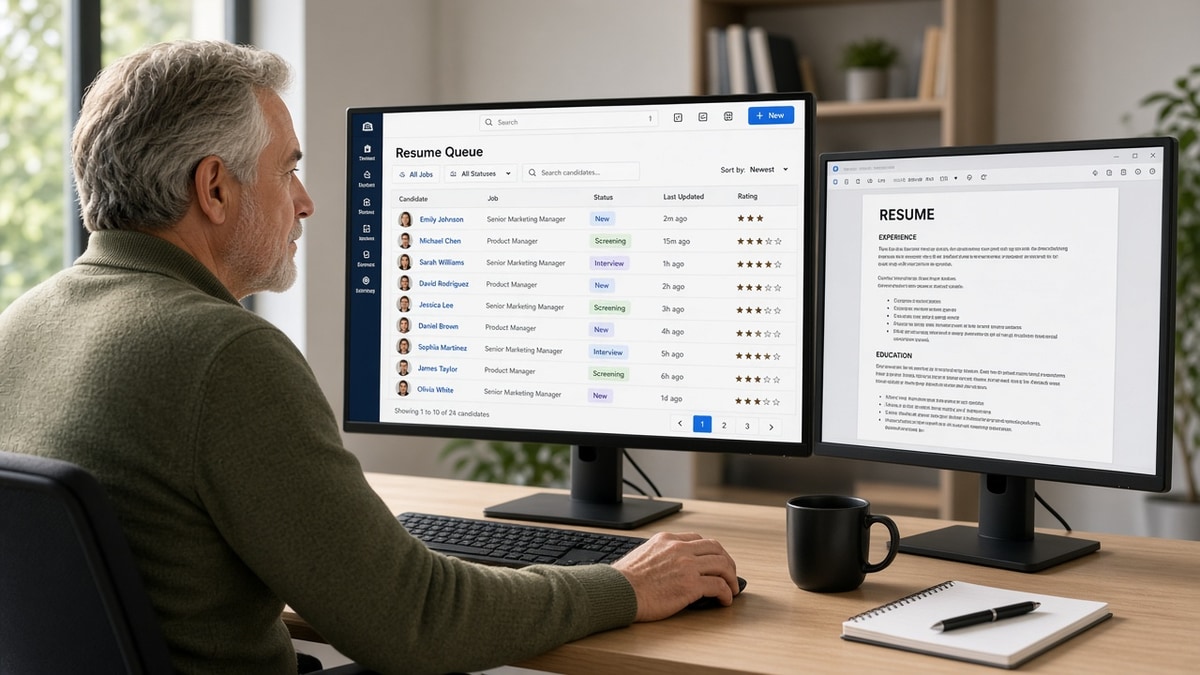
What you feel: "I'm a fit and still can't get a screen." What the recruiter sees in Greenhouse or Workday: a parsed profile where dates float away from titles, your headline says Consultant while the posting asks for Program Manager, or your row sits on page four of a sort they never scroll past.
The gatekeeper isn't a person deciding you're unworthy on a Tuesday afternoon. It's software doing intake at scale. Every corporate posting with volume gets more applications than one recruiter can open. The ATS exists so humans spend time on files that survived parse and match, not on opening four hundred attachments by hand.
That design is why silence feels personal when it's often mechanical. Your PDF might be strong. The imported profile might be scrambled. Recruiters live inside the imported view for first-pass sorting. If that view is broken or thin, the attachment rarely gets opened to save you.
Taleo, iCIMS, and Lever follow the same broad pattern even when the preview UI looks different. Text extraction runs first. Filters and keyword rules run on whatever text survived. Ranking sorts the survivors. A failure at step one means step two never sees your best bullet.
Read why your resume never reaches a human for the wider funnel story. This page focuses on diagnosing which gatekeeper step stopped you.
Why ATS is the first gatekeeper: three causes that stop files cold
Cause 1: Parser failure before scoring starts
Parsers read files as text streams, not as designed pages. Two-column layouts, tables, text boxes, headers with contact info, and icon skill rows reorder fields unpredictably. The system may still accept your upload while building a profile where your current employer is not your current employer.
How to tell this is you: Plain-text paste shows skills or tools before company names. Portal preview lists Skills above Experience. Search inside your PDF cannot find a job title you see on screen.
Fix: Rebuild as a single column in Word. Move tools into bullets under Month Year dated employers. Delete headers, footers, and floating boxes. Export DOCX or a text-based PDF and paste into Notepad again.
Before: Marketing coordinator with a left skills rail: HubSpot, Google Analytics, Mailchimp above a right-column employer block.
After: Single stack: Name, contact, Experience with Jan 2022 to Present · Marketing Coordinator · RetailCo · bullet one opens with email campaigns in HubSpot and GA4.
Parser failure is the most common gatekeeper stop I see on design-forward files. The candidate is qualified. The imported profile reads like a skills dump with no dated job attached. Ranking never gets real work history to score.
Cause 2: Filter mismatch on title, dates, or must-have terms
After parse, many teams run filters: current title contains Manager, years of experience above a threshold, required certification present, location field populated. These are blunt rules, not nuanced judgment. A file that parsed cleanly can still fail because the headline says Analyst while the posting says Business Analyst II, or because BLS and ACLS sit in an icon row the filter never read.
How to tell this is you: Plain-text order looks fine, but your headline title does not mirror the posting language. Required terms from the job description appear only in a Skills list, not in bullets under a dated role. Upload preview shows empty date fields on your last job.
Fix: Align headline to posting title on an honest spectrum. Spell certifications in the body. Put must-have tools in bullet one under the employer where you used them, not in a detached list.
Before: Headline: Operations Professional. Posting title: Supply Chain Coordinator. Bullets mention SAP and WMS only in a bottom Skills block.
After: Headline: Supply Chain Coordinator (or Senior Supply Chain Coordinator if accurate). Bullet under LogisticsCo: Managed inbound scheduling in SAP WM and cut dock wait time from 47 to 28 minutes average in Q2.
Filters are why keyword stuffing in a sidebar fails. The gate reads associations: tool plus employer plus date. A Skills paragraph with no employer attached does not satisfy a must-have rule tied to experience fields.
Cause 3: Rank cutoff in a full queue
Surviving parse and filters still leaves you sorted against everyone else who applied this week. Recruiters often open the top slice of a list sorted by match score, application date, or internal flags like referral and prior employee. You can be qualified and parsed correctly while sitting below the scroll line on day three.
How to tell this is you: File parses cleanly, title aligns, keywords sit in bullets, and you still hear nothing on a high-traffic posting. Friends who applied late with thinner backgrounds got screens because they applied on day one or carried a referral tag.
Fix: Apply within the first 48 hours when you can. Tailor bullet one to the three must-haves in the posting. Ask for a referral that flags your row. Target parallel roles with lower volume where the same file ranks higher in a shorter list.
Before: Generic summary, same file sent to twelve postings over two weeks, applied on day nine after LinkedIn repost.
After: Company-specific file name, bullet one mirrors posting language, submitted on day one, optional employee referral noted in the portal field.
Rank cutoff is the hardest cause because it's partly timing. It's still a gatekeeper effect. The ATS is where that sort happens. Fixing parse and match gives you a fighting rank. Ignoring them guarantees page four.
How to tell which cause hit your file
Run one plain-text paste test. If tool names appear before employers, start with Cause 1. If order is clean but headline and must-haves are thin, Cause 2. If both look solid on a crowded posting and you applied late with no referral, weight Cause 3. Mixed signals mean two problems; fix columns and dates before you chase timing tricks.
The decision tree in one line: broken order beats keyword tweaks, title gaps beat more applications, timing beats perfection only when the first two are already clean.
Copy-paste gatekeeper-safe experience block
Paste under your contact lines in a blank Word doc and replace bracketed fields:
[Headline title matching posting, honest level]

EXPERIENCE
[Month Year] to [Month Year] · [Job Title] · [Company] · [City, ST]
• [Must-have skill from posting] plus outcome in first eight words; metric if you have one
• [Second bullet with tool names tied to this employer]

[Month Year] to [Month Year] · [Prior Title] · [Prior Company]
• [Bullet showing progression or scope relevant to posting]
Edge case: you're a contractor with six short gigs in one year. Group under one consulting header with client names inside bullets so parsers see one employer line, not six one-month rows that trigger tenure filters. Edge case two: career change. Put a dated project or certificate line before a Skills block so tools attach to a real time period, not a floating list.
Pair 4: Staff nurse filtered on cert keywords
Before: ACLS and PALS as icons in a sidebar. Job title line reads RN without unit type. Posting requires Med-Surg experience.
After: Staff RN, Med-Surg/Telemetry, 32-bed unit, 6:1 ratio on line one under County General with Month Year dates. ACLS and PALS spelled on line three of contact block.
Pair 5: Software engineer ranked below referral rows
Before: Applied day twelve on a viral posting. Headline: Developer. Kubernetes mentioned only in a footer. No employee referral field filled.
After: Applied day one. Headline: Backend Engineer. Bullet under CloudCo: Owned Kubernetes deployments on AWS EKS for 14 services; cut rollback time from 22 to 6 minutes. Referral name entered when available.
What stalled applications share at the gate
They treat the upload field like a portfolio showcase instead of a data import. They optimize the PDF for human eyes while the recruiter sorts inside a parsed table view. They assume silence means "not qualified" when it often means "not readable" or "not on page one."
The pattern: strong background, generic file name, late apply, no preview check. The fix is never "apply to fifty more identical postings." It's flatten, align title, front-load must-haves in bullet one, then move fast on roles that fit.
Another miss: trusting the portal's green checkmark. Accepted for upload is not the same as imported correctly. Open the preview when Workday or Greenhouse shows one. If employers scramble, stop and rebuild before you burn another tailored paragraph in a cover letter.
Candidates also chase keyword density in a summary while the experience section still says Responsible for various duties. Filters and rank both weight recent dated work higher than adjectives in a paragraph no parser maps to a job title.
I've watched qualified rows sit unopened because the parsed headline was blank and the attachment was never clicked. The gatekeeper won without malice. The recruiter simply never saw a coherent profile to open.
Creative section titles make it worse. My Journey instead of Work Experience, Expertise instead of Skills. Parsers map standard headings. Creative labels get skipped or dumped into unsearchable fields.
Applying with scanned PDFs from phone photos fails parse entirely. OCR garbles letters. Your name becomes Nrne Smith. That row never competes. Export from Word or Google Docs as text, not a camera roll image.
Read how resume file type impacts screening if you're stuck between PDF and DOCX after a failed preview.
Verify the file before the next upload
Run your export through a checker with the job description pasted in. You're looking for parse warnings, missing employers, thin must-have coverage, and title alignment gaps after layout is clean.
Compare two exports if you're unsure: your designed PDF and a plain Word PDF from the same single-column source. Upload both. The one with fewer parse warnings is your portal file. Keep the other for networking conversations where humans open attachments on laptops.
Run a free ATS check on the same file you'll submit. If warnings clear, score your job match against the posting to see which requirements still look thin on paper.
Edge case: internal referral promised. Send the parser-safe version anyway. Forwarded emails still land in the ATS of record. A pretty file that scrambles in Greenhouse hurts warm intros the same way it hurts cold applications.
What to do in the next ten minutes
Open your last submitted file. Paste into Notepad. Read employers top to bottom. If order is wrong, rebuild as one column before you touch keywords. Save a new export with the company slug in the file name so you don't re-upload the broken version by habit.
Open one target posting. Highlight three must-haves. Rewrite headline and bullet one under your current job so one must-have lands in the first eight words with a dated employer attached. That single edit fixes more gatekeeper stops than a rewritten summary paragraph.
Apply early on the next role that fits. Ask for a referral when you have one. Check the portal preview if it exists. Switch from PDF to DOCX from the same clean source if employers still scramble.
Why ATS is the first gatekeeper is not a mystery and not a personal verdict. Parse, match, rank. Diagnose which step failed, fix that step, then tailor. The human reader is still at the end of the funnel. Your job is to arrive there with a profile that looks like the person on your PDF.
Keep a parser-safe master in Word and spin company-specific copies from it. Same facts, different bullet one and headline. You don't need a new design each time. You need a clean import path that survives the gate every time.
Read more
Frequently asked questions
Most corporate postings with an online apply button land in Workday, Greenhouse, Lever, Taleo, or iCIMS first. Small employers and some startups may read email attachments directly, but the default path for volume roles is automated intake. Assume the parser runs unless someone told you to email a hiring manager directly.
Yes, for referrals, internal transfers, and niche roles where the filtered list is thin. That override is the exception. For open-market applications on a popular posting, recruiters sort the ranked queue inside the ATS. Your file still had to parse cleanly enough to appear in that queue with the right title and dates attached.
Sometimes, but keyword gaps are rarely the first failure. Parser scrambles and title mismatches kill files before keyword scoring matters. Run a plain-text paste test first. If employers appear out of order, fix layout before you add more terms from the posting.
Use whatever the portal requests. When both are accepted, a clean DOCX from a single-column Word file often parses more reliably than a design-heavy PDF. If your PDF passes a plain-text paste test with employers in order, keep it. If not, rebuild in Word and export again.
Gatekeeper failure looks like instant silence or a generic rejection within hours, often with no interview request. Later-stage failure means you got a screen or assessment first. If you never received any human contact, suspect parse order, title gaps, or rank cutoff before you rewrite your entire career story.