11 min read
Skip the photo if you're applying through a US, UK, Canadian, or Australian employer portal. Include a professional headshot only when the country, industry, or posting clearly expects one, such as local roles in Germany or on-camera work.
You're not overthinking it. A photo feels personal, and advice online still splits fifty-fifty. In 2026 the split isn't about taste. It's about who reads the file first. If your application routes through Workday, Greenhouse, Taleo, Lever, or iCIMS, the parser reads text. It doesn't score your smile. Before you export another version, check your resume for free and confirm the header still parses cleanly with or without an image block.
Job searching is already draining. You shouldn't lose a week because a headshot shoved your email address into the wrong field. This page gives you the direct answer by country and industry, the exceptions that actually matter, and a short checklist you can run in ten minutes tonight.
Quick Wins
- If the posting is US or UK corporate, export a photo-free single-column PDF tonight.
- If you're applying in Germany or Austria locally, add a small headshot in the header and keep the rest text-only.
- Save two filenames: LastName-Resume.pdf and LastName-CV-Photo.pdf so you don't send the wrong one when you're tired.
- If the portal asks for a letter, draft one with the cover letter generator after you lock the photo decision.
Why resume photos split hiring norms in 2026
A resume photo is a small headshot embedded in the header of your CV or résumé file, usually next to your name and phone number. It is not the same as a profile photo on a networking site. The file still has to survive software that strips images, and humans who are trained not to weigh appearance in the first screen.
Most Anglo-market employers treat photos as a bias risk, not a branding boost. US, UK, Canadian, and Australian corporate recruiters work from text lists in Workday and Greenhouse. They search by title, employer, and skills. A photo doesn't add a searchable field. It adds a reason for a compliance-minded team to prefer the next candidate's plain PDF.
Continental Europe is different on local hires. German and Austrian CV conventions still include a professional Bild. French applications sometimes expect one on a full CV, though Paris tech roles on English portals often follow US rules. Asia varies by country and by whether you're applying to a multinational portal or a local family-owned firm on paper.
ATS parsers weren't built for headshots. They expect a single column of text: name, contact line, summary, experience blocks with Month Year dates. Drop a floating image in a text box or a two-column header table and the parser may read cells out of order. Your most recent job title lands under the wrong company. Your phone number vanishes. That failure mode matters more than whether a recruiter likes your photo.
Read resume photo rules by country: US vs EU vs UK when you're applying across borders and need a side-by-side norm table. This post focuses on the yes-or-no call and what to do with the file in your hands right now.
Where a resume photo is still expected (and where it hurts)
Treat this as an exceptions map, not a vibe check. If your situation matches a green row, prepare a photo version. If it matches a red row, keep the photo off the file you upload to a portal.
| Country or market | Default in 2026 | Notes |
|---|---|---|
| United States | No photo | Corporate portals and federal contractors expect text-only files |
| United Kingdom and Ireland | No photo | Same bias concerns; photo common on networking profiles, not CVs sent to HR |
| Canada and Australia | No photo | Public-sector and large employers mirror US practice |
| Germany and Austria | Photo often expected | Local Lebenslauf norms; multinational English postings may still be text-only |
| France, Spain, Italy (local roles) | Photo sometimes expected | Check posting language and whether HR is local or global |
| Singapore, UAE, parts of East Asia | Mixed | Banking and hospitality local CVs may ask for one; tech multinationals often don't |
Industry overrides country when the job is visual. Acting, modeling, brand ambassador, and some front-of-house hospitality roles use a headshot as a work sample. Corporate finance, software, nursing, logistics, and admin roles don't need your face on page one. They need proof you ran the work.
| Industry | Photo on resume? | Better move |
|---|---|---|
| Tech, finance, legal, healthcare (clinical corporate) | No | Single-column PDF, licenses and tools in bullets |
| Creative portfolio roles (design, writing) | Rarely on the resume | Link a portfolio site; keep the PDF parser-safe |
| Performing arts and on-camera work | Yes | Separate headshot sheet or performance CV, not the corporate PDF |
| Real estate, luxury retail (local EU) | Sometimes | Follow local brokerage norms; test parser if the portal is Workday |
Edge case: international student applying in the US from a photo-first home country. Your university career center back home may have templated a photo CV. US campus recruiting and OPT employers still want a photo-free PDF in Handshake and company portals. Keep both versions.
Edge case: refugee or name-change situation where a photo feels safer for recognition. If you're worried a recruiter won't connect your materials across names, fix consistency in the header text and application profile instead of adding a photo to a US corporate file. Use the same spelling in the portal, PDF, and email signature.
Should you include a photo on your resume (2026)? Steps for tonight
Run these in order. Stop when you hit a hard no. That's your answer for this application.
Step 1: Read the posting and portal country
Open the job post and note the employer location and application language. If it's a US or UK listed role on Workday, default to no photo even if you're currently abroad. If it's a German Mittelstand firm asking for a Lebenslauf in German, prepare a photo header.
Copy-paste this decision block into your notes and fill it in before you edit the file:
Resume photo decision (copy-paste checklist)
- Employer country: ___ · Portal: Workday / Greenhouse / email / other
- Posting language: ___ · Industry: ___
- Local norm says photo expected? yes / no / unclear
- Role is on-camera or client-facing with image norm? yes / no
- Decision: include photo / no photo / two versions
- Filename I'll upload: ___
Step 2: Pick one layout, not both at once
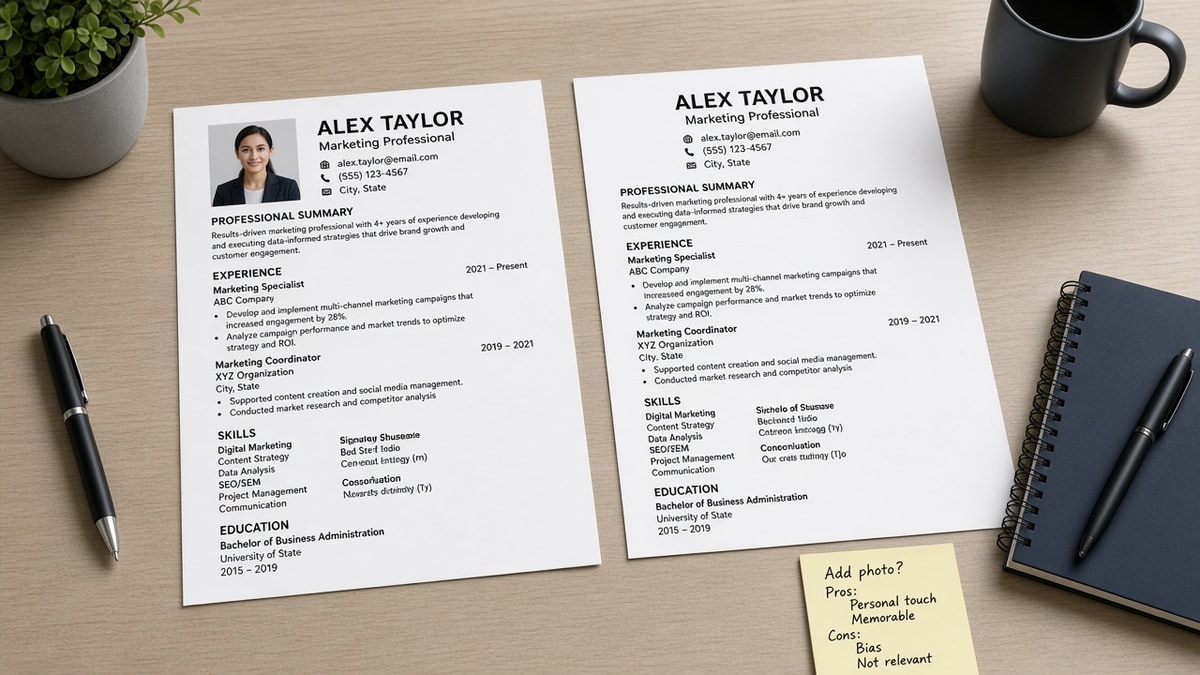
If you need a photo, use a simple top header: name and contact on the left, square headshot on the right, single column body below. No sidebar. No text box floating over the image. 11-point Calibri or Arial, Month Year dates, plain bullets.
Composite example: US marketing coordinator
Before: Two-column Canva-style header with a circular headshot, skills column on the left, jobs on the right. Workday upload shows email missing and only two jobs parsed.
After: Photo removed. Single column. Name, city, phone, email on one line. Summary with email marketing and HubSpot. Three bullets under the latest role with Month Year dates. Same person, same experience, parser-readable file.
Composite example: Berlin office administrator
Before: Text-only English PDF sent to a German employer that asked for a tabellarischer Lebenslauf. HR replies asking for a photo and date of birth line per local custom.
After: One-page German CV with small professional headshot, single column, dates in Month Year format, photo under 200 KB embedded once in the header. Upload tested locally before send.
Step 3: If you include a photo, keep it boring
Plain background. Shoulders up. Neutral shirt. No filters. File size small enough that the PDF stays under two megabytes. If you wouldn't wear the outfit to the interview, swap the photo, not the resume layout.
Edge case: religious or medical head covering. Use the same professional framing you'd use in an interview. The covering isn't the issue. A US corporate portal still doesn't want a photo at all. A German local CV still expects a professional Bild either way.
Step 4: Export and parse-test both versions
Save PDF and DOCX if the portal allows choice. Upload to a parser check and confirm name, phone, last job title, and last employer extract correctly. If the photo version breaks fields, send the text-only file even when local friends tell you everyone uses a picture. A broken parse beats bias only if someone actually reads your bullets.
Read how resume file type impacts screening when you're choosing PDF versus DOCX for image-heavy headers.
Step 5: Label files so you don't mix them up
Use LastName-Role-Company-NoPhoto.pdf for Anglo corporate portals and LastName-Role-Company-CV.pdf for photo norms. One wrong attachment at midnight erases a good week. I've seen strong candidates lose a screen because the photo version scrambled their phone number, not because anyone disliked their face.
Check parsing before you bet on a headshot
Don't guess whether the image broke your header. Upload the file to HireFlow's free ATS resume checker and read which fields extracted. If contact lines or your latest title dropped, fix layout or drop the photo before you apply.
When you're rebuilding a text-only version, use the free resume builder for a single-column template that keeps name, dates, and bullets in parser order. Swap content, not structure, when you maintain a photo CV for local markets.
Do this now: Export tonight's file, run the checker, and if parsing fails, remove the photo and re-test before you hit submit.
Bottom line for 2026 applications
Should you include a photo on your resume (2026)? For most US, UK, Canadian, and Australian corporate roles submitted online, the answer is no. For selected local EU applications and on-camera industries, the answer is yes on a separate or locally formatted CV, not on the same file you blast to every portal.
- Default to text-only when Workday, Greenhouse, or similar portals sit in the path.
- Add a headshot only when country or industry norms clearly expect it.
- Parse-test every version; a broken header costs more than a missing photo.
Open the posting you're working on tonight. Check your resume for free , pick the photo or no-photo file on purpose, and submit one clean PDF instead of guessing from outdated templates.
Read more
Frequently asked questions
No law bans you from adding a photo to your own resume file. Many US employers discourage it because photos can introduce appearance-based bias into hiring. Equal employment rules push companies toward text-only screening. A photo will not get you fined, but it can get your file set aside before a human reads your bullets.
Most portals accept the upload, but the parser often ignores the image or misreads the header layout around it. The risk is not automatic rejection. The risk is scrambled contact fields, missing experience text, or a recruiter view that looks broken. Test your exported PDF in a checker before you assume the photo stayed harmless.
Germany, Austria, and parts of France and Switzerland still treat a professional headshot as normal on local applications. Some employers in Spain, Italy, and parts of Asia ask for one on paper CVs. The UK, Ireland, US, Canada, and Australia default to no photo for corporate roles submitted through employer portals.
Yes for performance and on-camera roles where casting needs a visual reference. Use a separate one-page headshot sheet or a dedicated performance CV format, not the same PDF you send to a corporate Workday posting. Keep a photo-free corporate version for operations, admin, and office roles at the same agency.
That is the safer split for US and UK corporate searches. Recruiters expect a profile photo on a professional network. They do not expect one on the resume file that enters Workday. Match your name and title across both, but keep the PDF text-only unless the country or employer norm says otherwise.