7 min read
You already have a decent headshot. The question is whether tonight's portal wants it on the PDF or wants you to delete it before Greenhouse imports the file. If you're not sure which country owns the payroll entity, assume US rules until HR says otherwise.
Most cross-border mistakes aren't vanity. They're version control. You export the EU CV with a photo box filled, then upload that same file to a US entity that screens like EEOC guidance expects: qualifications first, appearance out of the packet.
Check your resume for free on the file you'll actually submit. You're confirming the parser still reads employer rows after the image export, not debating photography.
Job searching across regions is draining. This page is a file decision for US vs EU vs UK uploads, not a lecture on looking polished.
Resume photo rules by country: US vs EU vs UK
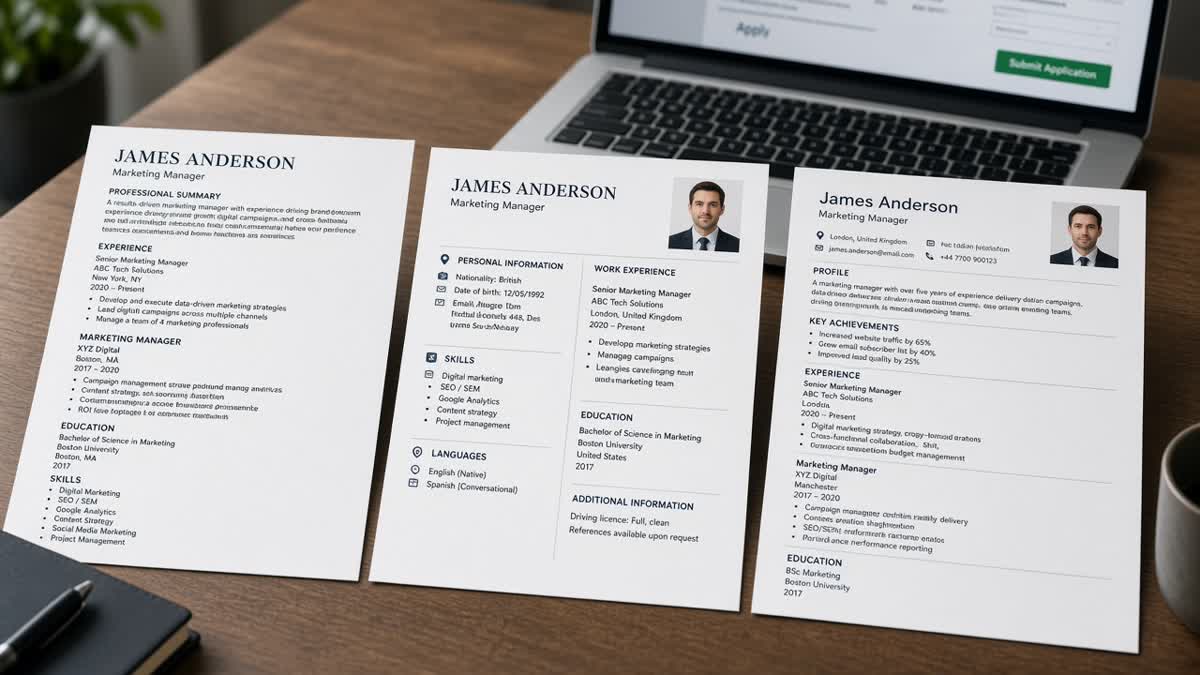
Match the file to the legal and cultural screen, not your passport. A US multinational's Dublin hub might still want a photo-free PDF for the US payroll entity. A Berlin hiring manager may still expect a photo on a local contract role even when the parent company is American.
| Factor | United States | European Union (typical mainland) | United Kingdom |
|---|---|---|---|
| Default corporate expectation | No photo on the resume | Small headshot common on page one | Sector-dependent; often no photo in corporate |
| Why recruiters care | Bias and compliance risk on early screens | Local CV customs and completeness signals | Mix of US-style caution and EU-style CV habits |
| Typical placement | No image; contact in body text | Top corner, passport-style size | Smaller corner photo when used |
| ATS/parser risk | Embedded images can break text import | Moderate if layout stays single-column | Same as US when photo omitted; image risk when added |
| When a photo is still rational | Acting, modeling, on-camera media, some real estate marketing roles | Most local office roles unless posting says otherwise | Creative, hospitality, sales with face-to-face clients |
Personal data rules still matter when you add a photo. EU processing follows EU data protection law ; UK employers fall under UK GDPR guidance from the ICO . That does not ban photos on CVs. It means you should not bolt on birth year, marital status, or other personal fields the posting did not request.
For layout mistakes that matter more than the headshot, see international resume formatting mistakes to avoid . A clean single-column export beats a perfect smile in the wrong market.
Three upload paths: US, EU mainland, and UK
United States: photo-free PDF first
Export a one-column PDF with contact lines in the body, Month Year dates, and no image objects. Tailor bullet one to the posting title family. If you're applying from abroad into a US entity, still strip the photo. The req location on the map does not override US screening habits on corporate roles.
Before: One global CV keeps a color headshot banner above the name for every apply button.
After: `FirstName_LastName_US_NoPhoto.pdf` ships to Workday with plain text contact and the same employer rows as your master file.
EU mainland: corner headshot, boring column
Add a professional photo in the top corner when the role sits in a market that still uses classic CV layouts. Keep the image small so Experience text wraps in one column. Do not let the Europass-style box push skills into a sidebar parsers skip.
Before: You remove the photo for "privacy" on a Munich engineering role and the local recruiter assumes you sent an incomplete template.
After: You keep a passport-style photo, drop extra personal fields, and mirror two posting tools in bullet one under the employer that used them.
United Kingdom: read the employer sample
When the careers site shows PDF examples, copy their photo choice, not your friend's EU file. Public-sector and large corporate packs often look US-neutral. Agency creative roles often expect a face on page one.
Before: You paste the same EU photo CV into a UK civil-service portal that strips attachments with images.
After: You upload a text-first PDF for the civil-service req and a smaller-headshot PDF for the design studio req, both with identical dates.
Copy-paste file naming convention:
FirstName_LastName_US_NoPhoto.pdf        → US corporate default
FirstName_LastName_EU_Photo.pdf          → mainland EU local reqs
FirstName_LastName_UK_PhotoOptional.pdf  → UK client-facing or creative reqs

Header block (same on every version):
Name | Target role family | City, Country | email | phone | work authorization line if needed
I've screened international stacks in Greenhouse where the US version still carried a wedding-photo crop and the parser dropped phone numbers. Recruiters never reach bullet one when contact fields import blank.
When you're choosing PDF versus DOCX for the same photo decision, read Word resume vs PDF resume for ATS before you re-export with embedded images.
Photo traps that break Workday and Greenhouse imports
Treating the photo as a branding banner. Full-width images push contact lines into floating shapes. Parsers read empty phone fields even when the PDF looks fine on your laptop.
Before: Skills live in a text box under a circular photo frame on a two-column Canva export.
After: Photo sits in the corner at thumbnail size, skills appear as plain bullets under dated jobs, and the file stays single-column.
Using casual crops. Selfies, filters, and group shots signal poor judgment faster than a missing photo signals "international candidate."
Shipping personal data with the image. National ID numbers, full birth dates, or marital status lines often travel with photo-heavy CV templates. Delete fields the posting did not ask for, especially on UK and EU uploads where data minimization shows up in employer FAQs.
This will not fix underqualified applications. It stops a qualified candidate from getting screened out because the US file still looked like a Frankfurt CV, or because a thumbnail broke the parser.
Scan the PDF you will ship tonight
Paste the posting into HireFlow's free ATS resume checker using the exact PDF variant for that country. Confirm employer names, dates, and must-have keywords still parse when the photo is present or removed.
If you need a clean US master before you clone EU and UK versions, build your resume in a single-column template so image experiments do not inherit broken tables from an old design export.
Do this now: Pick US no-photo, EU photo, or UK optional photo, name the file, run one scan, then apply with the labeled PDF only.
Name your files before you apply
Resume photo rules by country are really three versions of the same career story. The US file protects you on compliance-heavy screens. The EU file shows you understand local CV customs. The UK file follows the employer's visible template more than a rule you read online.
- Strip photos on default US corporate uploads.
- Keep corner headshots on many mainland EU local roles.
- Let UK sector and sample CVs decide optional photos.
- Label PDFs so you do not upload the wrong market by habit.
Open the req, pick the file, run a free ATS check , then submit. If the posting also asks for a letter, generate a cover letter in the same language as that primary PDF.
Read more
Frequently asked questions
Yes for most corporate, tech, finance, and government roles on Workday, Greenhouse, Lever, or Taleo. US employers treat appearance data on the resume as a compliance headache, and many parsers choke on embedded images. Keep a photo-free PDF as your default US file. Only add a headshot when the posting asks for one or you are in acting, modeling, on-camera media, or another field where appearance is part of the job description.
In much of continental Europe, recruiters expect a small passport-style photo on page one, especially in Germany, France, Austria, and parts of Southern Europe. You can still apply without one, but local hiring teams may read the gap as unfamiliarity with market norms. Keep the image professional, recent, and placed in a corner so text stays in a single column for parsers. Personal data rules still apply; only include fields the employer requests.
The UK sits between the two. Corporate and public-sector screens often mirror US caution on photos, while creative, hospitality, and client-facing sales roles more often include a headshot. When in doubt, read the employer's own application PDF or careers page. If they show sample CVs without photos, follow that. If every sample includes a small headshot, match the size and placement.
Parsers score text in Experience and Skills, not your face. A large image can still hurt you if it pushes contact lines into a text box the parser skips, or if the export turns headings into floating objects. Run the exact PDF you will upload through a checker with the posting pasted in. Fix section order and Month Year dates before you worry about smile versus neutral expression.