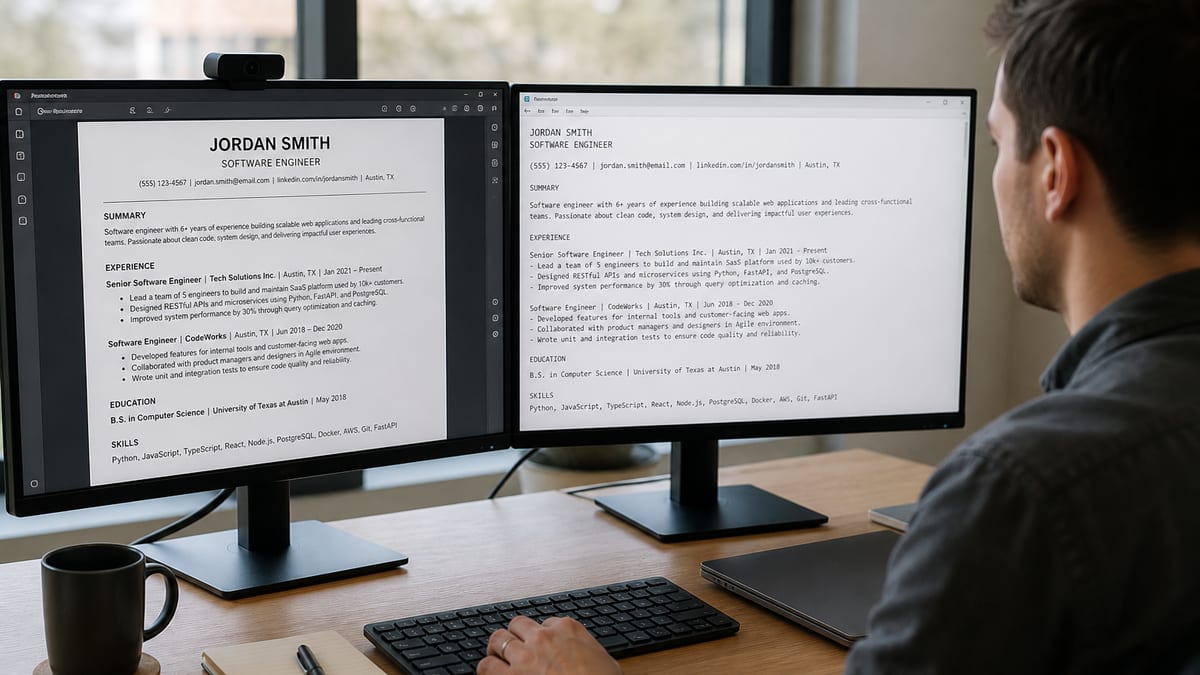
Testing a resume means checking the extracted text, not chasing a score. Run five tests in order of speed: paste into plain text, confirm the PDF has selectable text, check the version you actually submit, read a parse report, and give it to a human for ten seconds. Each catches something the others miss.
Most people test a resume by uploading it somewhere and reading a number. That number is invented by the tool, weighted differently by every vendor, and never seen by an employer. The output worth looking at is the text itself: what a system pulled out of your file and how it assembled your career from it.
Below: the five tests with what each one catches, how to read a parse report without being misled, a fix-order priority list, before and after examples of test failures, when to retest, and the edge cases where the file you tested is not the file you send.
Key Takeaways
- Five tests, thirty seconds to ten minutes, in the right order
- What a genuine pass looks like, stated concretely
- Which parts of a parse report to believe and which to ignore
- The fix-order list — structure before keywords, always
- Why the file you tested may not be the file you submit
The five tests, in the order that finds problems fastest
Start Here
Run them in order and stop when you find a failure. Fixing a structural problem often resolves everything downstream, so there is no point running test four on a file that fails test one.
| Test | Time | What it catches |
|---|---|---|
| 1. Plain-text paste | 30 seconds | Reading order, columns, missing headers |
| 2. Text-selection check | 10 seconds | Image-based PDFs with no text at all |
| 3. Submitted-version check | 2 minutes | DOCX and PDF diverging; stale saved copies |
| 4. Parse report | 2 minutes | Section mapping, dates, keyword coverage |
| 5. Ten-second human test | 5 minutes | Whether any of it is persuasive |
Notice that only one of the five involves a tool that returns a score. That is deliberate. Four of these tests produce objective evidence you can evaluate yourself, which is more reliable than a vendor metric with no external meaning.
Running each test properly
Do This Next
The definition of a pass matters as much as the test. "Looks fine" is not a result — check the specific things listed under each one.
1. The plain-text paste
Select all, copy, paste into Notepad, TextEdit in plain-text mode, or any code editor. Not Word — it preserves formatting and hides exactly what you are trying to see. Pass condition: the text reads in page order, your name and contact details appear, and every job title sits beside its employer and date range. If lines alternate between unrelated topics, you have a column problem.
2. The text-selection check
Open the PDF and try to highlight a single word with your cursor. Pass condition: text highlights normally. If nothing selects, your PDF is an image — scanned, photographed, or exported flat — and contains zero extractable characters. Every parser produces an empty record from it, which is the single most expensive failure on this list.
3. The submitted-version check
Test the file you actually send, not the master document you edit. These diverge more often than people expect: a DOCX with a text box may parse worse than the PDF exported from it, a Google Docs download may differ from the Word original, and the copy saved in your LinkedIn profile is frequently months old. Pass condition: every version you send passes tests one and two independently.
4. The parse report
Upload to a checker that shows extracted content by section rather than only a percentage. Pass condition: sections are correctly identified, every position appears with the right dates, and the total years of experience it reports matches reality. A free ATS resume check does this without an account, and the section-by-section view is the part to read.
5. The ten-second human test
Hand it to someone outside your field for ten seconds, then take it back and ask three questions: what do I do, how senior am I, and what is the one thing you remember? Pass condition: they answer all three. This is the test no software performs and the one that most closely resembles what happens in a real screen.
Reading a parse report without being misled
Reality Check
Believe the extraction. Be skeptical of the score. Those two sentences cover most of what goes wrong when people act on checker output.
Believe: the extracted text, the section mapping, the list of positions and dates it found, and the total years it calculated. These are observable facts about your file. If it reports four years of experience and you have eleven, you have found a real and expensive bug.
Treat cautiously: missing-keyword lists. They are derived from whatever job description you pasted, and they will happily recommend terms you cannot defend. Use them as a prompt to check whether you forgot something real, not as a shopping list.
Ignore: the overall score as an absolute measure. It is useful only as a before-and-after signal within a single tool — if you fix your column layout and the same tool's number moves, that is meaningful. Comparing scores across tools is comparing two unrelated formulas.
One reason extraction is worth trusting: mainstream platforms behave consistently. Workday builds a candidate profile from the flat text and infers total experience from date ranges. Greenhouse builds a structured profile from single-column PDFs cleanly and takes nothing usable from graphics or icon-based skill bars. Lever, iCIMS, and Taleo follow the same pattern, so a file that extracts cleanly in one test behaves well across all of them.
Fix order: structure before keywords, every time
Key Takeaway
Keyword work on a file that parses badly is wasted effort. The system already holds a broken record of your history; adding terms to it changes nothing.
- Text exists at all. Image-based file, or an export that produced no characters. Nothing else matters until this passes.
- Contact details are extracted. Usually means moving them out of the document header into the body.
- Reading order is correct. Collapse columns to a single full-width layout.
- Positions and dates are complete. One date format across every entry, employer and title adjacent on the same line.
- Sections are recognized. Rename creative headings to Experience, Education, Skills.
- Then keywords. Only now, and only terms you can evidence inside a bullet.
Working in this order also saves time, because steps one through three frequently resolve problems you would otherwise have chased at step six. A missing skill is often not missing — it was in a sidebar that never made it into the extracted text. For the full catalog of what breaks and why, see the ten ATS pitfalls and their fixes .
Before and after: what a test failure looks like
Quick Win
Each example below is what the extracted text looked like, followed by what it looked like after one structural change. The source content never changed.
Column interleaving
Before: Extracted text reading "SKILLS Senior Analyst SQL Acme Corp Python 03/2021 Tableau New York" — the sidebar and the work history alternating line by line.
After: Skills moved to a full-width line below Experience. Extracted text now reads "Senior Analyst · Acme Corp · New York, NY · 03/2021 – Present" followed by the bullets, then a clean Skills line.
Missing contact block
Before: Parse report shows name, email, and phone all blank, because the contact block sat in the document header where the extractor does not look.
After: Contact details as the first three body lines of page one. Report now populates every field, and the record stops being flagged as incomplete.
Understated experience
Before: Report calculates 3 years of experience for a candidate with 11, because dates were written as "Jan 2020 – Mar 2022," "2022-2024," and "Summer 2019" across three entries.
After: Every entry converted to MM/YYYY – MM/YYYY. Report now reads 11 years, and requisitions with a minimum-years filter stop screening the application out.
Run test four right now. Upload and read the extracted text section by section — titles, employers, dates, skills. No account, no email, no scan limit.
Check your resume free →When to retest — and when not to bother
Rule of Thumb
Structural changes need a retest. Wording changes do not. Rewriting a bullet cannot break parsing; moving that bullet into a sidebar can.
Retest after:
- Switching templates, or editing one you downloaded
- Exporting from a different program than last time
- Adding or removing a section, or renaming one
- Adding any image, logo, icon, or badge
- Converting between PDF and DOCX in either direction
Do not bother after:
- Rewriting bullet text
- Adding a keyword inside an existing line
- Changing a job title's wording
- Reordering bullets within a role
People frequently over-test, running a scan after every sentence and treating small score movements as signal. Those movements are usually noise from the keyword component of the formula. One test per structural change is the right cadence, and it keeps the exercise to a minute rather than an evening.
When the file you tested is not the file you send
Watch Out
The most wasteful failure is testing carefully and then submitting something else. Four common ways that happens.
LinkedIn Easy Apply
Easy Apply submits the resume stored on your LinkedIn profile, which is often a version from months ago. Check what is saved there and replace it before you use the feature — otherwise every test you ran applied to a file nobody received.
Portals that rebuild your profile
Many application forms parse your upload into editable fields and then use those fields, not your file. Read the auto-filled form carefully — this is where parsing errors become visible and correctable. Fixing a mangled job title in the form fixes the record the recruiter sees, even if the underlying file was imperfect.
Recruiter-reformatted resumes
Agencies sometimes reformat your resume onto their own template before submitting it. You have no control over that file and it may be worse than yours. Ask to see the version being sent — a reasonable request that most recruiters accept without friction.
Tailored copies drifting
If you keep per-role variants, they diverge over time and only the master gets tested. Test any variant that came from a different template, and keep the structural layout identical across all of them so a single pass covers the set.
What no resume test can tell you
Common Mistake
A clean parse is a prerequisite, not an advantage. Passing every test on this page and still hearing nothing usually means the problem was never the file.
Testing verifies that your record arrives complete. It cannot tell you whether you are applying at the right level, whether the role was filled internally before it was posted, or whether your bullets read as credible to somebody who does this work every day. Those are the things that decide most outcomes, and no tool measures any of them.
This matters because a failed test is oddly comforting — it offers a concrete, fixable explanation for silence. Sometimes that is the real answer. Often the file was fine and the honest diagnosis is targeting: too many applications to roles a level above current experience, or spread across three unrelated functions so no version of the resume looks convincing for any of them.
A practical way to separate the two: apply to twelve closely-matched roles with a file that passes all five tests, then look at the pattern. Screens but no interviews points at how you present verbally. Complete silence across twelve genuine matches points at targeting or seniority. Neither answer comes from another scan, and running one more is how people avoid asking the harder question.
Bottom line
Final Word
Read the extracted text, fix structure before keywords, retest only after structural changes, and confirm you are testing the file you actually send.
Resume testing has a definite end point, which is unusual in job searching. Once the extraction is clean and a human can answer the three questions in ten seconds, the file is done. Further scanning returns nothing, and the time is better spent on targeting and on the numbers inside your bullets.
Do the first two tests right now on the file you have been sending — they take forty seconds combined. Most people find either that everything is fine, which is genuinely worth knowing, or that one structural problem has been quietly costing them applications for months.
Test the extraction, not the score
See exactly what an applicant tracking system pulls out of your file — every title, employer, date, and skill, section by section. Free, no signup, no scan limit.
Run the Free ATS Resume CheckAlso useful: the 10 ATS pitfalls · free resume builder
Frequently asked questions
Start with the plain-text paste test, which costs nothing and takes thirty seconds: copy your resume and paste it into a plain text editor. Then run it through a free checker that shows the extracted text rather than only a score. Those two tests together catch nearly every structural problem there is.
Extracted text that reads top to bottom in page order, with your name and contact details present, every employer paired with its correct title and date range, and section headings recognized. If a stranger could reconstruct your career from the extracted text alone, the file passes.
Yes, if you send both. They are separate files and can fail differently — a DOCX with a text box may parse worse than the PDF exported from it, or better. Test whichever version you actually submit, and retest after any export from a different program.
Because each vendor invents its own formula and weights it differently. One counts keyword overlap heavily, another weights structure and dates. The same file can score 62 in one tool and 91 in another, and no employer ever sees either number. Compare the extracted text instead, which is objective.
After any change to layout, template, or export method — not after every wording edit. Rewriting a bullet cannot break parsing; moving a section into a sidebar can. One test per structural change is enough, and it takes a minute.
No. Passing the parse means your record is complete and searchable, which is a prerequisite rather than an advantage. Interviews come from relevance to the role and the strength of your evidence. A perfectly parsed resume aimed at the wrong jobs produces the same silence as a broken one.
Not exactly. Employers configure their systems differently, and no external tool replicates a specific instance. What you can verify is whether your file yields clean, correctly structured text — which is what every mainstream platform needs. If it passes that, it will behave well almost everywhere.
It changes which file gets sent. Easy Apply submits the resume stored in your LinkedIn profile, which is often an older version than the one on your desktop. Check what is actually saved there and replace it, or you will be testing a file you never send.