12 min read
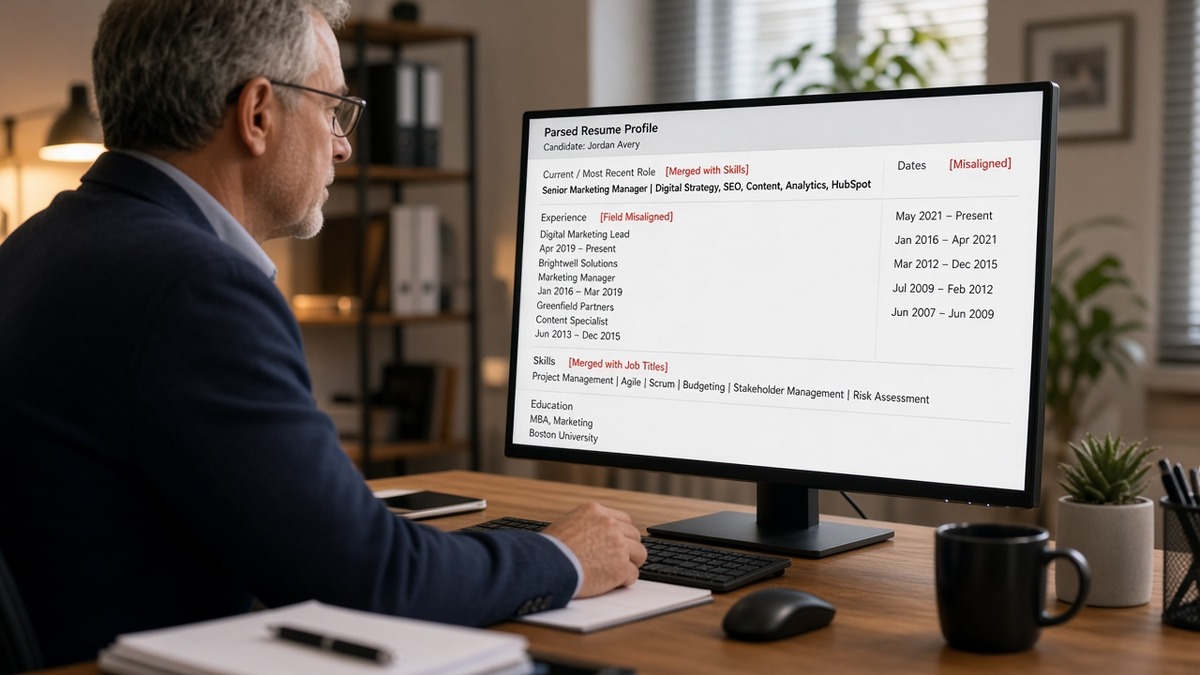
You uploaded a clean PDF. The preview on your screen still shows "Senior Product Manager" at Acme Corp. Two days later you hear nothing, and a recruiter friend says your profile in Jobvite lists "Roadmaps, Jira, SQL" as your current title. That's not a typo on your end. The parser read your layout out of order, and you didn't catch it because the PDF still looks fine.
Check your resume for free on the file you're about to attach, not the version that looked fine in Word. Jobvite parsing is sensitive to right-column dates and table rows. When the date column splits from the title line, your current role can land under Skills while a tool list looks like your latest employer. You'll want to fix that before recruiters filter on the wrong row.
Below you'll see the symptom recruiters describe, three layout causes that trigger merged titles, how to tell which one hit your file, and fixes you can run before the next upload. Job searching is draining. This isn't a lecture about fonts. It's a map of where Jobvite's reader loses the thread, and it's faster to fix than you're probably thinking.
If you've been adding keywords while your dates still float in a sidebar, flip the order. Parse layout before keyword density. A filter on "current title contains Manager" won't care about your summary when Jobvite thinks your skills table is your latest job.
When the posting asks for a cover letter and you're not sure the experience block parsed cleanly, generate a cover letter from the corrected plain-text order so the note names the same employers you fixed in the body.
Quick Wins
- Paste your export into Notepad once and read employer order top to bottom.
- Put Month Year dates on the same line as employer and title, not in a right column.
- Move tools from a sidebar into bullets under the job where you used them.
- Re-upload only after plain-text order matches how you'd explain your career aloud.
The symptom: your title became a skill line
The complaint sounds specific once you hear it twice. "Jobvite combined my jobs." "My current title shows up as Excel, Power BI, Tableau." "The recruiter said I only had one employer in the system." Your PDF still looks normal. The parsed profile does not.
What recruiters see first: structured fields, not your designed layout. Employer name, job title, start and end dates, and sometimes a skills bucket filled from whatever text sat nearest the title line. When those fields scramble, knockout filters and search boxes read the wrong row as "current."
Applicant tracking systems store applications. Employers set which fields must populate before a human opens the queue. Jobvite is common at mid-size US firms, especially in tech, healthcare operations, and professional services. The platform is not broken on purpose. It is reading files the way table-heavy templates export them.
I've screened parsed profiles where the candidate's real current role was a program manager title, but the system showed a comma-separated tool list as the latest job. The resume on disk was attractive. The data row recruiters filtered on was wrong.
Read why your resume looks different after upload in Workday for a parallel pattern on another major ATS. This page stays on Jobvite and the title-merge failure mode tied to column layout.
What Jobvite parsing does to your experience block
Title merging is a layout problem before it is a keyword problem. Three causes cover most of the files I see. Each one leaves a fingerprint in plain text if you know where to look.
Cause 1: Dates in a right column or table cell
Canva-style templates and Word tables often put "Jan 2022 to Present" in a narrow right cell while the employer and title sit left. Parsers frequently read across the row, then down. The date cell can glue to the next row's content instead of the title above it.
How to tell: Paste into plain text. If you see a date range on its own line between two job blocks, or dates appear before employer names, Cause 1 is active. Your current role may parse as a gap or as part of the skills row below.
Cause 2: Title and tools share a table row
Some templates place "Senior Analyst" in column one and "SQL, Python, Looker" in column two on the same row. The parser treats that row as one field. Your title merges with tools. The employer line on the next row can look like a second skill entry instead of a company name.
How to tell: Plain text shows your title immediately followed by a comma-separated tool list on the same line, with the employer name on the line below. In the portal preview, Skills may look richer than Experience.
Cause 3: Section headers inside invisible tables
Designers hide borders on summary and skills tables so the page looks airy. Jobvite still sees cells. A "Core Skills" header in row one can push your first employer into row two, making a keyword block appear above your real jobs.
How to tell: Skills or summary text appears before your first dated employer in plain text, even though the PDF looks like a standard top-to-bottom résumé. Recruiters searching "current company contains [Fortune 500 name]" miss you because the company field is blank or wrong.
How to tell which cause is yours
Run one plain-text export. Do not trust the PDF thumbnail. Read aloud the first three "jobs" the file gives you in order. If job one is a tool list, you are on Cause 2 or 3. If dates float alone, lean Cause 1. If Skills precedes Experience, Cause 3 is likely.
Edge case: Contract roles listed as bullet-only lines without an employer header can merge with the full-time job above when dates share a column. Give each contract a one-line employer stub with Month Year dates inline.
Edge case: Academic CVs with publication tables above experience push research keywords into early rows. For US corporate Jobvite reqs, move publications below experience or onto a separate addendum unless the posting asks for them up front.
Before/after: merged titles across roles
Before: Marketing manager template with dates in a right column. Plain text reads: "HubSpot, GA4, Marketo" then "Acme Corp" on the next line. Parsed current title becomes a tool string.
After: Acme Corp, Marketing Manager, Jan 2021 to Present on one line. HubSpot and GA4 appear in bullet two under that employer.
Before: Data analyst row splits title left and "SQL, Python, dbt" right in a borderless table. Employer line parses as a skill cluster.
After: Single column. Northwind Analytics, Data Analyst, Mar 2020 to Jun 2023. Bullet: Built dbt models in SQL and Python; cut refresh time from 6 hours to 90 minutes.
Before: RN resume with license and skills table above clinical employers. Parser fills Skills before Experience; recruiter filter on "current title contains RN" fails.
After: License on line two under name in body text. Mercy Hospital, Staff RN, Med-Surg, Jun 2022 to Present with unit detail in bullet one.
Before: Operations lead using a two-column Canva export with icons beside each employer. Icons become odd characters; titles merge with the icon row.
After: Word single-column export, no icons, standard section headers. Upload DOCX or a simple PDF saved from that file.
Copy-paste: ten-minute Jobvite parse check
1. Save resume as PDF from your editor.
2. Paste PDF text into Notepad (Windows) or TextEdit plain mode (Mac).
3. First dated employer line must appear before any Skills header.
4. Each job: Company, Title, Month Year to Month Year on one line or stacked without a side column.
5. Ctrl/Cmd+F three posting must-haves in plain text.
6. If title and tools share a line, move tools into bullet one under that job.
7. Re-export and paste again before you attach to Jobvite.
See resume rejected by ATS when parse order looks clean but you still never hear back. Sometimes the knockout is years or license, not layout.
Fixes matched to each cause
If Cause 1 (right-column dates): Delete the table. Type employer, title, and dates on one line or on two stacked lines with no side column. Use Month Year format: Jan 2022 to Present. Avoid separate date-only rows.
If Cause 2 (title plus tools in one row): Never share a row between a title and a tool list. Put tools inside bullets under the employer where you used them. The first eight words of bullet one should name a real outcome, not a comma-separated stack.
If Cause 3 (hidden tables around Skills): Move Skills below Experience for corporate US reqs unless the posting demands otherwise. Use a plain bullet list, not a grid. Standard headers: Experience, Education, Skills.
Mistake: trusting the application preview thumbnail. The small preview image is not the parsed field map. Plain text is the honest test. If it fails Notepad, it will fail filters.
Mistake: fixing only the summary. Knockout rules on current title ignore a polished summary when Experience is scrambled. Flatten the job block first, then tailor bullet one to the posting.
Mistake: uploading the Canva PDF because it looks modern. Visual design and parse order are different problems. A plain single-column Word file beats a pretty multi-column export for Jobvite uploads.
Edge case: Some Jobvite portals let you edit parsed employers after upload. Treat that as a backup. Fix the source file so every req starts from the same clean structure.
Edge case: Federal and healthcare postings sometimes require a full CV. If the req allows a two-page resume instead, send the shorter single-column version unless the form mandates the long file.
Before: Candidate adds "Program Manager" to the Skills list because the title kept merging in preview.
After: Candidate rebuilds the Acme Corp line with inline dates. Program Manager appears only as a title field paired with the employer. Skills holds tools, not job names.
Before: Candidate applies to five Jobvite reqs with the same two-column template and hears silence on all five.
After: One flattened export, same bullets, callbacks on two reqs where must-haves matched. Layout was the shared failure, not talent spread across five companies.
Greenhouse and Lever can scramble columns too, but Jobvite reqs in the US often show this exact title-meets-skills pattern when dates sit right. The fix is the same: one column, inline dates, tools inside bullets.
When you finish rebuilding, read the experience block out loud as if you're on a phone screen. Company, title, dates, one win. If you stumble, the parser will stumble harder.
Verify parse order before the next upload
Run the free ATS checker with the posting pasted in. You are confirming employer-title pairing and whether must-have terms land under Experience, not chasing a single vendor score.
Then build your resume in a single-column template if your current file depends on tables. Starting from a flat structure is faster than fighting a designed PDF that merges fields on every upload.
What to do on the next Jobvite req
Jobvite parsing merges titles when layout splits dates from employers or packs tools beside titles in the same row. That is fixable without a new degree or a rewritten career story. Run the ten-minute plain-text check, match the cause to your file, and flatten before you attach.
Open the posting on your list. Highlight three must-haves. Paste your export into plain text. If your current employer line is not first among dated jobs, rebuild that block tonight. Upload when company, title, and dates read correctly top to bottom.
This won't guarantee a callback on a req where you're underqualified or late in a flood. It does stop qualified files from dying because Jobvite read your skills sidebar as your latest job title.
Read more
Frequently asked questions
The parser often reads tables and two-column rows left to right, then top to bottom. When dates sit in a right column, the title line can attach to the tools row below instead of the employer above. Your current role then lands in Skills while a keyword line looks like your latest job. Flatten the layout and put Month Year dates on the same line as employer and title.
Not by itself. A PDF can still hide text in tables, text boxes, and header blocks. Export from Word or Google Docs as a single-column DOCX or a simple PDF with inline dates. Paste into plain text before upload. If the employer line does not appear before Skills, Jobvite will likely merge fields the same way.
Many recruiters work from the parsed profile first: employer, title, dates, and skills fields pulled from your upload. Some open the original file later. If the parsed current title is wrong, filters on years of experience or title keywords can fire before anyone reads your bullets. Fix the parse view even when the PDF looks fine to you.
Some portals let you edit parsed fields by hand. Do not rely on that alone. Correct the source file so every application starts clean. Manual edits are easy to skip when you are rushing, and cloned reqs may not show the same edit screen. A readable export travels with you.
Paste your resume into Notepad or TextEdit on a Mac. Read top to bottom. Current employer and title must appear before any Skills block. Ctrl/Cmd+F the posting's three must-haves in that plain text. If dates float on their own lines or titles sit beside tool lists, rebuild the experience section in one column before you upload.