11 min read
You can't answer "is my resume ATS friendly" by looking at the design. You check whether the parser can store your rows. Run three free tests in order: paste into plain text, search for one posting keyword inside the file, then upload to a checker with the job description attached. If the paste test fails, the other two are just confirming the damage. You won't know which test failed if you skip the order.
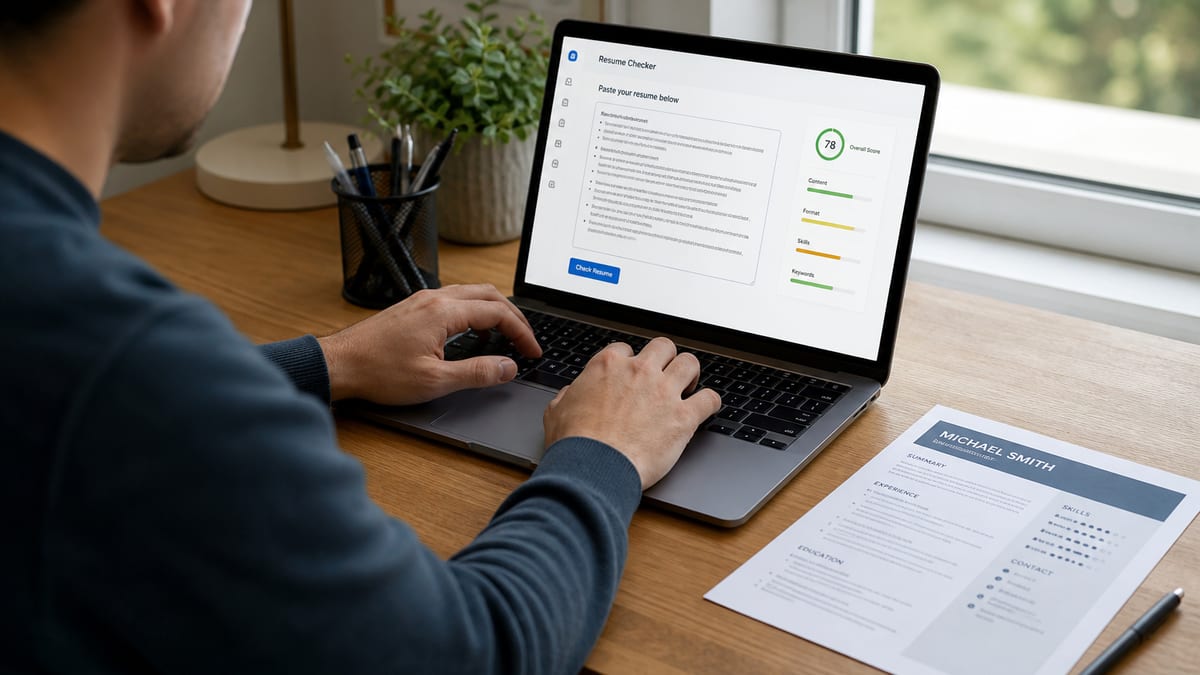
Before you run any test, check your resume for free against the posting you're targeting. Structure and match are separate problems. A file that parses clean can still miss required tools. A keyword-heavy file in a two-column Canva export still dies in Workday before a recruiter opens it. Don't optimize keywords until paste passes.
This page is teardown format. You'll see weak files next to repaired ones across five roles, what failed checks have in common, and a copy-paste run order you can finish tonight. No score guarantees. No "upload and magically get interviews" nonsense. Just observable tests you can repeat before every template swap.
Job searching's already slow. You shouldn't burn a referral on a file whose phone number lived in a Word header the parser skipped. I've screened stacks of uploads in Workday and Greenhouse where the PDF looked fine and the stored profile had scrambled dates. The pairs below show exactly what each test catches so you're not guessing from forum advice.
You don't need paid tools to learn whether the machine can read your file. The paste and search tests cost nothing and take under two minutes combined. The checker adds structure flags and posting overlap when you're ready to apply to a specific req.
Quick Wins
- Paste test: select all, paste to Notepad. Scrambled order means ATS-unfriendly.
- Search test: Ctrl+F one required skill from the posting. Zero hits means humans may read it but search won't.
- Checker: upload PDF or DOCX with the job description pasted. Fix structure flags before keyword gaps.
- Re-run paste after every layout change. Templates drift faster than you think.
The bar every file is judged against
ATS-friendly means Workday, Greenhouse, Lever, or iCIMS can map your upload into rows: name, phone, employer, title, start date, end date, degree, skills tied to jobs. Recruiters filter those rows. Hiring managers rarely see your original PDF layout.
Three free checks answer whether your file clears that bar. The paste test proves text order. The search test proves posting terms live in selectable text, not icons. The checker simulates parse plus rough match. Skip straight to a score without paste and you might optimize keywords inside a file that still drops your email.
Check 1: Paste test (thirty seconds)
Open your PDF or DOCX. Select all. Paste into Notepad or TextEdit. Read top to bottom once. Contact info should lead. Each job should show title, company, dates, then bullets in order.
Before: Pasted text shows Skills Python SQL beside Acme Corp 2019 with no line break.
After: Pasted text lists Experience, Acme Corp, Operations Analyst, March 2019 to Present, then bullets.
Check 2: Search test (one minute)
Open the posting. Pick one required hard skill or certification. Ctrl+F inside your resume file. If it returns zero hits, you are not searchable for that filter even if you have the skill on a graphic skill bar.
Before: Salesforce shown as a logo icon in a sidebar. Search finds nothing.
After: First bullet under current role starts with Salesforce Service Cloud and names a workflow you ran.
Check 3: Free checker (two minutes)
Upload the same file you will submit. Paste the job description. Read structure flags first: columns, headers, tables, image PDF. Then read keyword gaps. A checker is not a crystal ball. It is a second opinion after paste and search.
Structure flags map to the same failures as the paste test, but they name the cause faster when you are new to parsing. Keyword gaps tell you which posting terms never appear in selectable text. Fix structure before you chase match percentage. A readable file with an 70 match beats a scrambled file with a stuffed 95.
Edge case: paste looks fine but checker flags low text density. That often means an image PDF with a thin text layer. Edge case: checker scores high but paste scrambled dates. Trust paste over score for row order every time. Edge case: posting wants PDF only and DOCX parses cleaner. Test both, submit the one that passes paste on the format the portal accepts.
Before: You run checker first on a two-column file. Score looks mediocre. You add keywords to a sidebar.
After: Paste test fails. You flatten column, re-paste, then re-check. Score rises because rows exist, not because you repeated tools in a cloud.
Read common resume parsing errors and how to fix them when paste fails and you need the cause, not just the symptom.
Is my resume ATS friendly? Four teardown pairs
Same candidate stories, different file structure. Each pair shows which test failed and what changed. Minimal prose on purpose. Match your file to a pair, apply that fix, re-run all three checks.
Pair 1: Marketing coordinator (two-column template)
Before: Canva export with Skills rail left, Experience right. Paste test scrambles 2022 role under 2018 internship. Search finds HubSpot in a graphic badge only. Checker flags multi-column layout.
After: Single-column Word rebuild. HubSpot in first bullet: Owned HubSpot nurture flows for 14k SMB leads, lifting MQL-to-SQL handoffs. Paste clean. Search hits. Checker structure green.
Pair 2: Registered nurse (contact in header)
Before: Phone and license number in Word header. Paste drops phone entirely. Greenhouse preview shows blank mobile field. Checker flags missing contact.
After: Body block under name: Austin TX · RN · 512-555-0198 · email. Med-surg bullets unchanged. Paste shows full contact. Upload preview fills phone row.
Pair 3: Software engineer (image PDF)
Before: Design-tool PDF. Paste shows one gibberish block. Search for Kubernetes returns zero. Checker reports unreadable file.
After: DOCX from Word with plain bullets: Built Kubernetes deployment pipelines for twelve microservices, cutting rollback time in staging. Paste selectable. Search hits. Checker reads Experience rows.
Pair 4: Operations analyst (table job history)
Before: Table with title in left cell, dates in right cell. Paste merges Senior Analyst with January 2019 end date from the row below. Search finds SQL only in a footer Skills table.
After: Linear lines: Senior Analyst, Northwind Logistics, June 2021 to Present, then SQL bullet. Dates attach to correct employer in paste and Workday preview.
Pair 5: Customer support lead (creative section labels)
Before: Section titled Where I Shined instead of Experience. Paste keeps text but checker maps nothing to Experience rows. Recruiter title search misses current role.
After: Rename header to Experience only. Bullets unchanged. Parser stores employer and title fields recruiters filter on.
Pair 6: Project manager (decorative bullets and symbols)
Before: Checkmark bullets and arrow icons from a Word design pack. Paste shows empty squares between words. Search for PMP finds nothing because the credential sat inside a text box.
After: Hyphen bullets only. PMP in the summary line and in a bullet: Led SAP cutover for six warehouses, PMP-led RAID log, on time in Q2. Paste clean. Search hits. iCIMS preview shows certification text.
Copy-paste run order (ten minutes):
1. Paste test → fail? flatten to single column, move contact to body
2. Paste test again → pass? run search for top posting keyword
3. Search miss? move term into first eight words of a dated bullet
4. Upload to checker with job description attached
5. Fix highest structure flag, re-upload once
6. Save Lastname_Role_2026.docx and PDF from same source
7. Apply only after preview rows match paste output
Edge case: federal resumes with long duty blocks still need linear text. Edge case: academic CVs can stay multi-page but should not use side-by-side columns for core Experience.
What failed checks have in common
Failed files almost always put pretty layout ahead of linear text. Sidebars, icons, tables, and headers look modern in Word. Parsers read one stream. When that stream shuffles, recruiters see wrong employers in Workday and move on.
Chasing a score before paste passes. Keyword tweaks inside a scrambled file waste an hour. Flatten layout first. Always.
Trusting "Made in Word." Word templates with sidebars fail the same paste test as Canva. Software label does not equal parse-safe structure.
Checking a different file than you submit. You fixed DOCX but uploaded last week's PDF from Downloads. Name exports with dates.
Skills cloud without dated proof. Search test passes on a comma list but recruiters still skip files with no bullets tying tools to employers.
Assuming one green checker run lasts forever. Any template swap resets the clock. Re-paste after every design change.
Treating ATS-friendly as "done." Parse-safe files still lose on title level, gap questions, or volume. This fixes machine readability, not fit.
Using white-font keyword blocks. Parsers read them. Recruiters flag them faster than missing terms. Honest bullets under dated roles beat hidden text every time.
Skipping re-check after a friend "fixed" your resume. Designers optimize for human skim, not Greenhouse rows. Run paste yourself before you attach their export to an application.
This will not fix applying to roles you are not qualified for. It stops a qualified file from dying because the machine never stored your experience correctly.
Read how to pass an ATS checker when structure is clean and you need match tactics without stuffing keywords.
Checker and match score after the free tests
Free tests catch most structural failures before you spend time on demographic questions. The checker adds a second parse pass and compares your language to the posting text. Use it on the exact file type the portal accepts. A clean DOCX and a broken PDF from the same draft are more common than people admit.
When paste and search pass, run the free ATS resume checker with the posting attached. You want confirmation that titles, dates, and must-have terms land where you think before you spend twenty minutes on knockout questions.
If match gaps remain after structure is green, score your job match on the same posting. Move one missing hard skill into a bullet under the employer where you used it, not into a white-font block at the bottom.
Optional cover letter uploads should share the same contact block as the repaired resume. Mismatched phone numbers between files create duplicate candidate rows in some Greenhouse setups. When a posting asks for a letter, generate a cover letter from the same header you just fixed so both files merge to one profile.
Run order tonight
Paste. Search. Checker. That is how you answer is my resume ATS friendly without guessing from margins and font choice. When paste fails, fix layout before you touch keywords.
Pick the teardown pair that matches your file. Rebuild single column if you are unsure. Move contact into the body. Standardize Month Year dates. Re-export DOCX and PDF from one source.
A high checker score confirms readability and rough match. It does not replace proof in bullets or sane title level for the req. Parse first. Tailor second. Volume third.
Keep the Notepad paste output in your job tracker folder. Next time silence hits, you will know in thirty seconds whether to fix the file again or shift to a different posting level.
Boring single-column files win searches. Icons and color blocks do not. When you are unsure whether a template is safe, run paste before you show anyone the design. If it fails, rebuild in Word tonight and sleep knowing tomorrow's upload stores every row.
Save both paste output and checker screenshot in your job folder for the req. When a referral asks whether your file is ATS-safe, you can forward proof in one message instead of debating layout opinions in a group chat.
Read more
Frequently asked questions
Not reliably. A pretty PDF can still scramble in Workday or Greenhouse. Run the paste test first: select all, paste into Notepad. If order looks wrong, the ATS sees the same mess. Then run the search test for one posting keyword. If neither passes, upload to a free checker with the job description attached. Eyeballing layout is how qualified files die quietly.
A real checker parses your file like an upload step would: contact fields, employer rows, titles, Month Year dates, and keyword overlap against a posting. It flags structure problems (columns, headers, image PDFs) separately from match gaps. A high structure score means the machine can store your experience. It does not promise an interview or replace tailoring bullets to the req.
Check whichever file you plan to submit. Export both from the same Word source if the posting allows either format. DOCX often extracts cleaner on Lever. PDF works when text is selectable in the paste test. Never assume the two files parse identically because they look identical on screen.
Once when you finalize a master file, again after any layout or template change, and before batch applying with a new design. You do not need a full re-check for keyword tweaks inside the same single-column structure. Change columns, fonts in text boxes, or export source and you are back to paste test first.
No. ATS-friendly means parseable rows a recruiter can search. Keyword stuffing in white font or a giant Skills cloud without dated bullets hurts you with humans and can still fail parsing. Put posting terms in the first eight words of real Experience bullets under the job where you used the tool. Structure first, honest match second.