11 min read
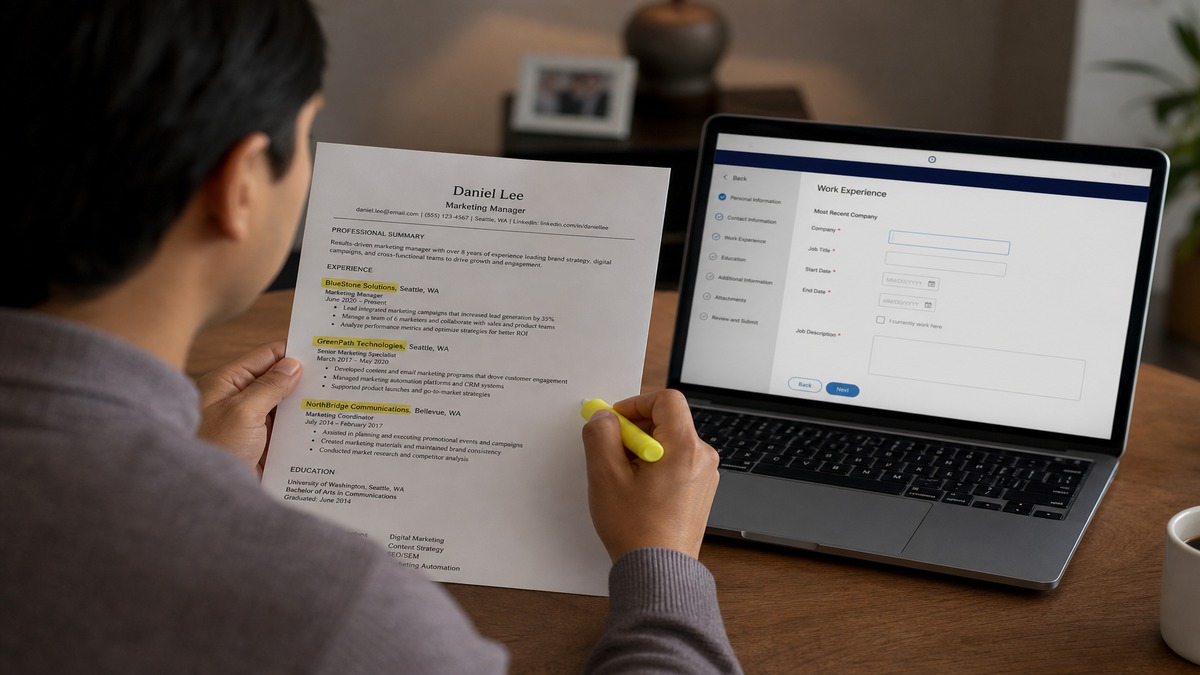
If Workday shows a blank employer field, the parser probably read your job title as the company name. That's the core of how to fix company mapping errors in US ATS files. The PDF looks perfect. The structured profile behind it doesn't.
Check your resume for free after you rebuild the employer lines. Mapping fixes only matter once the file parses in reading order. You'll know you're close when plain-text paste shows company, title, and dates on separate lines.
You're not crazy if the application looked complete and the recruiter still asked where you worked last. The gap is usually between what you uploaded and what the ATS stored. Below you'll see the three failure patterns I see most, how to spot which one you have, and the exact line format that maps cleanly in Workday and Greenhouse.
And if you've already submitted, don't panic. Many portals let you edit the structured profile before a recruiter opens it. Fix the employer field tonight even if the PDF stays the same.
Quick Wins
- Put company name alone on line one, title on line two, dates on line three.
- Delete hidden tables around your experience section in Word.
- After upload, open the ATS profile and type any blank employer field manually.
What company mapping errors look like in Workday
Company mapping is the step where the ATS matches text from your resume to an employer field in your candidate profile. When mapping fails, you get one of three symptoms.
Symptom one: the employer field is blank while your bullets imported fine. Symptom two: your job title sits where the company name should be. Symptom three: the company name is misspelled or truncated, like "Amaz" instead of "Amazon".
Recruiters screening in Workday often sort by employer filters. A blank field can hide a relevant brand from that view even when your bullets mention the work.
A composite marketing coordinator applied through Greenhouse last month. Her PDF showed "Spotify" clearly. The parsed profile listed "Senior Marketing Coordinator" as the employer and left dates attached to the wrong row. She did not catch it until a recruiter asked why her current company was missing.
I've screened stacks of Workday imports where the candidate looked unemployed for two years because one employer line never mapped. The bullets were there. The filter excluded them anyway.
Greenhouse behaves similarly. The recruiter view pulls structured fields first. If "Company" is empty, some teams never expand the attachment. Your narrative bullets never get a click.
iCIMS and Taleo use the same idea under different labels. The fix is always the same: separate employer from title from dates, single column, plain text. Platform name changes. Parser behavior does not.
You can also spot mapping trouble before upload. Open the PDF and hit Ctrl+F (or Cmd+F) for your current employer string. If search finds zero matches, the name lives inside an image or broken encoding. Fix that before any portal sees the file.
Double-check apostrophes in company names. A curly quote in "McKinsey & Company" can split a token so only "McKinsey" maps. Straight ASCII quotes and ampersands are boring. They parse.
How to fix company mapping errors by cause
Match your symptom to a cause below, then apply the fix. You can run all three checks in ten minutes on a single-column DOCX.
Cause 1: Dates and company share one line or table row
Parsers read left to right. When "Amazon · Senior Analyst · 2021 to 2024" sits on one line, the first token often becomes the employer slot even if it is a title fragment.
Before: Deloitte | Audit Associate | June 2019 to August 2021 (single line with pipes).
After: Deloitte (line one). Audit Associate (line two). June 2019 to August 2021 (line three).
Copy-paste block for each role header:
Official Company Name, Inc.
Job Title
Month Year to Month Year
Cause 2: Hidden tables or two-column layout
Canva and Word templates love invisible tables. You see a clean left margin. The parser reads column two before column one finishes.
Before: Company name in left cell, dates right-aligned in right cell on the same row.
After: Stack everything in one column. Toggle gridlines in Word (Table → View Gridlines) and delete any grid around experience lines.
Edge case: consultants who list four clients under one employer. Put the staffing firm on line one and add "Client: RetailCo" as the first bullet, not as a fake employer row.
Cause 3: Unknown subsidiary or typo
ATS company databases recognize legal names better than nicknames. A typo blocks matching entirely.
Before: Instgram (typo) or only "YouTube" with no parent listed.
After: Google LLC (YouTube) with correct spelling on the company line.
Edge case: early-stage startup not in any database. Add a six-word descriptor on line two under the company: "Series A fintech, 40 employees" so humans and parsers get context.
How to tell which cause is yours
Paste your resume into a plain text editor. If company and dates appear on the same line separated by tabs or pipes, you have cause 1. If lines jump out of order, suspect cause 2. If the company name looks right in plain text but the field is still blank, check spelling against the employer's footer on their website (cause 3).
After you fix the file, upload to a test application or run the checker, then open the imported profile. Do not submit until every employer field shows the name you expect.
Role-specific employer lines that map cleanly
Finance candidates often stack designation, firm, and dates on one line because CV templates encourage it. US ATS imports hate that layout.
Before: JPMorgan Chase & Co. | Vice President, Risk | 2020 to Present (pipes on one line).
After: JPMorgan Chase & Co. on line one. Vice President, Market Risk on line two. January 2020 to Present on line three.
Engineers listing client work through a consultancy should not create a new employer row per client unless they changed W-2 employers. One staffing firm line, client names in bullets.
Before: Three separate "employer" rows: Acme Staffing, RetailCo, HealthSys (same dates, same staffing firm).
After: Acme Staffing Group as employer. First bullet: "Embedded at RetailCo: rebuilt checkout API, cut latency 18%."
Healthcare roles with system names in the employer slot confuse non-clinical screeners. Put the hospital network on line one and the facility in parentheses if needed: HCA Healthcare (Memorial West).
When the application form disagrees with your resume
Some US ATS flows ask you to type employer names again after upload. If you abbreviate differently in the form, you create two records for one job. Match the form spelling to line one on the resume exactly.
Workday sometimes auto-suggests a parent company. If you worked at a division, accept the suggestion only when it is factually correct. Wrong mapping here is worse than a blank field because it looks deliberate.
Keep a master list in a notes app: official name, common abbreviation, and month-year start and end. Copy-paste from that list into both resume and form fields so you never freestyle spelling under pressure.
For international candidates, list the US legal entity if you worked through a global parent. A composite analyst in London listed "Barclays" on a US requisition; Workday wanted "Barclays Capital Inc." on the employer line. One word difference, empty field in the US instance.
Acquisitions create the same friction. If your resume still says the old brand, update to the acquirer with "(formerly OldCo)" for twelve months after the deal closes. Screeners keyword-search the buyer name first.
Where employer lines break in US ATS imports
Logos in the header replace the text employer line entirely. The parser skips graphics. Your name imports. Your last company does not.
Abbreviation roulette hurts too. Switching between "IBM," "I.B.M.," and "International Business Machines" across roles makes filters think you worked at three unrelated places.
Before: Company name only inside a text box with a colored background.
After: Plain 11-point Calibri text, no shading, no icons beside the name.
Another trap: trusting the application form without reviewing the parsed work history. Always scroll the Workday profile after upload. Manual entry beats a silent blank field.
Rebrand years are messy. Listing only "Twitter" after a corporate rename can blank the field. Use the current legal name with the former brand in parentheses once, then stay consistent in every application that week.
Contract roles tempt people to skip the employer line and jump straight to bullets. The parser still needs a company anchor. "Self-employed" is valid when true. "Various clients" is not a mapping-friendly employer name.
Footer contact blocks duplicate company names in some templates. If your header repeats the current employer as a logo, the parser may attach that graphic to the wrong job entry. One text employer line per role is enough.
Military and federal titles sometimes land in the company field when candidates list branch name and billet on one line. Split them: United States Army on line one, Logistics Officer on line two, deployment dates on line three. Civilians screening defense roles search employer filters, not MOS codes alone.
Page breaks mid-entry are rare in PDF exports but brutal when they happen. Keep each job block on one page when you can. If a role must break, put the company and title on the earlier page and start bullets after the break, never split the employer line across pages.
Tools that catch mapping issues before you submit
Run your rebuilt file through the free ATS resume checker first. It flags column layouts and reading-order problems that break employer fields before you waste an application.
If you are rebuilding from scratch, the free resume builder outputs single-column employer blocks that map consistently in Greenhouse and Workday imports.
When a role needs context the parser will never capture, pair the resume with a short tailored cover letter that names the employer and scope in prose. The letter does not fix mapping, but it gives a human reviewer a backup when a field imports wrong.
Tonight's employer-field check
Open your latest Workday or Greenhouse application profile if you still have access. Scan every employer slot. Blank means fix the line format, not the bullet wording.
Rebuild each role as three stacked lines. Paste into Notepad to confirm order. Re-upload once. How to fix company mapping errors in US ATS is mostly layout discipline, not keyword tricks.
Run this five-point audit on your current role before you touch older jobs: company alone on line one, title on line two, dates on line three, no tables, no logos. Fix the present job first because filters weight recent employers heavily.
Save two versions of your file: a master with every role and a one-page tailored export for each application. Employer mapping errors often creep in when you delete roles for space but leave table formatting from the longer version.
If a startup name will not stick, add the city and industry in the first bullet instead of inventing a parent company. "Austin B2B SaaS, 25 employees" gives humans context without faking a Fortune 500 mapping match.
Job searching is already exhausting. A missing employer name is one of the few silent failures you can catch in ten minutes before the next submit button.
When in doubt, type the employer manually in the portal and attach the same PDF. Redundant beats wrong. Recruiters forgive a duplicate field. They do not forgive a two-year hole that was never real. Five minutes on the profile view tonight can save you a week of waiting.
Read more
Frequently asked questions
A company mapping error happens when the ATS imports your resume but puts the wrong text into the employer field, leaves it blank, or lists your job title where the company name should sit. Workday and Greenhouse both build a structured work-history record from your file. When the parser reads lines out of order, the employer slot fills with whatever text landed in the wrong column.
Workday often leaves the employer field empty when it cannot find a clean company line separate from dates and titles. Table layouts, right-aligned dates in a second column, and company names inside header graphics are the usual triggers. The PDF looks fine to you. The importer sees scrambled tokens.
Yes. After upload, open the Workday candidate profile and confirm every employer field. If the parser missed a role, type the official company name exactly as it appears on your resume and match the dates. Do not rely on the import alone when a senior role is missing from the structured history.
They can. If you list only a brand name the ATS database does not recognize, the field may stay blank. Use the legal parent on the first line and add the brand in parentheses on the same line or in the first bullet. Example: Meta Platforms, Inc. (Instagram).
Fixing mapping errors stops a qualified file from looking like it has a hole in employment history. It does not replace tailoring or fit. But a blank employer field can hide a relevant title from keyword filters, so the fix is worth doing before you submit.