11 min read
You don't win contract screens with a single Freelance header and a skills cloud. You win when each client looks like a dated job row on LinkedIn and the same row survives Workday import on the resume you attach. That's US best practice, and most profiles still hide real work inside one vague block recruiters scroll past. The profile preview and the application file are two gates. Both need matching titles, Month Year ranges, and proof bullets.
Before you rewrite headline keywords again, check your resume for free against the posting you're targeting. You'll see whether freelance clients imported as dated employers or collapsed into one line the parser could not score.
Job searching is draining when you're qualified and still getting silence. You're not failing because you took contract work. Your LinkedIn rows might not match the file recruiters open after Easy Apply. This page walks through Experience placement, job-like titles, date discipline, resume mirroring, and the mistakes that make solid freelance history look like a gap.
Quick Wins
- One LinkedIn Experience row per client with Month Year dates.
- Job titles that match the posting family, not Freelance Consultant alone.
- Two bullets per contract: stack in line one, outcome in line two.
- Same title strings and dates on your single-column DOCX resume.
What US recruiters check on LinkedIn before they open your resume
LinkedIn is the preview screen, not the score. Recruiters in Greenhouse often click your profile from an application or InMail reply, scan Experience for title fit, then download the resume the portal parsed. They're not reading every bullet on mobile. They're asking: does the current row match this req, do dates look continuous enough, and is there one proof line with a tool name I recognize.
Freelance work only helps when it reads like employment history, not a hobby block. A lump labeled Freelance with no client names and no end dates looks like underemployment or a gap you didn't explain. Separate rows with Product Designer, Series B fintech SaaS, Remote, Mar 2024 to Aug 2024 tell a different story than Freelance, various clients, Present.
Parsers on the resume side do not read your LinkedIn profile automatically on every req. Some integrations pull LinkedIn into Workday when you connect accounts, but most US corporate flows still score the uploaded DOCX or PDF. That means your LinkedIn edits are wasted if the resume file still lists one generic Freelance employer. The two documents are a pair; treat them as one data set.
Month Year formatting matters on both surfaces. Jan 2024 to Jun 2024 beats 2024 alone when a recruiter compares tenure to the posting's years-of-experience line. Stack names belong in bullet one, not only in the Skills endorsement list recruiters rarely open during a fast screen.
Edge case one: you're on a W2 day job plus weekend freelance. List the W2 role as current with accurate dates. Add freelance rows with non-overlapping evenings-only scope or label part-time in the description if hours were limited. Edge case two: agency placement where the end client is NDA-blocked. Use a neutral sector label on LinkedIn and the same label on the resume so the match still holds.
For resume-side formatting when you mirror these rows, read how to list freelance work on a resume after you fix LinkedIn Experience. Profile first, file second, parser check third.
How to add freelance roles on LinkedIn: six profile rows that mirror your file
Work in this order. Tweaking your About section before you split client rows wastes a pass. Each step targets what recruiters compare between LinkedIn and the uploaded resume.
Step 1: Put client delivery work under Experience
Open your profile, go to Experience, and add a position for each contract that maps to the job title family you want next. Design delivery, data engineering sprints, and marketing retainers belong here when they look like jobs on a resume.
Reserve Projects for portfolio builds, hackathon demos, or open-source maintenance without a paying client row. Projects can support proof, but they do not replace dated Experience when your target req asks for three years in a named function.
Before: One Experience row titled Freelance with Present and a paragraph listing client logos in prose.
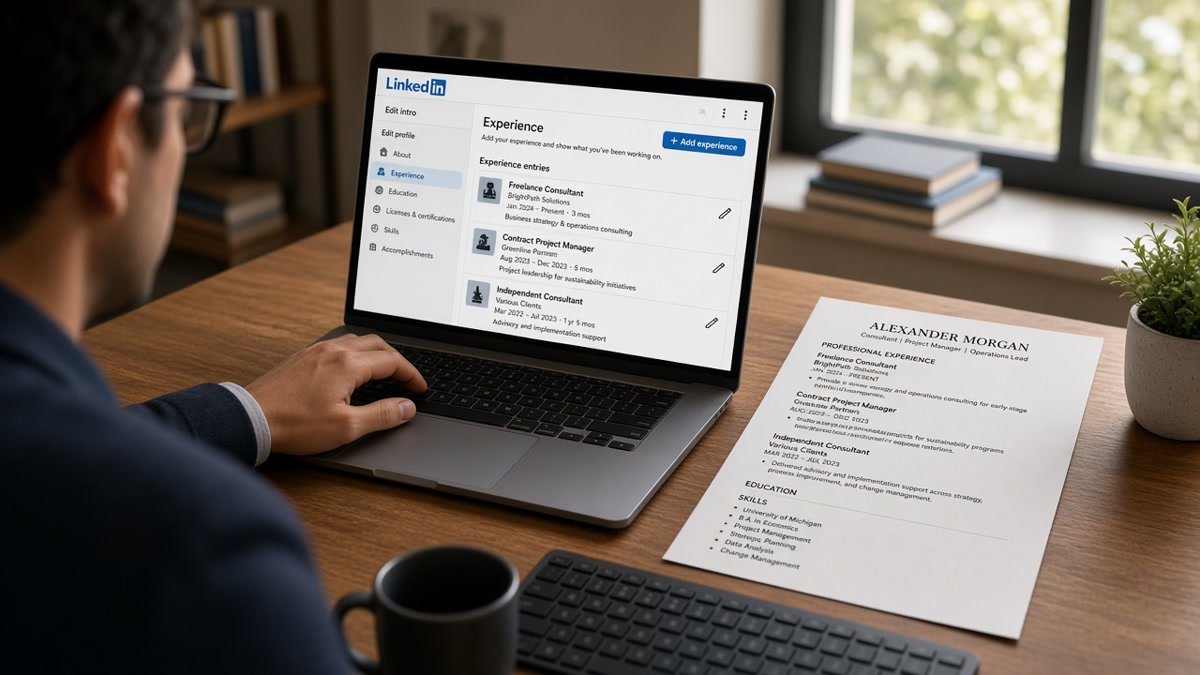
After: Four Experience rows, each with its own title, client or neutral label, Remote or city, and Month Year start and end.
Step 2: Title each row like a W2 job, not a gig label
The title field is what recruiters match to the req, not the company field alone. Use the same title string you would put on a resume employer block: Senior Business Analyst, not Freelancer. Put the client name in the company field when you can. When you cannot, use a sector descriptor both places.
Before: Title Freelance Consultant, company Self-employed, description lists every skill you ever touched.
After: Title Implementation Specialist, company Regional healthcare network (contract), description holds two bullets with Epic and go-live scope.
And keep employment type honest. LinkedIn offers Full-time, Part-time, Contract, and Freelance flags. Contract or Freelance is fine when the dates and bullets prove delivery. Mislabeling a full-time W2 role as Freelance creates mismatch when the background check runs.
Step 3: Lock Month Year dates on every contract
Click edit on each row and set start month and year plus end month and year. Overlapping contracts are normal for freelancers; overlapping full-time W2 dates are not. If two clients ran in parallel, both get accurate ranges rather than hiding one inside the other row's description.
Present belongs only on the contract you're actively billing. Closed clients need a closed month. Recruiters notice when every freelance row still says Present even though your resume shows end dates from last year.
Step 4: Write two proof bullets per client
LinkedIn allows short descriptions under each Experience row. Use bullet-style lines, not a paragraph essay. Bullet one names stack and scope. Bullet two names an outcome with an illustrative number inside the project, the same way you'd write a resume bullet.
Before: Helped various startups with marketing and growth tasks.
After: Ran paid search in Google Ads and HubSpot for a B2B SaaS launch; cut CPA from $142 to $98 over twelve weeks while holding lead volume flat.
Before: Did some React work for a client.
After: Rebuilt checkout flow in React and TypeScript for an e-commerce replatform; cut page load from 4.1s to 2.3s on mobile product pages.
Cut duty lines that start with Responsible for or Assisted with. Recruiters skim the first eight words. Put the tool name there.
Step 5: Mirror every LinkedIn row on your resume DOCX
Open your single-column resume in Word or Google Docs. For each LinkedIn Experience entry, create a matching employer block with the same title string, client label, city or Remote, and Month Year range. Copy bullets verbatim or tighten without changing dates or titles.
Do not keep Freelance, various clients on the resume while LinkedIn shows four named rows. That mismatch is the fastest way to lose trust on a corporate req. Agency contractors can list the agency as employer on the resume and client name in bullet one when NDAs allow; mirror whichever pattern you pick on LinkedIn too.
Export plain text from the DOCX. Read top to bottom. If a 2024 client row appears below a 2019 internship, fix column layout before you touch LinkedIn again.
Step 6: Reconcile LinkedIn, resume, and the posting before Easy Apply
Open the job description. Highlight three must-have skills. Confirm each appears in a dated bullet on LinkedIn and on the resume file, not only in Skills endorsements. When you Easy Apply, the portal often pulls profile data then still asks for an upload. Send the file you tested.
When keywords sit in bullets but match scores still feel thin, read how ATS matches resumes to job descriptions after your mirror pass. Structure and date alignment come before keyword stuffing.
Edge case: staffing agency with invisible end client
List the agency in the company field on both surfaces when the contract requires it. Put scope in bullets: Workday reporting module for Fortune 500 retail, not the retailer's name. Keep the same neutral phrase on LinkedIn and DOCX so the recruiter does not see two different stories.
Edge case: one long retainer split into phases
A single client with renewal phases can stay one row if the title and scope stayed constant. Split into two rows when the title changed materially, such as Content Strategist phase one and Marketing Manager phase two on the same account. Dates must reflect the phase boundary on both LinkedIn and resume.
Copy-paste block: LinkedIn freelance Experience row
Title: [Posting-aligned title, e.g. Senior Financial Analyst]
Company: [Client name OR neutral sector label (contract)]
Location: Remote (or city, state)
Dates: Mon YYYY to Mon YYYY
Employment type: Contract

Description (2 bullets):
• [Tool] + [scope]; [illustrative outcome metric in project]
• [Second stack or stakeholder scope]; [delivery boundary]

RESUME MIRROR CHECK:
[ ] Same title string on DOCX employer line
[ ] Same Month Year range on resume
[ ] Same client or neutral label
[ ] Bullets match or tighten without date changes
I've screened profiles where the LinkedIn preview looked strong and the uploaded resume still hid every client inside one Freelance paragraph the parser scored as unemployment.
Where freelance LinkedIn entries still fail the screen
One catch-all Freelance row. Recruiters cannot tell which client matches their industry req. Fix: split rows with dates and titles.
Skills endorsements without Experience proof. Endorsed Figma or SQL means little when no dated bullet names a delivery. Fix: move must-have tools into bullet one under the client row.
Present on every contract. It suggests you never finish work or you forgot to close old clients. Fix: end dates on completed SOWs, Present only on active billing.
Resume file still generic after LinkedIn cleanup. The profile gets clicks; the parser scores the upload. Fix: mirror titles and dates before you apply again.
Creative titles that don't match the req. Chief Everything Officer reads cute and fails title filters. Fix: use the posting's title family even if your LLC name was different.
Uploading a PDF exported from a design tool. Columns reflow and client rows scramble in Workday. Fix: DOCX single column, test import, then export PDF from Word if the portal requires it.
Exception: pure creative portfolios sometimes lead with Projects and a website link. Corporate finance, ops, and tech reqs still want Experience rows that match a resume file recruiters can parse. Another edge case: career break with one small freelance client. One dated row beats hiding the work inside About text with no Month Year anchor.
Mirror LinkedIn rows on the resume parsers read
After you split client rows on LinkedIn, paste the same bullets into a single-column file using the free resume builder . Export DOCX, then upload that file and the target posting to HireFlow's free ATS resume checker . Confirm each freelance client imported as a dated employer block with bullets in order.
When the layout passes but you need a short employer note for a referral path, use the free cover letter generator with the same posting. Mention one client row by title and stack, not a generic freelance availability paragraph.
Do this now: Pick your top four contracts, add four LinkedIn Experience rows with Month Year dates, mirror them on DOCX, then run the checker on the file you'll upload.
What to update tonight
Learning how to add freelance roles on LinkedIn is mostly structure. Split clients into dated Experience rows, title them like jobs, mirror the same data on your resume file, and test import before the next Easy Apply batch.
- Add one Experience row per paying client with Month Year dates.
- Match title strings and bullets on single-column DOCX.
- Close completed contracts; reserve Present for active work only.
- Run ATS check on the upload, not on the profile alone.
Open the posting you care about. Run a free ATS check , confirm freelance clients imported as employers, and send a file that matches what recruiters saw on your profile.
Read more
Frequently asked questions
Use Experience when the work maps to a job title family you want next, especially client-facing delivery with Month Year dates. Projects works for one-off builds, open-source contributions, or portfolio pieces without a clear employer row. Recruiters scanning for a product manager hire look at Experience first. A strong Projects block does not replace dated client rows when your resume lists six months at a named company.
Yes, with a neutral label and real dates. Use Industry descriptor plus scope, such as Series B fintech SaaS or regional healthcare network, instead of inventing a fake employer. Keep the same label on your resume DOCX so LinkedIn and Workday import match. Never paste confidential metrics; describe outcomes as ranges or scope counts you can defend in an interview without naming the client.
No. Open to Work is a signal flag, not proof. Recruiters still open Experience to see title fit, stack, and tenure before they request a resume. A profile with Open to Work turned on but one vague Freelance line and no dates reads like a gap, not like active contract work. Add the rows first, then toggle visibility settings if you want inbound traffic.
Short stints are normal in contract work. The problem is undated lumps, not three clients in eighteen months. Each entry needs Month Year start and end, a title aligned to the posting family, and two bullets with stack proof. When six roles each run under eight weeks with identical copy-paste bullets, trim to the four that support your target lane and collapse the rest into one line on the resume file.
Yes on most corporate reqs. The LinkedIn profile is the preview; the DOCX or PDF in Greenhouse is what parsers score. When titles, dates, or client labels disagree, the screen stops before bullet one. Mirror each LinkedIn Experience row on the resume with the same Month Year range and title string, then upload the exact file you tested.