7 min read
You've probably renamed the section Professional History and assumed the parser would still find your roles. Sometimes it will. Often it won't, because the software never needed that label.
Before you tweak bullets, confirm the file still exposes each job as its own block. Check your resume for free against the posting so you can see whether dates and employers survived the upload. If you're not sure which export broke, compare DOCX and PDF in the same checker pass.
This won't turn a stretch role into a perfect match. It stops a qualified timeline from looking like one blurry job when recruiters sort by years of experience.
Tonight you need to spot which parser failure you have, then fix the layout that caused it. We'll walk symptoms first, then the block shape parsers expect. You don't need a new template; you need repeatable lines the importer can split.
What counts as an experience block to a parser
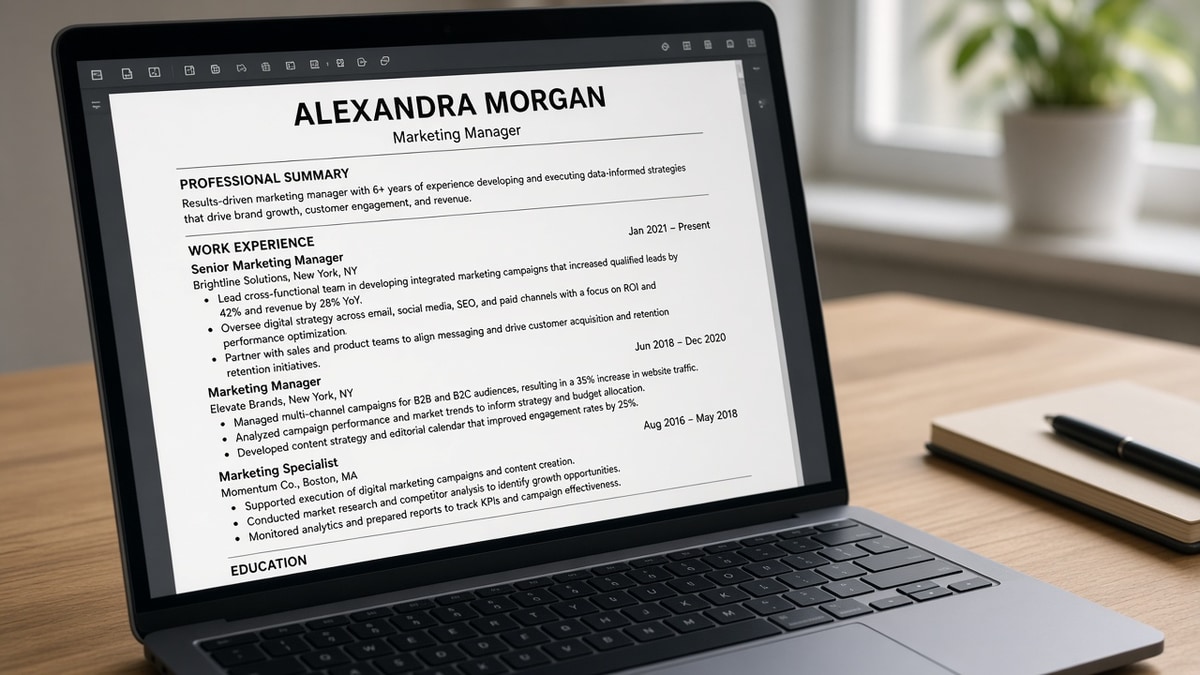
Decision rule: one block equals one employer line, one title line, a date range, and the bullets that follow until the next date line appears.
Applicant tracking systems in Workday, Greenhouse, Lever, Taleo, and iCIMS do not read your resume like a designer. They read character order. When they see January 2021 to March 2024 near Acme Corp and Operations Analyst, they attach the next lines to that job until another date pattern shows up.
The section header is a hint, not a lock. Professional Experience, Work History, and Career Summary can all sit above the same parse pattern. If the anchors are clean, the header is decoration. That's why renaming the section rarely fixes a merged job row.
Recruiters editing your profile in the portal are looking at the same parsed fields. When employer and end date are blank, they're not ignoring your PDF. They're working from a broken block the system already stored.
Before: You trust the Word template because it looks polished in print preview.
After: You read the plain-text export and count whether each job still has four separate fields a recruiter can edit in the portal.
Before: You stack two promotions at one company in one paragraph because it saves space.
After: You split each title with its own date line so tenure math does not collapse into a single row.
For how titles get matched after parsing, see how ATS maps resume titles to roles once your blocks parse as separate jobs.
How ATS identifies experience blocks when something breaks
Symptom: jobs merged into one employer
Cause is usually a shared table row, a line break inside a text box, or dates pushed into the right margin on a two-column template. The parser keeps reading characters and assumes one continuous role.
Symptom: a role vanished but the PDF looks fine
Cause is often a graphic timeline, a column swap, or a bullet style that did not survive PDF export. The job is still on the page visually, but not in the character stream the ATS ingests.
Symptom: dates shifted under the wrong company
Cause is misaligned columns: company in column one, dates in column two, title in column three. Many parsers read left to right, top to bottom, so fields divorce from each other. The fix is to stack employer, title, and dates on consecutive lines in one column, even if it looks less flashy on paper.
Symptom: only the most recent job imported
Cause is often a page break that splits a table, or work history continued in a header block on page two. Move older roles into the main body column and retest. If the oldest roles still drop, shorten bullets before you delete jobs you need on the record.
Copy-paste block shape: paste this skeleton under your header and replace the brackets. Keep one employer per cluster.
[Employer legal name]
[Job title as posted in industry]
January 2021 to March 2024 | [City, ST]
• [Verb-led bullet with tool from posting]
• [Second bullet with scope, not duties list]
• [Third bullet with outcome you can defend in interview]

[Next employer]
[Next title]
June 2018 to December 2020 | Remote
I've screened stacks of Workday profiles where the PDF showed five roles and the parsed view showed two because dates lived in a sidebar. Boring blocks beat clever design every time.
When bullets parse but years look short, read why strong experience still gets rejected for fit signals beyond layout.
Layout traps that break experience blocks
- Tables for alignment: parsers often flatten cells out of order.
- Text boxes for dates: dates outside the main flow orphan from titles.
- Icon or picture bullets: importers drop symbols and mash lines together.
- Multiple roles, one date line: tenure math treats them as one job.
- Headers and footers for contact info duplicated into body: extra lines confuse where work history starts.
Fancy templates are a common thread. Why fancy resume layouts fail walks the same parser failures from the design side.
Test before the next apply
Upload once to a sandbox application or run a parse check on the exact file type the employer accepts. You are validating field boundaries, not keyword color.
Run the free ATS check on your DOCX and PDF exports. If one format loses a job, send the other when the portal allows it.
If you need a clean single-column file fast, Build your resume with plain employer lines instead of rebuilding the template from scratch.
When a role needs a short context line for contract work, Generate a cover letter that names the client and dates while the resume keeps the parseable block.
Lock the shape
Rule: if a recruiter cannot copy employer, title, and dates into four separate fields, the parser probably failed too.
Rename headers if you want. Fix anchors first: one employer per block, dates beside titles, bullets in the main column, no tables hiding structure.
Job searching is already draining. A parseable timeline is one less silent rejection you can control tonight.
Read more
Frequently asked questions
No. Most parsers look for repeating clusters of employer name, title, and dates. A missing header rarely matters. A table layout or a sidebar that splits dates from titles matters a lot.
Overlapping date lines, merged roles at one company, or dates trapped inside a text box often create one long job or a gap the system invents. Open the employer view in the portal and compare each role line by line with your PDF.
Decorative bullets and icon fonts sometimes vanish on import, which can glue bullets to titles or drop whole lines. Standard round bullets or hyphens on a single-column DOCX export are the safer default.
Yes. Use a client or business name as the employer line, a clear title, and the same Month Year date pattern. Contract work still needs a parseable block, not a paragraph buried under Skills.