11 min read
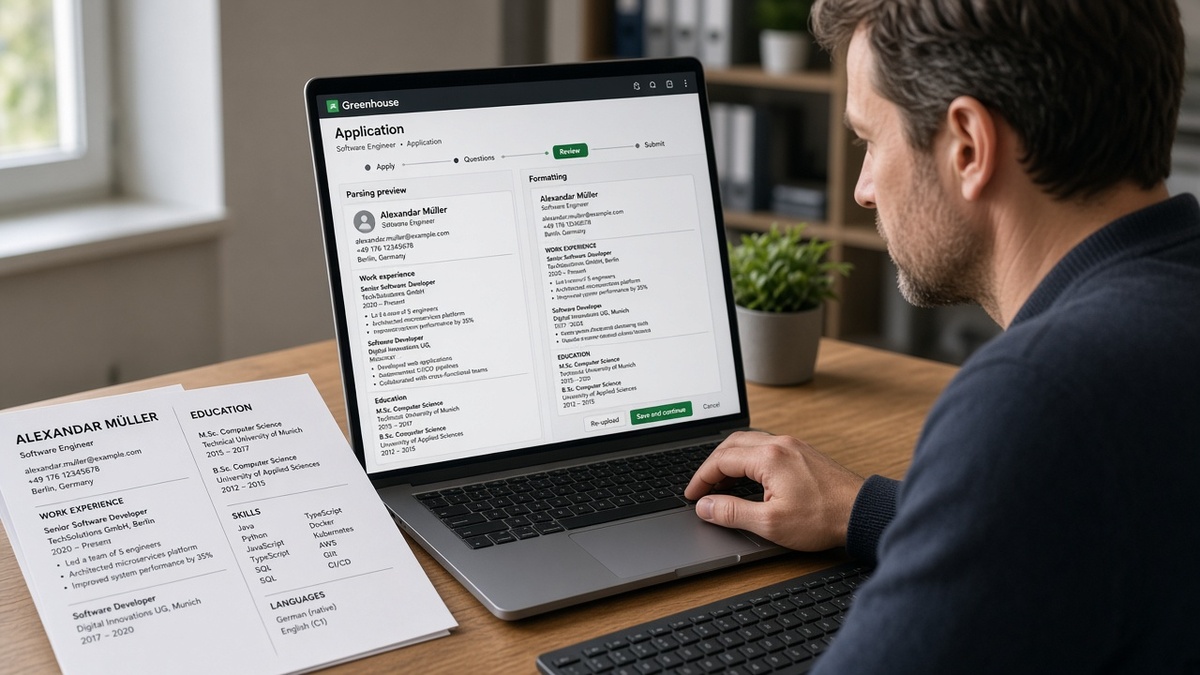
Your CV looks sharp on screen. Two neat columns, icons for Kubernetes and Terraform, dates tucked in a right rail like every Canva template you've seen. You're not underqualified when the preview scrambles. You upload to a Berlin fintech req, a Dublin SaaS role, or a remote-first scale-up hiring through Greenhouse, and the preview doesn't match what you polished. Your current employer shows up without dates. Last role's end date sticks to the wrong company. Half your bullets vanish into a skills blob between 2019 and 2021. You're not underqualified. The file layout broke before a recruiter searched your stack.
Check your resume for free with the posting pasted in after you flatten layout. Mid-level European IT CVs break in Greenhouse ATS on structure more often than keywords. Backend engineers, platform folks, and data engineers all hit the same split: employer in one column, dates in another, importer reading left to right and attaching fields to the wrong rows.
Below: the symptom you'll recognize on preview, three causes behind scrambled European IT imports, and fixes with before/after pairs you can paste against your export. You won't fix this with another template subscription. Job searching across borders is already draining. At least you'll know why a prettier PDF made things worse, and what to rebuild tonight in plain DOCX. You won't fix this with another template subscription. You need one column and Month Year beside every role.
Pull up your last Greenhouse preview if you still have it. We're matching symptoms to causes, not recycling generic ATS advice. You'll know it's layout when the PDF thumbnail looks fine and the preview doesn't.
Quick wins
- Rebuild as single-column DOCX with Month Year beside each role.
- Paste the CV into Notepad before you upload again.
- Drop photo headers, Europass tables, and icon skill rows.
- Re-upload only after employer, dates, and bullet one align in preview.
What Greenhouse ATS does to a two-column European IT CV
Upload succeeds. Then parsed view betrays the PDF you polished. Three symptoms repeat across Dublin, Amsterdam, Munich, and remote reqs on Greenhouse: employer without dates, dates on the wrong company, bullets floating between jobs with no title strip.
I've screened Greenhouse previews where FinTech GmbH imported with no dates while Docker and PostgreSQL landed between 2019 and 2021 blocks. Greenhouse read columns out of order, not tenure.
That mismatch is the whole problem. European CV norms reward visual structure. Greenhouse imports a text stream. Until the stream matches reading order, every re-upload of the same layout reproduces the same scramble.
Cause 1: two-column layouts split employer from dates
This is the failure recruiters see most on mid-level European IT CVs in Greenhouse. Canva, Figma, Word boutique templates, and some Google Docs designs put employer and title in a center column while dates live in a right rail. Your eyes read center first. The importer reads the document stream in export order, and the rail often loads after the next job block already entered the queue.
Before: Two-column Canva CV. Left rail: Python, AWS, Kubernetes, Terraform. Center: Senior Software Engineer at Nordlicht Digital with four bullets. Right rail: Mar 2021 to Present floating beside the block.
After paste test: Python, AWS, Kubernetes, Terraform, Nordlicht Digital, Senior Software Engineer, bullet text, Mar 2021 to Present arrives after bullets, then prior employer without its own dates on the strip.
Why nudging boxes fails: visual editors move pixels, not DOM. Dragging the date box on screen does not move its text chunk earlier in the export. The parser still meets dates late, then glues them to the next employer name it finds.
Fix direction: one column only. Title, company, and Month Year on one left-aligned strip per role, then bullets underneath. Skills echo after Education, not beside Experience. No second column for dates while titles sit center.
Read why Greenhouse reorders resume sections for the longer DOM-order explanation. Same importer behavior on European uploads. Different CV template, same scrambled stream.
Cause 2: European date formats parked in side rails
The second branch is how dates are written and where they sit. DD/MM/YYYY, 03.2021, and Q1 2022 labels in a right column are common on European CVs. Greenhouse field mapping expects employer, title, and a date range on one logical strip. Ambiguous numeric dates plus physical separation from the company name doubles the mismatch risk.
Before: DevOps engineer CV lists 01/09/2019 to 30/06/2023 in a narrow right column. Employer block sits left with no Month Year on the strip.
After import: Greenhouse stores 01/09/2019 as a standalone token, attaches 30/06/2023 to the following employer, leaves current role undated.
Before: Data engineer resume uses German-style 03/2021 to heute in the margin while job title stays center.
After import: heute never maps to Present. Recruiter view shows an open-ended gap on an old block and a missing end on the current one.
Fix direction: Mar 2021 to Present on the same line as employer and title. Spell Present in English on international reqs unless the posting is strictly local language. Drop slash dates from side rails entirely.
Cause 3: tables, Europass blocks, and photo headers
The third branch is invisible structure from Europass exports, Word table-per-job designs, and photo-heavy headers. Tables read as grids, not story order. Skill matrices import before Experience. Creative section titles like Parcours professionnel never open the Experience bucket recruiters filter on.
Before: Platform engineer resume uses one Word table per job with dates in the last row cell.
After import: Dates from three roles collapse onto one employer. Bullets from the newest role attach to the oldest company string the parser kept.
Before: French CV with photo header and no word Experience on the main block.
After import: Education rises as the only standard label. Paid roles sit in an unlabeled blob.
Delete grids. Rename to Experience, Education, Skills. Keep photos off portal uploads when optional. Move stack proof into bullet one under a dated employer line.
How to tell which cause scrambled your European IT CV
You don't need to guess from the template brand. Run one paste test, then compare to Greenhouse preview side by side. Export PDF or DOCX, select all, paste into Notepad on Windows or plain TextEdit on Mac. Read top to bottom with formatting stripped.
Column cause: tools or skills appear between two employer names in Notepad. You'll see Kubernetes before Acme GmbH even though the PDF showed Acme at the top of page one. Dates show up after bullets instead of on the employer strip.
Date-format cause: numeric dates float alone without company names beside them. Present or heute appears separated from the current role. The same end date repeats beside multiple employers in preview.
Table or Europass cause: a skill matrix or competency block appears before any employer name. Section labels in Notepad do not include Experience or Work History. Bullets show up before company strings.
Paste test decision tree
1. Skills between two employers? → rebuild single column, skills after Education
2. Dates after bullets or orphaned? → Month Year on employer strip, drop side rail
3. Matrix before first company? → kill tables, tools into bullet one
4. Preview still wrong in DOCX? → rename headers to Experience, Education, Skills
5. Preview matches Notepad order? → tune keywords, not layout
When Notepad order already looks correct but preview still scrambles, switch from PDF to DOCX or the reverse once, then retest. Rare encoding quirks aside, mismatched Notepad almost always means mismatched preview.
Fixes that survive Greenhouse re-upload
Match the fix to the cause you diagnosed. These pairs are mid-level IT shapes you can paste against your file tonight.
Fix for column splits: single-column DOCX strip
Rebuild in Word or Google Docs with one column. No Canva export for portal uploads. Each role gets one strip, then bullets, then the next role.
Before: Two-column Canva PDF; Senior Backend Engineer at RheinTech AG in center; Mar 2020 to Present in right rail; Kubernetes proof in bullet three.
After: Senior Backend Engineer | RheinTech AG | Mar 2020 to Present on one line; bullet one: Built Kubernetes platform serving 40 microservices on AWS EKS, cutting deploy time from 45 minutes to 12 minutes per release in 2024.
Fix for date rails: Month Year beside employer
Move every date onto the employer strip. Kill DD/MM-only tokens in margins.
Before: Site Reliability Engineer block with 15/03/2018 to 22/11/2022 in a right column.
After: Site Reliability Engineer | CloudScale BV | Mar 2018 to Nov 2022 with bullets directly beneath, no date column anywhere on the page.
Fix for tables: linear Experience blocks
One employer per block. Plain headings importers already map.
Before: Europass competency grid on page one; three jobs on page two inside tables.
After: Experience heading, then Data Engineer | Helsinki Analytics Oy | Jan 2021 to Present, bullet one leads with Spark and Python from the posting, Skills echo lists remaining tools after Education.
Before/after: mid-level full-stack developer
Before: Strip missing months; bullet one: Worked on React and Node projects for various clients.
After: Full-Stack Developer | Baltic Payments AS | Sep 2021 to Present; bullet one: Shipped React and Node checkout flow handling 18K daily transactions; cut failed payment retries 14% in Q2 2025 after Redis session refactor.
Edge case: contract stack across EU countries
Short contracts need separate strips, not one merged block labeled Freelance 2019 to 2023. Recruiters clock overlaps and gaps on the strip. Two six-month platform gigs in one year is fine when each shows Month Year ranges and bullet one proves output at that client.
Before: Single block lists three clients in one paragraph with no per-client dates.
After: Platform Engineer | Nordic Retail API (contract) | Jan 2024 to Aug 2024 with two bullets; Platform Engineer | MedDevice Cloud (contract) | Sep 2024 to Present with its own strip and bullet one tailored to the new req.
Edge case: UK hire from an EU-format CV
UK recruiters on Greenhouse still get the same importer. Drop photo for portal upload, switch to Month Year strips, keep two pages if needed. See how to adapt a UK CV for international applications when the req crosses borders and your local norm included a photo or personal line UK postings skip.
Copy-paste employer strip template
Job Title | Employer Legal Name | Mon YYYY to Mon YYYY or Present
• [Posting must-have tool] + scope + outcome in first eight words
• Second proof bullet with stack term already in bullet one
Repeat per role. Skills section after Education only echoes tools proven above.
Habits that keep mid-level IT CVs scrambled in Greenhouse
Prettier PDF, same columns. Higher resolution does not fix DOM order. Orphan dates return on every re-upload while dates stay in a right rail.
Sidebar stacks without dated proof. Terraform in a left rail does not survive filters when Experience bullets stay generic. Move three terms into bullet one under your current employer.
Skipping preview after attach succeeds. Open parsed view before knockout questions lock. Compare employer count and date fields to your source file. See formatting mistakes that kill parser reads when layout is flat but keywords still sit only in a skills footer.
Test layout before the next EU application
Paste test first. Then run duty terms against the posting. Score your job match after strips and bullet one look right. The scan flags missing tools in Experience when a sidebar looked full. It won't rebuild columns for you. It shows where proof still sits outside dated jobs.
Starting from a scrambled Canva file? Build a plain single-column resume once, then swap bullet one per req instead of re-exporting designed PDFs that split employers from dates on every upload.
When the EU req asks for a motivation note, keep layout out of it. Generate a cover letter from the posting after the Greenhouse preview shows clean strips.
Rebuild as single-column DOCX before the next req
The file that wins in Greenhouse ATS is boring on purpose. Single column. Month Year beside each employer on the strip. Stack proof in bullet one, not in a rail that imports between jobs. A prettier PDF without that structure sends the same orphan dates on every upload.
Keep one plain master CV. Run the paste test before every portal submit. Tailor bullet one per posting. You'll still see silence when reqs close or teams pause hiring across borders. You won't lose as often to layout you could fix in an evening.
Run a free ATS check on the next EU or remote req after strips look right. Fix parse order on your side. Let queue timing explain the rest.
Read more
Frequently asked questions
Upload what the posting requests. When it is silent, a plain single-column DOCX from Word often survives import better than a designed PDF from Canva or Figma. The file type matters less than layout. Two columns, text boxes, and right-rail dates scramble in both formats. Run a Notepad paste test on whichever export you plan to submit.
Photos are still common on German and French CVs, but image blocks can push contact text out of parse order in Greenhouse. If the posting does not require a photo, drop it for portal uploads and keep a local version with photo for direct email. When a photo is mandatory locally, place it outside the main text flow and rebuild Experience as single-column body text beneath contact lines.
Month Year beside each role on the same line as employer and title: Mar 2021 to Present, not 03/2021 or 21.03.2021 alone in a sidebar. DD/MM ranges confuse parsers when the employer is US-based. Put start and end dates on the employer strip, not in a right column the importer reads after the next job block.
The importer read your layout out of order. A two-column template often stores dates in a right rail that loads after the next employer in document stream. Greenhouse attaches company names to one field and dates to another, then mismatches them. Rebuild with title, company, and Month Year on one left-aligned strip per role before you re-upload.
Tables read as grids, not story order. Europass skill matrices often import before Experience and bury employer proof. Move three stack terms into bullet one under a dated role, then list the rest in a short Skills echo after Education. Recruiters search on tools inside dated jobs, not inside a matrix floating above history.