11 min read
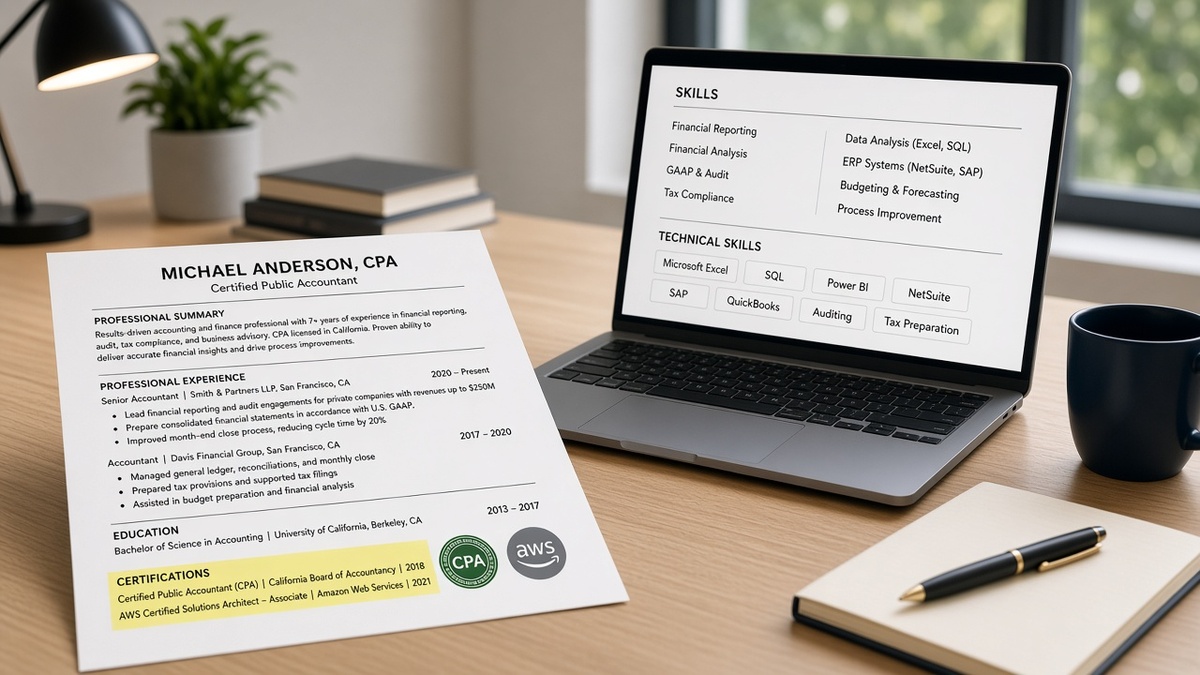
Gate certifications go on the title strip under your name or in a dedicated Certifications block right after Experience. Nice-to-have certs belong in the skills echo at the bottom. Wrong placement hides a CPA from recruiter keyword search in Workday. That's the full answer. Everything below sorts which credentials get which zone and what to change tonight.
You've probably got a PMP, CPA, RN license, or AWS line sitting in a footer nobody reads, and it's costing you screens. The posting asked for it in the first screen. Check your resume for free with the req pasted in. You'll often see the cert matched in Skills while the title strip still says Analyst with no credential beside it.
Recruiters don't hunt page three for your Scrum badge. They ctrl-f the queue or filter on credential fields the ATS imported. If CPA only lives in a skills cloud below Education, you can be qualified and invisible in the same afternoon. Job searching's draining enough without losing on placement you can fix in ten minutes. You'll know it's wrong when the posting says CPA required and your strip still says Analyst.
Pull up your PDF. Getting certifications on resume placement right takes ten minutes: sort gate creds from nice-to-have, pick a zone for each, and run before/after pairs you can paste against your file.
Quick wins
- Put gate creds on the title strip or Certifications block after Experience.
- Park nice-to-have certs in the skills echo at the bottom.
- Repeat gate abbreviations in bullet one under a dated employer.
- Paste-test so creds import before Education, not in a sidebar.
Why recruiters miss certs in the wrong zone
A credential on your resume only works when it lands where the skim and the parser both look first. In Workday, Greenhouse, Lever, Taleo, and iCIMS, recruiters often filter on imported credential text or run a keyword search across the parsed profile. A CPA buried under Education may parse as a school line, not a license.
The title strip is the highest-attention real estate on the file. Name, city, phone, then credential abbreviations recruiters expect: CPA, PMP, RN, SHRM-CP. That line imports into header fields on many US corporate builds. Skills at the bottom import last and get less weight on the first human pass.
I've screened queues where CPA sat in bullet four while the strip still said Analyst. Another file with CPA on the strip and one audit bullet under a dated employer survived the same filter. Same degree, different zone.
Parsers don't reward badge graphics or certificate thumbnails. Plain text, standard section headers, Month Year on the credential line when the issuer expects it. A dedicated Certifications block after Experience gives gate creds a labeled home without pushing your current job title below the fold.
Read how recruiters actually scan resumes in the USA for the six-beat skim after contact info. Certs on the strip hit beat one. Certs after Experience hit beat five. Certs only in Skills may never get a beat.
Sort gate certifications from nice-to-have first
Open the posting. Highlight every line that says required, must have, licensed, or certified. Those map to gate zones: title strip or Certifications block after Experience. Everything else is nice-to-have and can live in the skills echo unless you have spare room on the strip.
Gate examples: CPA for public accounting, RN for bedside nursing, PE for engineering sign-off, active bar admission for litigation, PMP when the req names project management certification, CISSP when security clearance work expects it.
Nice-to-have examples: Google Analytics cert on a general marketing req, HubSpot inbound on a content role that doesn't list it, AWS associate when the posting says cloud experience preferred, Scrum Master when agile is one bullet among ten.
When you're unsure, treat it as gate if the application form has a separate license field. Employers that ask for CPA number in a dropdown expect CPA on the strip, not tucked beside Excel in Skills.
Do not list twelve nice-to-have badges above Experience. That pattern reads like padding and pushes your current title down. Gate first, echo the rest.
Certifications on resume: three zones that parse and skim clean
Once you've sorted gate from nice-to-have, pick exactly one primary zone per gate cert. You can repeat the abbreviation on the strip and spell it out in the Certifications block. Don't rely on Skills alone for a gate.
Zone 1: Title strip under your name
Best when the posting gates on one or two credentials and the abbreviation is industry standard. Keep it short. Name, credential, city, contact. No paragraph under your name.
Before: Alex Morgan | [email protected] | Dallas, TX (CPA only in Skills footer).
After: Alex Morgan, CPA | Dallas, TX | [email protected] | 214-555-0142
Nursing works the same way: Maria Santos, RN, BSN on the strip when the req says current RN license. Add state only if space allows or the posting names a compact license format.
Zone 2: Certifications block after Experience
Use when you hold multiple gate creds, when the cert needs issuer and date on one line, or when the strip would look crowded. Place the block immediately after your last job, before Education. Standard header: Certifications or Licenses and Certifications.
Before: PMP listed under Education with no date; AWS cert inside Skills only.
After:
Certifications
Project Management Professional (PMP), PMI, renewed March 2025
AWS Certified Solutions Architect – Associate, Amazon, June 2024
Each line: full name, issuer, Month Year earned or renewed. Gate abbrevs can still appear on the strip: Sam Rivera, PMP with the spelled-out block below jobs for parsers that map section headers.
Zone 3: Skills echo at the bottom
Nice-to-have certs only, comma-separated with tools. One line after Education or a short Skills section. Repeat a tool name here only if it also appears in a bullet under a dated employer.
Before: CPA in Skills echo; no CPA on strip; audit bullets generic.
After: Strip shows CPA; Skills echo holds Excel, Power BI, CaseWare for nice-to-have tools. Audit bullets name SOX testing and PCAOB standards under a dated firm line.
Before: Google Ads Certified and Meta Blueprint alone in a Certifications section above Experience for a content role that didn't gate on ads creds.
After: Certifications section removed; Skills echo: SEO, Google Ads Certified, Meta Blueprint, WordPress. Bullet one under current job proves campaign spend managed.
Before/after: project manager with PMP
Before: Strip: Project Coordinator | bullet one: Helped plan timelines; PMP at bottom of page two in Skills.
After: Strip: Dana Cho, PMP | Project Manager | Northwind Health | Jan 2022 to Present; Certifications block: Project Management Professional (PMP), PMI, Jan 2023; bullet one: Led $2.4M EMR rollout across 6 clinics on budget using MS Project and weekly steering reviews.
Before/after: registered nurse, ICU
Before: Certifications above Experience with BLS, ACLS, PALS stacked; RN license missing from strip.
After: Strip: James Okonkwo, RN, CCRN | ICU RN | Riverside Medical | Mar 2021 to Present; Certifications after jobs: RN License, California #RN123456 | Active; BLS, ACLS, American Heart Association, renewed April 2025; bullet one: Managed 2:1 critical care assignments in Epic for septic shock and post-op open heart patients.
Before/after: cloud engineer, AWS gate
Before: AWS Certified Solutions Architect in a sidebar column; experience bullets mention on-prem only.
After: Single column; Certifications after Experience: AWS Certified Solutions Architect – Associate, Amazon, August 2024; bullet one: Migrated 14 microservices to AWS ECS and cut monthly infra spend $38K while holding p99 latency under 120ms.
When the placement rules bend
Gate and nice-to-have covers most US corporate reqs. These edge cases still show up every week in queues.
In-progress exams and candidate status
One honest line on the strip or in Certifications: CPA Candidate, FAR and AUD passed. Do not write CPA until you're licensed. Same for bar exam: Bar Exam Candidate, UBE scheduled October 2026. Recruiters prefer clear status over a missing line.
Expired or lapsed gate creds
Drop them unless renewal is in flight and the posting still expects the license. If you list one, add renewed or renewal in progress with a Month Year. An expired PMP at the bottom with no context hurts more than leaving it off.
Students and new grads with one strong cert
When Experience is thin, a gate cert can sit on the strip and in Certifications while internships carry bullets. Don't create a Certifications section above Education that pushes your only internship to page two. Strip + block after any paid or clinical work beats cert-first ordering.
Career changers with a cert as bridge proof
A completed bootcamp cert that's nice-to-have belongs in Skills echo plus one bullet that proves hands-on use. A gate cert in the new field (e.g., SIE for finance pivot) goes on the strip when the posting names it, with bullet one showing applied work, not course titles.
Multiple gate creds on one req
Strip carries the top one or two abbrevs: CPA, CFE. Certifications block after Experience lists the rest with issuers and dates. Never dump seven lines above Experience unless every one is a hard gate on that specific posting.
See why weak bullet points get ignored when the cert is visible but bullets still don't prove the work behind it.
What to do now: ten-minute cert placement pass
Run this once per master resume, then again when a posting gates on a credential you haven't led with before.
1. Highlight required / licensed / certified lines in the posting.
2. Mark each as gate (strip or Certifications block) or nice-to-have (skills echo).
3. Move gate abbrevs to the title strip: Name, CPA or Name, RN.
4. Build Certifications after Experience: full name, issuer, Month Year.
5. Drop nice-to-have certs into one comma line at the bottom.
6. Mirror each gate cert in bullet one or two under a dated job.
7. Remove cert badge images and icon rows.
8. Paste PDF to Notepad: strip creds appear before job two?
9. Ctrl-f each gate abbrev inside Experience, not only Skills.
10. Upload once; fix placement before you rewrite bullets again.
Copy-paste Certifications block template (gate creds):
Certifications
Certified Public Accountant (CPA), State Board of Accountancy, License #12345, active
Project Management Professional (PMP), PMI, renewed March 2025
AWS Certified Solutions Architect – Associate, Amazon, June 2024
Copy-paste title strip examples:
Priya Nair, CPA | Chicago, IL | [email protected] | 312-555-0198
Daniel Reyes, PMP, CSM | Austin, TX | [email protected]
Keisha Williams, RN, BSN | Atlanta, GA | [email protected]
Export single-column PDF or DOCX. Two-column templates often import Skills before Experience and leave creds orphaned in a sidebar. Month Year on renewal lines when the issuer tracks expiration.
If the posting lists a cert in the title (Senior Accountant, CPA required), mirror CPA on your strip even when your last title was Staff Accountant. Honest level on the job line, gate abbrev on the name line.
Test gate creds against the posting
Placement fixes fail quietly when Skills looks full but Experience doesn't repeat the gate term. Score your job match on the req you have open. The scan shows whether CPA, PMP, or RN appears in parsed Experience fields, not only in a footer list.
Rebuilding from a sidebar template? Build a plain single-column resume once, put gate creds on the strip, then clone per req instead of moving cert lines around a designed layout every time.
When the req asks for a letter, name the gate cert once in line one. Generate a cover letter from the posting after the strip and Certifications block match.
Fix placement before you add another cert
Certifications on resume succeed when gate creds sit on the title strip or in a block right after Experience, and nice-to-have creds stay in the skills echo. Wrong zone hides qualified candidates from the same keyword search recruiters run on every open req.
Sort gate from nice-to-have tonight. Move one abbrev to your name line. Spell out issuers and dates after your last job. Mirror each gate in a bullet under a dated employer. You'll still see silence when teams pause hiring. You won't lose as often to a CPA sitting in a footer.
Run a free ATS resume check on the next posting before upload. Fix zones on your side. Let queue timing explain the rest.
Read more
Frequently asked questions
Gate credentials that the posting names as required belong on the title strip under your name or in a Certifications block immediately after Experience. Nice-to-have certs stay in the skills echo at the bottom. Putting a CPA only in Skills while Experience stays generic often means recruiter keyword search in Workday never surfaces the credential on the first screen.
Only when the cert is a nice-to-have, not a gate. AWS Solutions Architect in a comma list at the bottom works when the posting treats cloud certs as a plus. CPA, RN license, or PMP on a req that lists them as required need a visible credential line on the strip or in a dedicated block after jobs so parsers and humans both see them without scrolling past six bullets.
Drop expired gate certs unless you are actively renewing and the posting still expects the credential. List in-progress exams in one plain line: CPA candidate, FAR passed. Never bury an expired PMP at the bottom without context. Recruiters treat mystery dates as a credibility hit, not a keyword win.
Active licenses with state numbers (RN, CPA, PE, bar admission) follow the same gate rules as certifications. Put the license abbreviation on the title strip when the role requires it: Jane Doe, CPA or Maria Santos, RN. State and license number can sit on the strip or on the first line of a Certifications block. Do not mix licenses into a skills cloud without the credential line above Experience.
One to three gate lines visible without scrolling. Stack additional nice-to-have certs in the skills echo, comma-separated. More than five credential lines before Experience pushes your current job title down on the skim and splits parser focus. Lead with what the posting gates on, not every Coursera badge you earned since 2020.