12 min read
You've tailored the bullets. You matched the posting. Workday still shows a blank job title or shoves your certification into the employer field. You're not losing to a smarter algorithm. You're losing to a file the parser read out of order before a recruiter ever opened the req.
ATS resume optimization for Workday on US job applications starts with layout, not keyword stuffing. Most parsing failures I see are single-column fixes: kill the sidebar, put the title above the company, and export a plain DOCX. If you can't tell whether your file is broken, check your resume for free against the posting before you burn another apply click.
You don't need a new template shop purchase. You need a boring export that reads top to bottom the way Workday expects. Candidates who fix parsing first often see the same req open in search where they were invisible yesterday. That's not magic. That's a title field that finally populated.
If you've already applied with a broken file, don't panic. Many reqs stay open for weeks. Fix the layout tonight, re-upload when the portal allows, and you'll stop competing with a profile that says your employer is your phone number. It won't fix every req, but it stops the silent failures you can't see on your own screen.
This page walks six troubleshooting steps, two edge cases, the mistakes that keep files broken, and what to do when the preview still looks wrong after a clean export.
Quick Wins
- Copy the file into Notepad. Wrong order there means wrong order in Workday.
- Title line directly above employer. Month Year dates on the same block.
- Open the portal preview and fix blank fields before you hit submit.
What Workday parsing errors look like on US applications
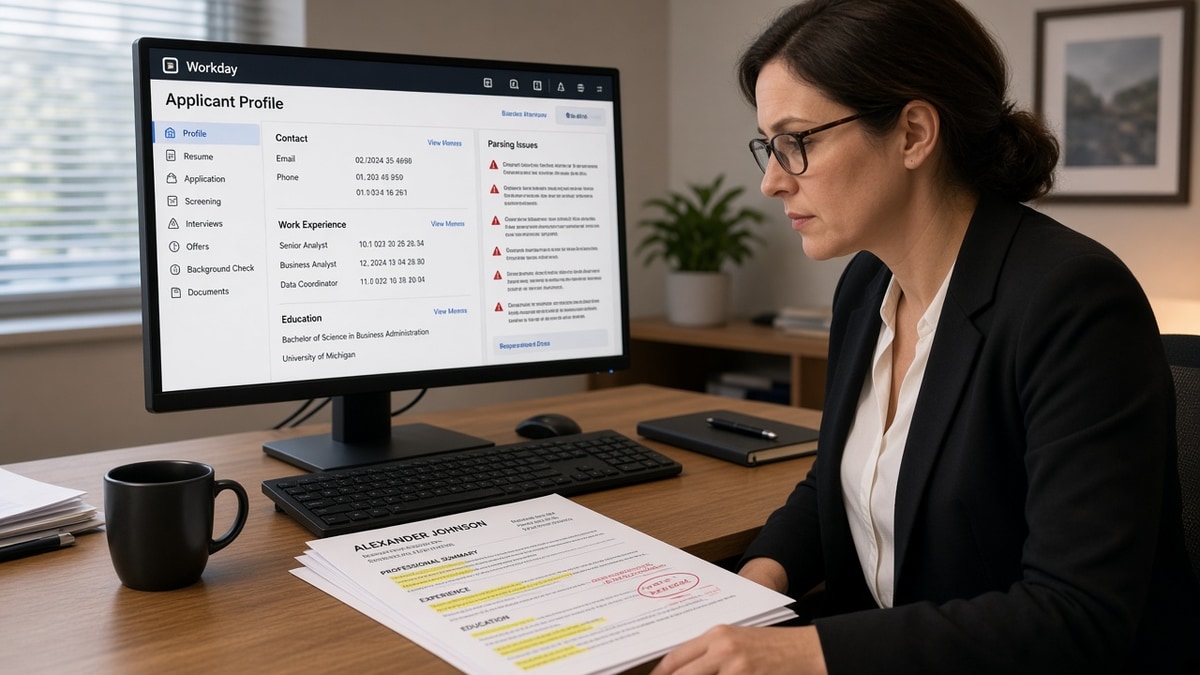
The symptom is familiar. You upload a polished PDF. The preview shows your skills duplicated, your current employer listed as a past job, or an empty title row where your headline should sit. Recruiters search on title and employer strings. A blank title means you never enter the list they open Monday morning.
Workday reads visual order, not your intent. Fancy templates put contact info in a left rail. The parser often treats that rail as the first column and imports phone numbers where job titles should live. I've opened hundreds of Workday profiles where the candidate was qualified and the file was unreadable.
US corporate reqs on Workday rarely fail because you missed one keyword. They fail because the attachment never mapped to searchable fields. Fixing that is mechanical. Rewriting every bullet is optional until the preview is clean.
Another common symptom: education imports twice while work history shows only one role. That usually means a table wrapped your degree block and the parser read each cell as a separate entry. Flatten the education section the same way you flattened experience.
Healthcare and finance candidates often hit date math errors. Workday may show a three-month stint when your header split "January 2022" from "Present" across a page break. Keep the date range on the same line as the employer or directly under the title without a logo row between them.
Read why resumes get rejected by ATS when parsing is fixed but you still never hear back. That is a different filter than a scrambled upload.
ATS resume optimization for Workday: six troubleshooting steps
Step 1: Run the Notepad test
Open your resume. Select all. Paste into Notepad or TextEdit plain mode. Read top to bottom. If your name is followed by a skill list before your first job title, Workday will import skills first too.
Before: two-column Canva export where the left rail lists phone, email, and eight tools before any employer name appears in the plain text dump.
After: single column starting with name and contact on two lines, then Professional Experience, then title-employer-dates as plain lines.
Step 2: Strip layout traps
Remove tables used for alignment, icon bullets, header/footer repeaters, and text boxes. Workday treats each as a separate object and may skip the block that holds your dates.
Use standard round bullets or hyphens. Replace graphic rating bars for skills with a simple comma list or one-line Skills section. Parsers do not score stars. They misread them as stray characters.
Hyperlinks are fine when the visible text is plain. Write "Portfolio: janesmith.dev" as text instead of embedding a button shape. Footer page numbers and "confidential" watermarks often import as random words above your first job.
If you use Word styles, stick to Heading 1 for your name and Normal for everything else. Custom style names like "Resume Title Blue" sometimes export as empty tags parsers skip entirely.
Step 3: Lock the role block order
Every job entry needs the same sequence: Job Title, Employer, Location optional, Month Year to Month Year, then bullets. No logos between title and company. No line break that separates the title from the employer across a page break without repeating the title on the next page.
Copy-paste role header block: "Senior Financial Analyst | Acme Corp | Chicago, IL | March 2021 to Present" then bullet one naming the top skill from the posting in the first eight words.
Remote roles still need a location line when the posting asks for one. "Remote (US)" or "Chicago, IL (Remote)" parses cleaner than leaving location blank and hoping the recruiter assumes eligibility.
Promotions inside one employer can stay under one employer header with the highest accurate title spanning the full tenure. Split only when the function changed enough that search strings differ, such as Analyst to Manager with new scope bullets.
Step 4: Export the right file type
Built in Word? Save as DOCX. Built in Google Docs? Download as DOCX, not PDF, for the first test. Designed in InDesign or Canva? Rebuild in Word before you apply to a Workday employer. Design tools export pretty layers parsers hate.
Before: image-heavy PDF where selecting text jumps between columns.
After: DOCX with Calibri 11 pt, one-inch margins, no embedded shapes, file under two megabytes.
Step 5: Upload and audit the preview
After upload, Workday often shows a parsed view or populates application fields. Scroll every field: current title, current employer, start date, end date, education school, degree. Screenshot mismatches. That screenshot is your fix list.
Compare parsed employer against your most recent role first. Recruiters sort on current company before they read bullets. If Workday shows a volunteer board as your employer, your sidebar pushed that line above your day job in the import order.
Check whether skills duplicated into the summary field. That happens when the same keyword block appears in a left rail and again in a summary paragraph. Delete the duplicate block and re-upload once.
Step 6: Fix one failure mode and re-upload once
Blank title: move title above employer in the source file. Wrong employer: kill columns. Dates missing: put Month Year on the same line as the employer or directly below the title with no icon row between. Re-upload. Confirm preview. Submit.
Do not submit five variants the same day unless the req allows multiple profiles. One clean file beats three broken uploads cluttering the same application ID.
Edge case: government and clearance lines
Clearance level belongs in a single plain line under contact or in a short Additional section. Do not put TS/SCI inside a table beside your name. Parsers shove clearance tags into employer fields on some Workday configs.
Edge case: contract and consulting stints
List the staffing firm or your LLC as employer with the client in parentheses: "Data Engineer (Contract, Major Retail Client) | Apex Consulting | January 2023 to June 2024." Splitting client name into a fake employer row confuses tenure math in the preview.
When the preview still fails after a clean export
Try the opposite file type. If DOCX scrambled, export PDF from Word with "best for electronic distribution" checked. If PDF failed, switch to DOCX. Some employer Workday builds prefer one format on mobile apply flows versus desktop.
Shorten the file name to letters and numbers only. "Jane_Smith_Resume_2026.docx" beats "Jane Smith Resume (FINAL v7)!!.docx" on uploads that choke on special characters.
Fill critical application fields manually when the portal allows edits. Parsed data is a convenience layer. Recruiters still search typed fields when imports fail. Type the market title and employer yourself if the preview will not cooperate after two layout fixes.
Read how ATS handles resume formatting internally when you want the field map behind what Workday imports from each block.
Parsing mistakes that keep Workday files broken
Chasing keyword density before layout. A stuffed skills paragraph does not populate a blank title field.
Trusting the PDF because it looks fine on screen. Selectable text in wrong order still fails the Notepad test.
Using a resume from a design marketplace. Two-column templates are the top source of scrambled Workday profiles I see on US corporate reqs.
Ignoring the preview because apply buttons are stressful. Submitting a broken file burns the req when recruiters filter on parsed title.
Repeating the same broken export with a new filename. Change the source layout, not only the export label.
Stuffing contact info into a header graphic. Parsers skip headers and footers on many builds. Put phone and email in the body.
Listing every certification above experience. Long cert blocks push job one to page two and split date lines across pages.
Applying mobile-first without checking desktop preview. Some Workday mobile flows strip attachments differently. Upload from desktop when possible and verify fields on a full screen.
Mixing US and international date formats on one file. Stick to Month Year for US corporate reqs. "03/2021" and "March 2021" on the same resume can split into two date fields.
Check the file before your next Workday apply
Upload your resume and posting to HireFlow's free ATS resume checker and confirm title, employer, and dates parse in order before you compete on Workday searches.
When the posting asks for a short note about a title change or contract role, draft a plain paragraph with the cover letter generator and name the official title plus the market label on the resume.
Submit once with a file Workday can read
ATS resume optimization for Workday on US job applications is a layout job. Run the Notepad test, strip columns, lock title-employer-dates, export plain DOCX, audit the preview, fix one failure mode, and submit. Keywords matter after the parser can see your headline.
Save the preview screenshot next to your export. When a similar req opens next month, start from the file that already passed Workday once instead of rebuilding from a template that broke before.
Build a one-page checklist taped to your monitor: Notepad order, single column, title above employer, preview screenshot, submit. Boring beats clever on Workday every time a req matters.
Track which employers returned clean previews on DOCX versus PDF. Your master file can stay in Word while a PDF clone serves the outliers. That log saves an hour when the same company posts three reqs in one quarter.
Share the preview screenshot with a friend who recruits in another industry. Fresh eyes catch employer fields you stopped noticing after the fifth upload attempt.
- Notepad test passes before every upload.
- Preview shows title, employer, and current dates correctly.
- One re-upload max unless the portal locked the file.
Run the free resume check on the version you plan to upload. Recruiters want qualified people. They cannot search you if Workday imported a blank title.
Read more
Frequently asked questions
Workday reads your file in visual order, not design order. Two-column layouts, text boxes, and icon headers push employer names into skill fields and leave job titles blank. Export a single-column DOCX or PDF from Word or Google Docs before you upload.
DOCX usually parses cleaner when you built the file in Word. PDF is fine when it is a plain export with selectable text. Run the Notepad test: copy the whole file into Notepad. If the order looks wrong there, Workday will read it wrong too.
Some employers let you replace the attachment on an active application. Others lock the file after submit. If the portal still shows an edit option, upload the fixed version and note the change in the optional message field. If not, apply again only when the req is still open and duplicate applications are allowed.
Keywords do not fix a blank title field or a date range split across two lines. Fix layout first. Once title, employer, and dates import in order, keyword alignment in bullets matters for search. Parsing and matching are separate problems.