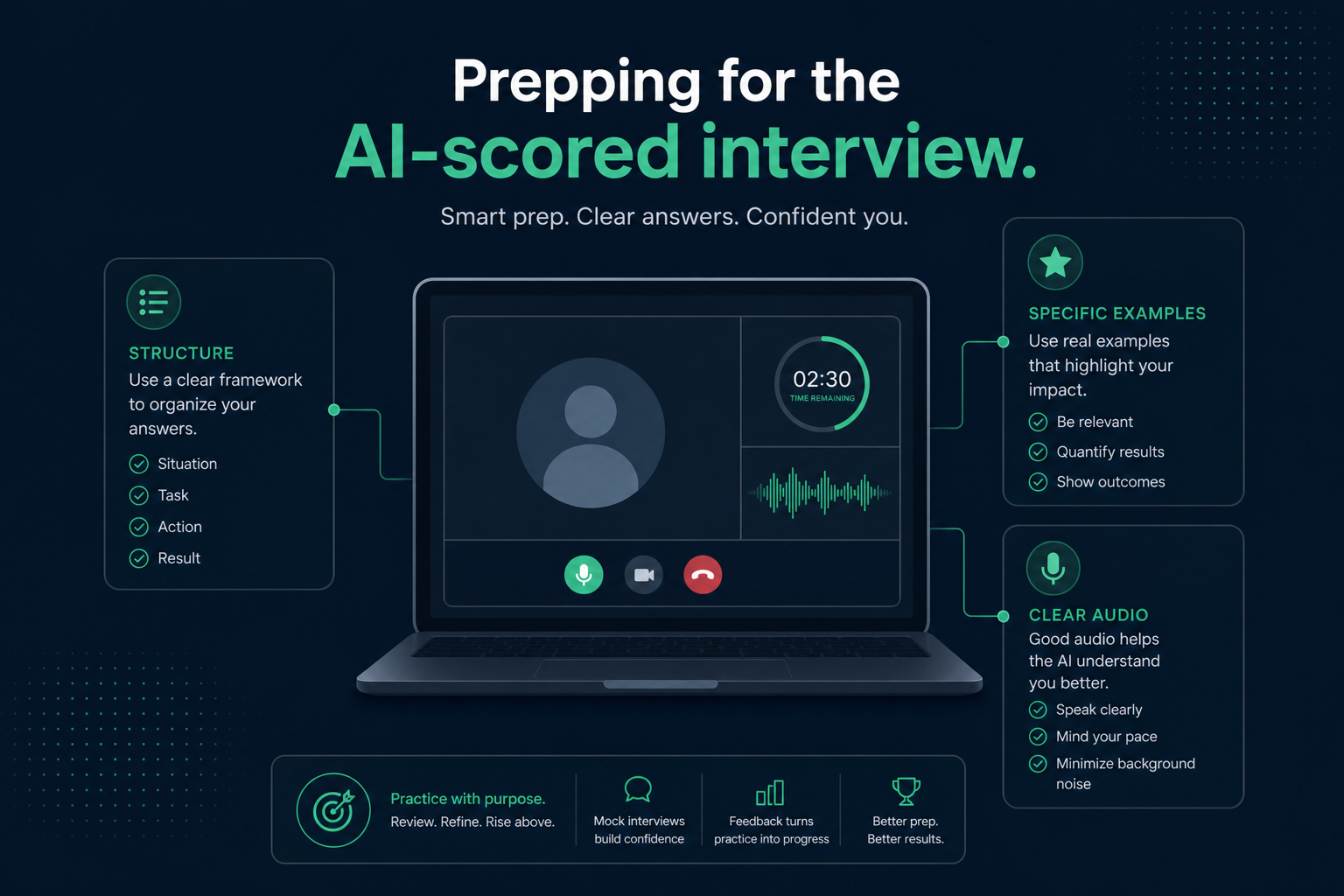
You get a link, a set list of questions, and a timer. You record your answer to a camera with no one on the other end, submit, and wait. This is the async AI video interview—a format that has moved from "occasional first-round filter" to a default step for a large share of mid-size and large employers' hiring funnels in 2026, especially for high-volume roles in retail, customer service, sales, and early-career tech.
Because there is no interviewer reading the room, candidates often either underprepare (treating it as a formality) or overprepare in the wrong direction (assuming facial-expression analysis decides everything). Neither is accurate. This guide covers what these systems actually score, what they generally do not, and a preparation approach that works regardless of which specific platform you are asked to use.
Key Takeaways
- What async AI interview platforms actually measure
- What most platforms explicitly do not score (and why the rumors persist)
- The five most common mistakes that tank a strong answer
- A structure for answering that scores well and sounds natural
- A practical prep checklist for the day of your recording
What async AI interview platforms actually measure
Key Takeaway
Scoring layers focus on transcript content, structure, and pacing—not on how you look, despite what most candidates assume.
Platforms vary, but the scoring layer most of them share focuses on the content and delivery of your spoken answer, transcribed to text and analyzed alongside audio signal:
- Answer relevance and structure. Does your response actually address the question asked, and does it follow a recognizable shape (situation, action, result) rather than rambling?
- Specific, concrete language. Same pattern as resume screening—an answer with a named project, a number, or a specific outcome scores higher than a vague generalization.
- Pacing and clarity of speech. Extremely long pauses, excessive filler words, or answers that run far short of or over the expected time can affect the transcript-based score.
- Keyword and competency alignment. Many platforms map your answer against a rubric tied to specific competencies the role requires (e.g., "conflict resolution," "attention to detail") and score how clearly your answer demonstrates that competency.
These video screens rarely stand alone. Most large employers embed the video-interview step directly inside their existing applicant tracking pipeline—a Workday-hosted careers site or a Greenhouse portal will send you the recording link automatically once your resume clears the initial parsing stage, and your video score gets attached to the same candidate record the ATS is already tracking.
What most platforms do not score (despite the rumors)
Key Takeaway
Most major platforms have moved away from facial-expression scoring—content and pacing matter far more than forced smiling or perfect staging.
A lot of anxiety around these tools comes from older, widely reported controversy around facial-expression and "emotion" analysis in early video interview products. Following legal challenges and regulatory scrutiny in several jurisdictions, most major platforms have publicly moved away from facial-expression-based scoring, focusing instead on transcript content and speech pacing. That does not mean camera presence is irrelevant to how a human reviewer later perceives your recording—it means the automated score itself is generally not derived from analyzing your face.
Worth your prep time
- What you actually say and how you structure it
- Specific examples with a concrete outcome
- Clear audio and a quiet environment
- Answering the actual question asked, first
Lower priority than you'd think
- Forced smiling or exaggerated enthusiasm
- Perfect background staging (a clean, plain one is enough)
- Memorizing a script word-for-word
- Camera angle beyond basic eye-level framing
A calm, well-organized, specific answer consistently outperforms a performatively "energetic" one with weak content. Direct that nervous energy into preparing better examples, not into over-rehearsing your smile.
Five mistakes that tank a strong answer
Key Takeaway
Most score-killing mistakes are fixable in one practice run: answer the actual question, name a concrete outcome, and use the retake if you flub the first take.
- Answering a different question than the one asked. Nerves push people toward a rehearsed story instead of the actual prompt— restate the question in your head before you start speaking.
- No concrete outcome. "I helped the team hit our goals" gives the transcript nothing specific to score—name the goal and the result.
- Running dramatically under or over the time limit. A 30-second answer to a question expecting 90 seconds reads as underprepared; doubling the limit often gets cut off mid-point.
- Bad audio. A noisy room or a laptop mic picking up echo can degrade transcription quality enough to affect the content score—use headphones with a mic if you have them.
- Not re-recording when you flub the first take. Most platforms allow at least one retake per question—use it if your first answer trailed off or missed the point, rather than accepting a weak take out of nerves.
A structure that scores well and still sounds natural
Key Takeaway
STAR works because it matches what both the AI layer and a human reviewer look for: context, a specific action, then a named outcome.
The classic STAR format (Situation, Task, Action, Result) works well here precisely because it matches what both the AI scoring layer and a later human reviewer are looking for: context, then a specific action, then a named outcome.
A 60-90 second answer, roughly:
- 10-15 seconds: One sentence of context—the situation or challenge.
- 10-15 seconds: What specifically you did, in first person, using an active verb.
- 20-30 seconds: The result, with a number or concrete outcome if you have one.
- 10-15 seconds: One sentence tying it back to the role you are interviewing for.
Practicing this shape with two or three of your strongest stories ahead of time means you can adapt to whatever specific question the platform asks instead of freezing when the exact prompt is not one you rehearsed verbatim.
Day-of prep checklist
Key Takeaway
Test your tech thirty minutes early and have two or three STAR stories ready—most day-of failures are preventable, not talent problems.
- Test your camera, mic, and internet connection at least 30 minutes before your session opens
- Pick a quiet room with a plain background and a light source in front of you, not behind
- Have two or three STAR-structured stories ready that cover teamwork, a challenge, and a measurable win
- Read the full question list (if shown in advance) and jot one keyword per question, not a full script
- Keep a glass of water nearby and plan a short pause between questions if the platform allows it
- Re-read the job description once more right before you start, so relevant language is fresh
What these platforms are actually scoring
Key Takeaway
No single signal dominates the score—a composite across content, pacing, and structure means strong content can offset a rough delivery, but not the reverse.
Most async AI interview platforms converge on a similar set of signal categories, even when they brand them differently. Understanding each one lets you direct your preparation toward what actually moves your score rather than spending time on things the system does not weight.
| Signal | What it means | How to improve it |
|---|---|---|
| Keyword and content relevance | Your transcript is compared against competencies tied to the role — words and phrases that signal the specific skill being screened for. | Re-read the job description directly before you record and mirror the exact language used for the core skill in the question. |
| Answer structure | Does your response follow a recognizable shape — situation, then action, then outcome — rather than a loose string of connected points? | Practice a brief opening (context), a focused middle (what you did specifically), and a clear close (the result). Avoid wandering between two separate stories. |
| Speech pace and filler-word frequency | Your audio is analyzed for words such as "um," "uh," "like," and "you know," as well as for unusually long pauses or rushed delivery. | Record a short practice answer and play it back. Most people are surprised by how often filler words appear in live speech versus a prepared, deliberate delivery. |
| Eye contact and camera presence | Looking at your camera lens rather than at your own face on screen signals engagement to both the scoring layer and any human reviewer who watches the recording later. | Place a small dot sticker beside your camera to give yourself a visual anchor. Look at the lens, not the screen. |
| Sentiment and tone | Platforms assess whether your word choices and vocal energy read as positive and constructive versus flat or negative — particularly in questions about challenges or conflict. | Frame setbacks as learning moments. End your answer with a forward-looking sentence rather than dwelling on the problem itself. |
| Answer completeness | Did you reach a natural conclusion within the time window, or did you run out of things to say at the 30-second mark for a 90-second question? | Know your expected time window in advance and time your practice runs. An answer that fills roughly 80 percent of the allowed time is the safe target. |
No single signal dominates. Platforms typically produce a composite score across multiple categories, which means a stumble on pacing can be offset by especially strong content — and a polished delivery cannot rescue a vague, off-topic answer.
A technical setup checklist that actually affects your score
Key Takeaway
Lighting, camera height, and a wired connection affect transcription quality directly— fix these before you worry about how you look.
Most setup advice for video calls focuses on aesthetics. The items below focus on technical factors that can degrade your recording in ways that directly harm the scoring layer — not just how you look, but how clearly your content is captured and transcribed.
- Light source in front of you, not behind you. A window or lamp behind you turns your face into a silhouette. The AI and any human reviewer need a clearly lit face. Sit facing a window or place a desk lamp between you and your camera at roughly eye level.
- Camera at eye level, not below it. A laptop on a desk means the camera is aimed up at your chin. Stack the laptop on books or a box until the lens is level with your eyes. Looking down into a camera reads as disengaged regardless of what you are saying.
- Wired internet connection over Wi-Fi where possible. Dropped frames or a buffering pause mid-answer can cut off the final words of your response — typically the result, which is the highest-scoring segment of a structured answer. If your router is nearby, an ethernet adapter costs very little and removes the single biggest technical risk.
- Close every other application before you start. Screen recording tools, browser tabs streaming video, and cloud-sync software can all cause frame drops and audio glitches. Close anything that is not needed for the interview session itself before you launch the platform.
- Use headphones with a built-in microphone. Standard laptop microphones pick up keyboard echo, room reverb, and ambient noise. Even inexpensive wired earbuds with a mic produce a cleaner transcript than a built-in laptop mic in a typical home or office environment.
- Do one full practice recording and watch it back before your session. This is the single highest-impact setup step. A practice run reveals audio problems, lighting issues, distracting background items, and filler-word habits that no written checklist surfaces. Watch it without audio first to check visual presence, then again with audio to catch pacing and content gaps.
- Confirm browser permissions at least 30 minutes before your session opens. Camera and microphone access errors at the start of a timed interview are not easily recoverable. Most platforms specify a supported browser — confirm yours matches and that permissions are granted well before the countdown begins.
One rule of thumb
If your environment produces a clean recording for a short practice run, it will hold for the real session. Test first, then trust your setup. The 10 minutes before your session opens are better spent reviewing your answer examples than rearranging your room.
If a video screen is one checkpoint, your resume is the one before it.
Confirm it parses cleanly with HireFlow's free ATS resume checker — no signup required — before you get to the interview stage.
Answer structure that scores well without sounding robotic
Key Takeaway
The label does not matter—what scores well is a specific narrative with a real endpoint and a one-sentence bridge back to the role.
STAR gets overexplained to the point where candidates produce stilted, mechanical answers that technically follow the format but sound memorized and hollow. What the scoring layer actually rewards is not a labeled four-part checklist — it is a complete, specific narrative with a concrete endpoint. The label does not matter; the shape does.
A practical way to think about it: your answer needs a setup (one sentence of context), a center of gravity (what you personally did, in specific terms), a landing (a real, named outcome), and a one-sentence bridge that connects the story to the role you are applying for. That final sentence is what most candidates omit — and it is what elevates a technically solid answer to one that also signals role-fit to both the AI layer and a human reviewer.
The difference in practice
Here is the same story told two ways in response to: "Tell me about a time you had to meet a tight deadline."
Before — rambling, low-signal
"So, we had this big project that was due really soon and my manager was putting a lot of pressure on us. It was really stressful because the team was not all on the same page about what needed to happen, and I kind of had to step up, you know. I stayed late a few nights and made sure everyone knew what they needed to do. We ended up getting it done and the client was happy so that was good. I think it showed that I can handle pressure and communicate well."
After — structured, high-signal
"At my previous company, our product team had a client deliverable due in four days after a key developer left mid-sprint. I mapped the remaining tasks, redistributed them across two engineers based on availability, and set up a brief daily check-in to catch blockers early. We shipped on time and the client extended the contract for another quarter. I am drawn to this role partly because managing delivery timelines under shifting constraints is something I genuinely find energizing."
The second answer does not announce its structure or use the word "STAR." It tells a specific story, names a concrete outcome, and ends with a sentence that connects to the role. That is the shape the scoring layer rewards.
A few things to notice in the revised version: the situation is one clause, not a paragraph. The action names something specific — redistributed tasks, set up check-ins — rather than "I took charge." The result carries a real business outcome rather than a vague impression. And the final sentence is present-tense and forward-looking, not a retrospective summary of the experience.
Prepare two or three stories that you know well enough to adapt on the fly. You will not know every question in advance — but if your stories are genuinely familiar to you, you can reach for them when a question touches teamwork, pressure, conflict, or results, and shape them to fit the prompt in real time without freezing.
Where to take this next
Key Takeaway
Prepare for both screening layers with the same habits: specific, quantified language and a resume that parses cleanly before you ever hit record.
An AI video interview is usually a checkpoint after your resume has already been screened, so the two systems reward similar habits—specific, quantified language over vague claims. If you have not already, run your resume through HireFlow's Job Match Score before the interview stage so you know exactly which parts of your background the employer is likely to probe, or run a free structure scan on HireFlow . For more on what happens before this stage, see our breakdown of how AI resume screening agents score you .
Frequently asked questions
Most platforms allow at least one retake per question, and some give you two or three. Check the platform instructions before your session starts — the retake option is usually shown on the same screen as your recording controls. If you flub the first take, use the retake rather than submitting a weak answer out of reluctance to seem indecisive. A confident second take is always better than a poor first one.
Reputable platforms with regulatory exposure in the US and EU have moved away from prosody scoring that correlates with accent, under pressure from anti-discrimination concerns. Practically, what matters most is that your speech is clear enough to transcribe accurately — if the platform cannot turn your audio into an accurate transcript, the content score suffers regardless of accent. Speaking at a measured pace and recording close to a good microphone reduces transcription errors more than any other single change.
The platform will usually give you a time window — follow it closely. If you are not given one, aim for 60 to 90 seconds for a behavioral question and 45 to 75 seconds for a factual question such as "Tell me about your experience with X." Answers shorter than 30 seconds rarely contain enough content to score well; answers longer than two minutes tend to lose focus and often end with the weakest part of the story.
It depends on how the employer has configured the platform. In many high-volume funnels, only candidates who pass the automated score threshold are watched by a recruiter. In others, the AI score is used to rank or sort, but a human watches all recordings above a cut-off score. Either way, preparing for a human audience as well as an AI audience costs nothing extra — a clear, specific, well-structured answer works for both.
To a human reviewer, noticeable eye movement to one side combined with reading pauses is visible. More importantly, heavily scripted answers tend to sound flat and unnatural, which can affect both automated tone scoring and the impression you leave on any recruiter who watches later. A better approach is to put one or two key phrases on a sticky note placed at eye level beside your camera — just an anchor, not a script — so you stay present while keeping your main points accessible.
Treating the format casually and giving the same vague, unprepared answer they might offer as a warm-up question in a live interview. The async format removes the back-and-forth that lets a live interviewer prompt you for more detail or redirect a wandering answer — every response has to be self-contained and specific enough to stand alone. Candidates who prepare two or three concrete, quantified stories and practice delivering them on camera consistently outperform those who rely on thinking well on their feet.