8 min read
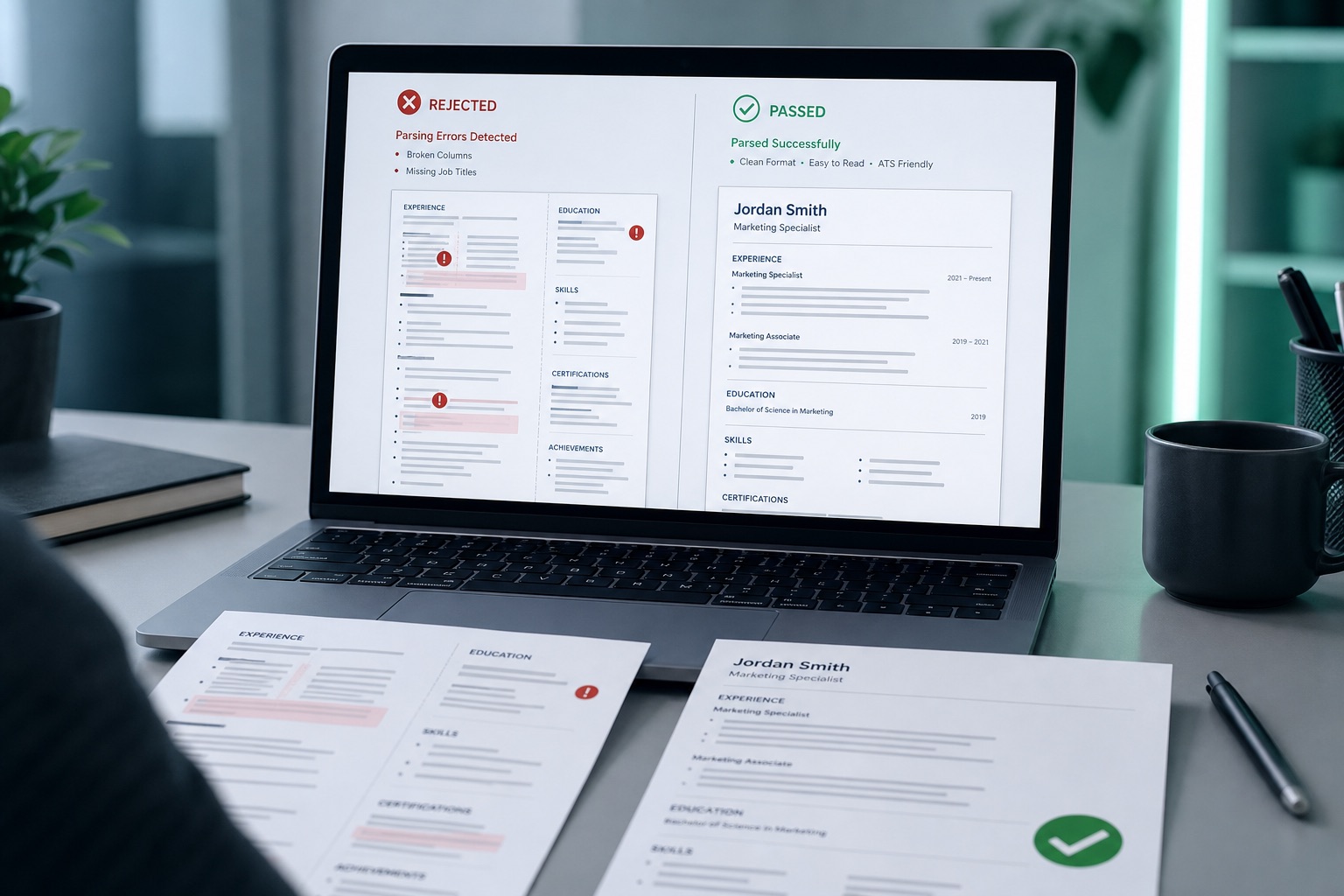
ChatGPT didn't ghost you. A column layout, a skills block that's the job posting in disguise, or a summary that could belong to anyone probably did. Candidates blame "the AI filter" when the file never stored their last title correctly.
You can't see which layer failed from the outside. That's why you'll want a parse preview before you spend another hour on synonyms.
Before you prompt for synonyms again, check your resume for free and confirm titles, dates, email, and employers paste out of the PDF as plain text. If that preview is empty, wording tweaks won't matter this week.
Job searching is already heavy. This won't fix applying ten levels above your scope. It stops a qualified file from dying because a template hid your contact line in a header the importer ignores.
Quick wins
- Rebuild in one column with Experience, Education, Skills in that reading order.
- Move phone and email under your name in the body, not the margin header.
- Replace one stuffed skills line with a bullet that names the tool and the outcome.
Three silent layers behind "AI filtered my resume"
Recruiters and applicants use one phrase for three different failures. Parsers turn your upload into fields. Match tools compare extracted text to the posting. A human still skims what survives. When people say AI resume mistakes that get you filtered, they're often mixing all three.
Parse layer: Workday-style importers choke on tables for dates, text boxes, and contact trapped in headers. Your PDF looks fine. The candidate record shows blank job titles or no email.
Match layer: Keyword lists without bullets can inflate overlap scores while giving ranking agents nothing to weight in Experience. Generic AI summaries repeat posting language without scope.
Human skim: Uniform bullet length, inflated verbs, and round percentages with no baseline read like an unedited draft even when Greenhouse parsed the file cleanly.
Treat the layers in order. Tailoring keywords on a file that never imported your employer name is wasted effort. Read Workday resume upload formatting fixes for US applicants when the portal preview already looks wrong before anyone reads a bullet.
Lever and iCIMS show their own quirks, but linear text, standard headings, and selectable characters cover most corporate stacks. The stricter importer you design for, the fewer surprises on the next application.
Which layer failed you (symptoms first)
You don't need a mystery algorithm. You need a short symptom map so tonight's edits hit the right layer.
- Parse check: Copy the top of your PDF into Notepad. If email, phone, or employers vanish, rebuild layout before keywords.
- Portal preview: After upload, open the candidate view if the site shows one. Blank Experience fields mean structure, not tone.
- Callback pattern: Wide silence with no emails often tracks parse failure. Quick rejections on a plain DOCX point to match or skim.
- Voice pass: Read three bullets aloud. Cut any line you wouldn't say on a phone screen.
Copy-paste job header block (plain text, one column):
Jordan Lee | Austin, TX | 512-555-0198 | [email protected]
LinkedIn: https://linkedin.com/in/jordanlee

EXPERIENCE
Acme Logistics | Operations Analyst | Jan 2022 to Present
• Cut average ticket cycle time from 4.2 days to 2.6 days by rewriting intake and dropping two approval steps.
Before: Two-column Canva export with skills in a left rail and titles in a narrow right column. Parser stores a skills paragraph where job history should live.
After: Single column with Experience above Skills. Same content, but importers read employers before tool lists.
Before: AI summary reads, "Results-driven professional leveraging cross-functional synergy to drive impactful outcomes."
After: "Operations analyst at Acme Logistics; rebuilt intake forms and reporting for a 40-person support desk." Specific beats polished when a recruiter has ten seconds.
I've screened stacks of AI-polished files in Workday and Greenhouse, and the ones that reach a human are boring on layout and specific in bullet one.
If you're unsure whether tailoring caused the drop, read can AI tailor my resume to a job posting for where automation helps versus where it creates stuffed skills.
AI resume mistakes that get you filtered in the wording pass
Models optimize for readable PDFs, not importer logic. These patterns show up on filtered files more than "wrong font" ever does.
- Sidebar skills: Greenhouse may keep text but reorder it so Skills precede Experience in the extracted stream.
- Header contact: Branded headers look professional and drop email on import.
- Creative section titles: "Career Journey" instead of Experience lands in miscellaneous text.
- JD paste in Skills: Every required term listed with no bullet behind it.
- Same-length bullets: Two-line bullets with executive verbs and no baseline numbers you can explain.
Keyword density without proof hurts on the match pass. See why keyword stuffing lowers ATS score if your tailored file ranks low even though every posting word appears somewhere.
Marketing bullet swap: Before: "Executed omnichannel campaigns to enhance brand awareness and engagement." After: "Grew organic blog sessions from 18K to 29K in two quarters by rebuilding 12 money pages and fixing internal links from top guides."
Engineering bullet swap: Before: "Built scalable solutions using best practices to improve user experience." After: "Reduced p95 checkout API latency from 820ms to 310ms by adding a read-through cache and batching three authorization calls."
Keep tools in the line (SEO, API, latency) without pasting the posting. That's the balance that survives both automated ranking and a skeptical hiring manager.
Check structure, then match
Run the same file you'd upload. You want titles and contact visible in preview, not buried in a graphic banner.
Run the free ATS check first. Fix columns, tables, and missing fields. Then score your job match against the posting once structure passes. If the role asks for a short letter, generate a cover letter that repeats one proof bullet, not a stuffed skills list.
When parse fails, rebuild in Build your resume with a linear template instead of fighting a design export for the third night in a row.
Fix order tonight
AI sped up drafting. It didn't replace parser rules. Confirm extraction, place each must-have term once in proof, then edit voice by hand. That sequence is how you move from silent drops to files a recruiter can actually reject for a real reason.
Start with structure. Check your resume for free on the upload version, fix anything that blanks titles or contact, then tailor and humanize the draft. You'll know which layer was failing instead of guessing.
Read more
Frequently asked questions
No. Most filters fail on structure and proof, not authorship. A single-column file with real titles, dates, and bullets you can defend in a screen usually passes the same gates as a hand-written resume. Shipping unedited model output with stuffed skills and header contact is what triggers silent drops.
Wide silence with almost no rejection emails often points to parse failure: blank titles, missing email, or empty experience in the portal preview. Fast auto-rejections on a plain Word file more often point to weak match or generic wording. Run a structural check first. If fields extract cleanly, shift effort to tailoring and bullet edits.
No. That pattern creates a skills dump that mirrors the posting without experience behind it. Pull five to eight must-have terms, place each once in a bullet you can explain, and keep Skills for tools you actually used. Repeating the same phrase in every line reads like stuffing to matchers and recruiters.
Follow the portal when it names a format. When it does not, use a text-selectable DOCX or a PDF exported from Word or Google Docs. Design-tool and Canva exports often flatten text, which leaves experience fields empty even when the layout looks sharp on your laptop.