By Peter Miller · Published March 24, 2026 · Last updated: October 4, 2026
7 min read
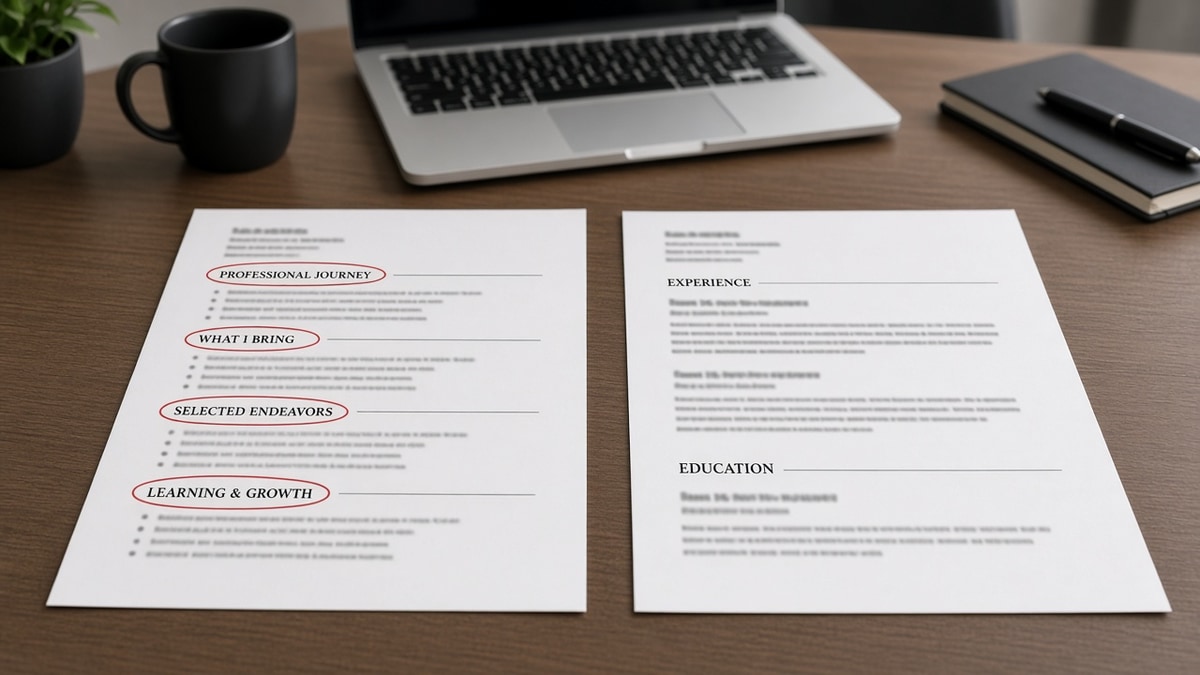
Templates promise personality through headings like Impact Journey or Leadership Footprint. Parsers promise nothing except field names they already know.
When your best work sits under a label the machine cannot route, you'll look underqualified even with ten years on the page. That's the symptom we're diagnosing.
You can't charm an importer with branding. You can only give it headings it has seen ten thousand times before lunch.
If you've been told to stand out, stand out in bullets and outcomes, not in section titles recruiters never repeat out loud.
Before you rename another section, check your resume for free and read where each block landed after upload.
Quick Wins
- Rename custom headings to Experience, Education, or Skills.
- Move paid work out of Projects and into dated employer lines.
- Paste to plain text and confirm sections stay in order.
Symptoms when custom sections break the file
Experience looks empty while a paragraph field is huge. That pattern means jobs imported as free text, not rows with dates.
Another tell: skills show up, but employment does not, even though your PDF looks full. The parser latched onto a friendly heading and missed the work block entirely.
Recruiters may still open the PDF attachment, but filters and sorts run on structured fields. Missing rows means you never enter the short list those tools build.
Silence after apply feels personal. Sometimes it is a parser that never attached your last two roles to Experience. Fixing headings is faster than assuming the market hates you.
How parsers map section labels
Importers scan for heading text, then attach following lines to a bucket. Workday, Greenhouse, Taleo, and iCIMS differ on details, but the bucket list is narrow. Fancy fonts on headings do not change that list.
Experience expects employer, title, and dates. Education expects school and degree. Skills expects a list or short lines. Anything else is a gamble.
Why custom sections hurt parsing is not spite. It is pattern matching with no human to fix your clever title at import time.
I've seen profiles where a Career Highlights block swallowed three jobs because the parser treated it as summary text above a single employer row.
Summary sections are not evil. They become a problem when they replace dated employer lines or when the summary heading is so long it looks like a section break to the importer.
Certifications and licenses deserve their own standard label when you have them. Do not bury a required license inside a custom Awards and Distinctions block without the word Certifications nearby.
Quick diagnostic: parser or content gap?
Upload the file and open the structured view. If employer count is zero but word count in notes is high, you are fighting headings, not fit.
If employers import but dates are wrong, switch to formatting fixes first. Custom sections and broken columns often show up together.
Before: Preview shows one job and a giant Other field.
After: Preview lists four jobs with titles and Month Year ranges under Experience.
Which custom label caused the drop?
| Your heading | Likely parser bucket |
|---|---|
| Professional Journey / Career Story | Summary or notes, not experience rows |
| Selected Engagements | Projects or uncategorized text |
| Core Competencies | Skills, sometimes duplicated oddly |
| Impact Dashboard | Often ignored or merged into summary |
| Publications & Thought Leadership | Publications if lucky; otherwise uncategorized |
When in doubt, paste the heading into a job posting's required fields mentally. If you cannot imagine a form field with that exact name, rename it before upload. Recruiters will not miss your clever title if the jobs finally show up.
Compare with resume contact information for ATS when the top of the file also uses nonstandard blocks.
Fixes when custom sections stole your timeline
Fold highlights into Experience
Before: Career Highlights lists three employers with bullets but no Experience heading.
After: Experience section with Company · Title · dates, same bullets nested under each employer.
Collapse consulting clients
Before: Client Portfolio section with six names, no parent employer.
After: Independent Consultant · Jan 2022 to Present with client names inside scope bullets.
Copy-paste: safe heading block
Experience
Education
Skills
Volunteer work can stay under Experience if it is recent and relevant. Label the organization like any other employer with Month Year dates.
Academic candidates often split Research and Teaching. Hiring managers in industry searches still want Employment or Experience with dates first. Move academic sections below unless the req is faculty.
Military experience should use plain employer lines with branch and role, not only a custom Service Record section without dates beside each assignment.
For layout issues that scramble headings, read common ATS resume formatting mistakes next. Section labels and columns often break together.
Renames that still fail parsers
Work History instead of Experience sometimes maps, sometimes not. Experience is the safer default in US corporate flows.
Technical Skills duplicated under two cute names creates duplicate skill blobs and can push experience down the import order.
Summary titles that sound like sections, such as Executive Profile spanning a page, can eat the first employer block when the parser thinks the summary never ended.
Mixing languages on headings (Expérience next to Skills) can route one block and drop the other depending on locale settings.
Job searching is draining when you do everything right and still hear nothing. Standard headings are one variable you can control tonight without rewriting your whole career story.
Verify section routing before you tailor
Upload once with a test application or checker view. Scroll structured experience, not just the PDF thumbnail.
Build your resume with default headings if your designer export keeps inventing new labels on every save.
Standard sections will not fix a skill gap. They stop qualified timelines from living in a notes field recruiters never open.
Keep a human-designed PDF for networking if you want flair. Send the plain heading version to employer portals so both audiences get what they need.
Headings are instructions, not decoration
Why custom sections hurt parsing comes down to routing. Give the importer labels it already knows, then put your personality in the bullets where humans actually read.
Rename one custom heading, re-upload, and compare previews. That single test tells you more than another hour of keyword tweaking on a misrouted file.
Your story does not get smaller when headings get standard. It gets easier to find in the queue where decisions actually happen. That is the whole point of sending a file into an ATS at all.
If you send a short note with the file, align section names with the cover letter generator output so nothing references a heading that no longer exists on the resume.
Frequently asked questions
Sometimes a human-only PDF shared by email can use flair. For employer uploads, standard labels win. Experience, Education, and Skills are recognized across most parsers. Cute titles often land in uncategorized text recruiters never sort on.
You can, but many systems treat Projects as secondary or merge it into notes. If the work was paid employment, keep it under Experience with clear dates. Use Projects for academic or volunteer builds that are not employers.
Skills or Technical Skills parses more reliably than branded labels like Value Proposition or Expertise Matrix. Put tools in bullets too. A skills heading alone does not replace proof lines.
Open the application preview. If jobs appear under Other, Notes, or a blank area while your custom heading vanished, the parser did not map that block. Rebuild under Experience with the same text.