12 min read
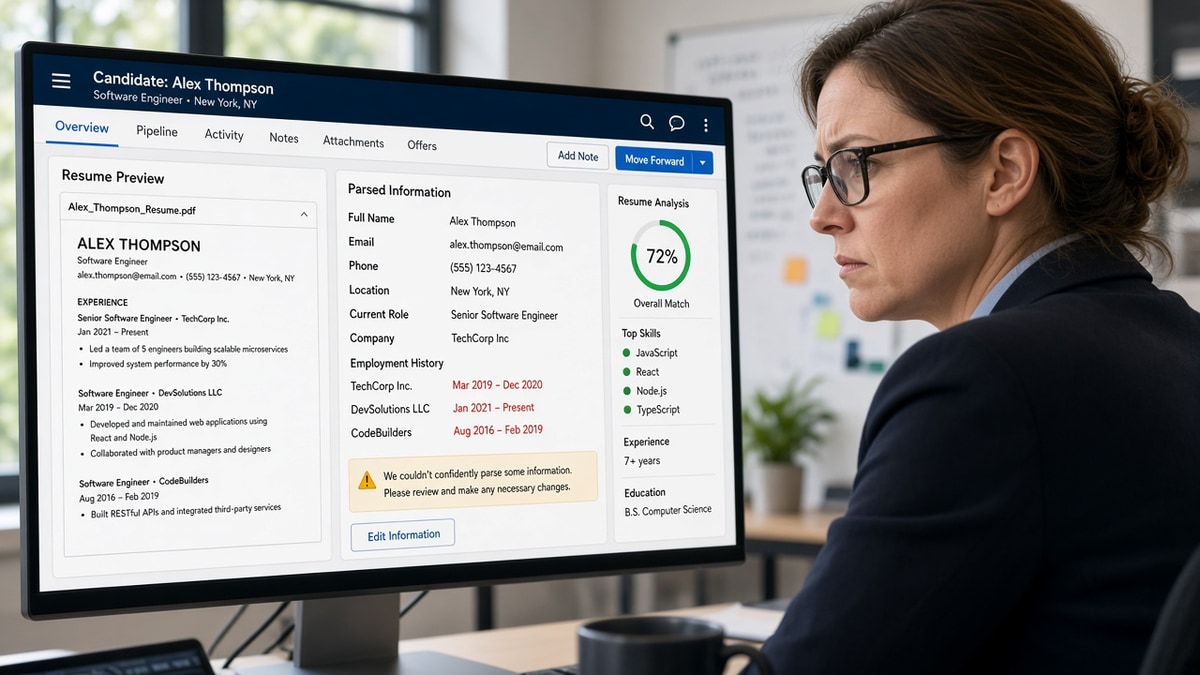
Your Lever application preview shows a job you left two years ago as still current. The PDF on your desk lists Mar 2023 plain as day. Lever parsing didn't miss your dates because you forgot them. It often drops end dates when Month Year sits in a table cell, a right column, or a line the parser reads out of order, so tenure reads as Present when it is not. Below you'll match the symptom to three common causes, learn how to tell which one hit your file, and apply the fix that matches before you re-upload.
You're not sloppy with timelines. You're uploading a layout Lever's importer can't stitch back together. Before you change employers or rewrite bullets, check your resume for free and confirm Month Year lines still extract in reading order.
Date errors feel personal because they look like you overstated tenure. Most of the time it's a parser gap, not dishonesty. I've screened enough Lever imports to know recruiters pause when end dates vanish even if the PDF looks clean on your screen.
This page walks through the symptom recruiters see, three causes that break Lever parsing, how to tell which cause matches your file, fixes for each, mistakes that survive a second upload, and where tools fit. When the posting also asks for a letter, generate a cover letter with employer names spelled exactly as they appear in Experience.
Quick Wins
- Put Month Year on the same line as each job title in reading order.
- Use Jan 2020 to Mar 2023, not slashes, ISO dates, or day-level stamps.
- Drop date tables and right-column layouts before you export.
- Read the Lever preview after upload; don't trust the PDF alone.
The symptom when Lever parsing drops end dates
The failure mode shows up the same way on most Lever portals. You upload a resume. The preview builds a work history. One or more past roles show a start month but no end month, so the line defaults to Present or Current.
Recruiters read that as inflated tenure unless they open the attachment. Many don't on the first pass. They filter on years of experience pulled from parsed fields, not from your PDF. When Lever parsing marks a 2019 role as current, you can look overqualified for an entry posting or underqualified for a senior one depending on which dates survived.
The PDF still looks correct on your machine. That's what makes this error madding. The source file and the parsed profile disagree, and the parsed profile is what populates recruiter search, compliance screens, and sometimes auto-reject rules on tenure.
Lever parsing is not unique in struggling with dates, but Lever-powered career sites are common at US startups and mid-size tech employers. If you're applying through a Lever link, assume the preview is the first version of your timeline a human sees.
For broader parser failures outside dates, see why your resume never reaches a human . Date gaps are one slice of the same layout problem.
Three causes of broken Lever parsing and how to tell
Lever parsing breaks dates for layout reasons more often than format typos. These three causes cover most files that look fine in Word but wrong in the preview.
Cause 1: Month Year trapped in a table cell
Word and Google Docs resume templates love invisible tables. Left cell holds employer and title. Right cell holds Jan 2020 to Mar 2023. Lever reads cells as separate blocks. It often grabs the company line and the start month, then treats the end month as orphaned text below Skills or Education.
How to tell: Click each date in your editor. If a table border highlights, or the date jumps in a box, you're in this bucket. The preview usually drops end dates on every role that used the template, not just one.
Before: Two-column table with Acme Corp in cell one and Jan 2020 to Mar 2023 in cell two on the same row.
After: Plain lines in reading order:
Senior Analyst
Acme Corp
Jan 2020 to Mar 2023
Cause 2: Dates aligned in a right column
Designed resumes put dates flush right while titles sit left on the same row. Visually clean. Parser-hostile. Lever reads left to right, top to bottom. When the title line wraps, the date line can attach to the wrong role or import as a standalone fragment with no end half.
How to tell: Toggle formatting marks. If dates sit in a separate text box or tab stop column, and only some roles lose end dates, suspect right-column alignment. Internships and short roles break first because their title lines wrap more often.
Before: Product Manager at left margin, Mar 2021 to Aug 2024 tabbed to the right on one line.
After: Product Manager, Beta Labs, Mar 2021 to Aug 2024 on one left-aligned line under the company name.
Cause 3: Mixed date formats inside one file
Lever parsing handles several Month Year patterns, but mixing them in one Experience section splits the parser's pattern matching. Role one uses Jan 2020 to Mar 2023. Role two uses 03/2018-11/2019. Role three uses 2017 to 2019. Each variation is readable to you. Together they produce partial ranges.
How to tell: Scan dates only, ignoring everything else. If formats differ row to row, and the preview breaks on the odd rows, standardize before you touch layout. Fixing tables without fixing formats leaves one stray slash to break the next role.
Before: Jan 2020 to Mar 2023 on role one and 04/2017 to 08/2019 on role two.
After: Jan 2020 to Mar 2023 on role one and Apr 2017 to Aug 2019 on role two with the same spacing and the word to on both lines.
The fix for each cause
Table trap: remove the table, paste plain lines, re-export DOCX. Right column: move dates under titles on left-aligned lines. Mixed formats: pick Month Year with three-letter months and apply it to every role, including internships and contract work.
Edge case: Present or Current roles. Write Jan 2022 to Present on the same line as the title. Do not leave the end date blank hoping the parser assumes ongoing work. Blank end fields import inconsistently across Lever builds.
Edge case: overlapping contract and full-time work. List both with full Month Year ranges on separate lines. Do not merge overlapping dates into one range to save space. Overlaps are fine; missing end dates are not.
Copy-paste block: Lever-safe date lines
{`FORMAT (use on every role):
Job Title
Company Name
Mon YYYY to Mon YYYY

EXAMPLE BLOCK:
Senior Analyst
Northwind Health
Jan 2020 to Mar 2023

Product Manager
Beta Labs
Mar 2021 to Present

INTERNSHIP (same format, no shortcuts):
Marketing Intern
Contoso Retail
Jun 2017 to Aug 2017

REPLACE THESE PATTERNS:
03/2018 to 11/2019  →  Mar 2018 to Nov 2019
2019-2021           →  Jan 2019 to Dec 2021
March 15, 2020      →  Mar 2020
Jan 2020 – Mar 2023 →  Jan 2020 to Mar 2023 (plain word "to", ASCII hyphen only if needed)

PRE-UPLOAD CHECK:
1. No tables around dates
2. No right-aligned date column
3. Same Month Year pattern on every role
4. Lever preview end dates match source file`}
Date fixes that still fail on re-upload
Candidates often fix the visible typo and re-upload without fixing the layout Lever parsing actually choked on. These habits keep end dates missing on the second try.
Editing the PDF instead of the source file. Changing text in a PDF editor does not restore reading order. Export a fresh DOCX from Word with tables removed, then build a new PDF if the portal requires it.
Trusting the attachment over the preview. Recruiters see parsed tenure first. If the preview says Present on a closed role, fix layout and upload again even when the attachment looks perfect.
Using Present in the body and a different label in the portal field. Some Lever forms ask for end date separately. Match the Month Year in your file to what you type in the form. Mismatched labels create duplicate roles with conflicting dates.
Leaving day numbers for polish. March 15, 2020 to June 30, 2021 looks precise. Lever parsing often strips days and keeps one month, or drops the end entirely. Month and year only is less pretty and more reliable.
Before: Re-uploaded the same Canva PDF after changing Mar 2023 to March 2023 in the editor.
After: Rebuilt Experience as plain lines in Word, exported DOCX, confirmed every end date in the Lever preview, then submitted.
For Workday-specific date table failures in healthcare layouts, see optimizing your resume for Workday ATS in US healthcare . The table trap is the same; only the portal skin changes.
Preview dates before you hit Submit on Lever
Layout fixes are easier when you see extraction order before the portal does. Upload your draft to HireFlow's free ATS resume checker and read the experience timeline top to bottom. If end dates disappear on the same roles Lever will struggle with, fix tables and columns in the source file first.
When you're rebuilding a file from a broken template, use build your resume to export a single-column DOCX with Month Year on each role line, then upload that export to the Lever preview instead of the designed PDF.
Do this now: Open your Lever preview, flag any role showing Present that should be closed, trace that role back to tables or right-column dates, apply the matching fix, and re-upload once the preview matches your timeline.
What to do now
Lever parsing breaks dates when layout splits Month Year from job titles, not when you forget to type an end month. Fix tables, kill right-column alignment, standardize formats, and trust the preview over the attachment.
- Flag every Present line in the Lever preview that should be closed.
- Rebuild those roles as plain stacked lines with Jan YYYY to Mon YYYY.
- Apply the same date pattern to internships and contract work.
- Re-upload once preview end dates match your source file exactly.
Open the Lever role you're targeting. Run a free ATS check , fix the layout cause that matches your file, and submit when parsed tenure matches your real timeline.
Read more
Frequently asked questions
Lever often drops end dates when Month Year sits in a table cell, a right-aligned column, or a line the parser reads after the employer name. The start date imports, the end date does not, and the profile defaults to Present. Open the application preview after upload. If end dates are blank while your PDF looks fine, the layout split the range, not your math.
Month Year on the same line as the job title is the format that imports most reliably: Senior Analyst, Northwind Health, Jan 2020 to Mar 2023. Use three-letter months, a space, four-digit year, and the word to between start and end. Avoid 01/2020, ISO strings like 2020-03, and day-level dates like March 15, 2020 unless the portal asks for them in a separate field.
DOCX from a plain Word file usually survives Lever parsing better than a designed PDF exported from Canva or InDesign. If the posting accepts Word, upload DOCX with single-column Experience and dates on the same line as each title. If PDF is required, export from Word with Calibri 11pt, no text boxes, and no date table. Then read the Lever preview before you submit.
Yes. When dates sit in a narrow right column and job titles sit left, Lever often reads the column with the company name first and treats dates as stray text. The parser may capture Jan 2020 but miss Mar 2023 on the next line. Switch to a single-column layout with title, employer, and dates stacked on consecutive lines in reading order.
Upload the same file to a Lever-powered careers page you are not prioritizing, or use HireFlow's free checker to confirm Month Year lines still extract in order. Compare every end date in the preview to your source file. One missing end date on an older role is enough to make tenure look inflated. Fix layout, re-export, and upload again until the preview matches.