10 min read
Your resume isn't wrong because you took a gap. It's wrong when March 2022, 03/22, and 2022 sit on the same page and Workday counts three different timelines. If you're fixing inconsistent dates on a US resume, don't hide months. Pick one Month Year standard, add a one-line gap note where needed, and make the portal fields match the file you upload.
Check your resume for free after you normalize dates. Parser warnings about employment blocks often trace to format mix, not missing jobs. Humans notice overlaps that look like double employment when year-only ranges collide.
Below: five steps, before/after pairs, edge cases, mistakes, and a copy-paste audit. You'll finish tonight without rewriting every bullet.
And if you've been hiding months to shrink a gap, stop. Recruiters aren't fooled by year-only ranges on recent roles. They'll ask anyway once the screen moves forward.
Month Year isn't fancy formatting. It's the default US corporate parser expects. When your dates already match, you won't lose interview slots to a timeline math error you could fix in ten minutes.
Quick Wins
- Month Year on every role: January 2022 to March 2024.
- Present for current job, not blank end date.
- One-line gap note with Month Year bounds, not year-only hiding.
- Same dates in portal work history as on the PDF.
Why inconsistent dates fail parser and human review
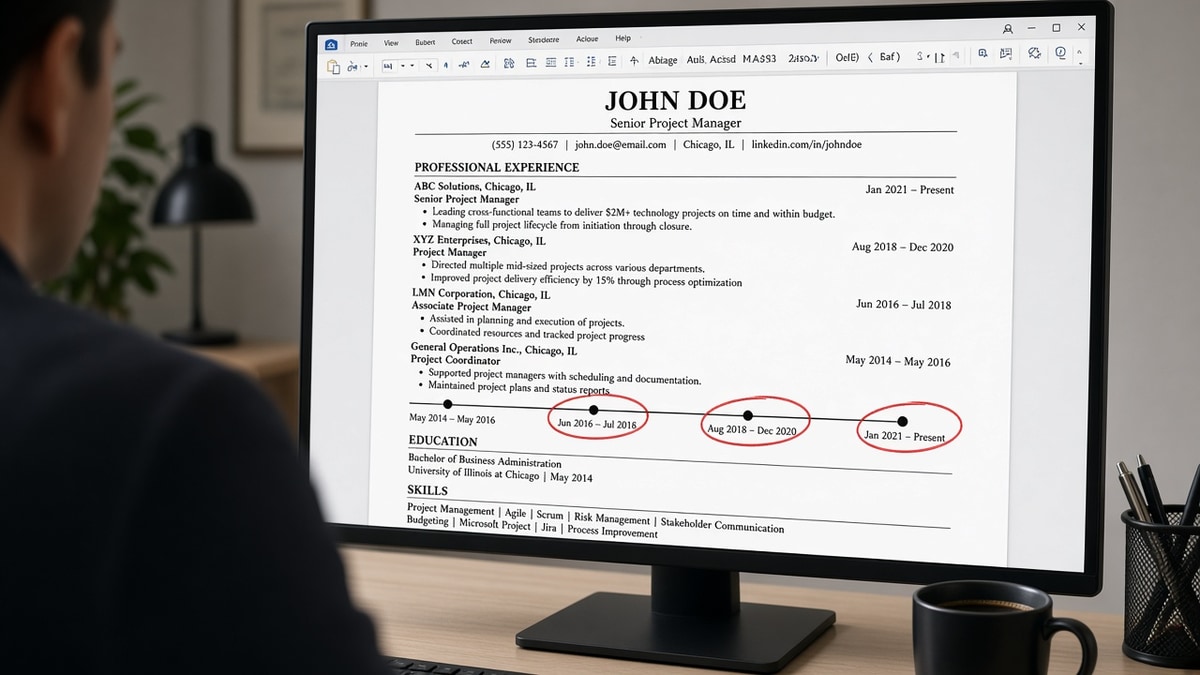
Workday and Greenhouse build a timeline from whatever text they extract. When one job uses 2021 to 2023 and the next uses June 2023 to Present, the parser may assume January starts on the year-only role and flag overlap with June. Humans then see two full-time jobs at once and stall the screen.
The fix isn't shortening history. It's making every start and end use the same Month Year pattern so math matches what you actually did.
A composite operations analyst showed 2019 to 2021 on an older employer and March 2021 to Present on the next. Looked fine visually. The parser read 2019 as January 2019 through December 2021, overlapping the current role by nine months. One format pass cleared the warning.
Read how far back a resume should go when trimming old roles after dates are stable.
US corporate norms expect Month Year on Experience even when your old European CV used day-first numeric dates. Convert before upload. Don't leave 14/03/2022 on the page beside March 2022 on the next employer.
Tenure filters in many portals count total years in role from parsed start and end. Wrong month assumptions shorten or lengthen your tenure silently. A six-month gap hidden by year-only labels can still surface in background checks even when the parser stayed quiet.
Freelance stacks often list Client A, Client B, and Client C with overlapping project dates. That's valid when each client is its own employer line with Month Year bounds. One paragraph labeled various clients 2020 to 2022 parses as one job with muddy scope.
How to fix inconsistent dates on a US resume: five steps
Step 1: List every start and end in a scratch column
Export PDF, copy Experience into a doc, write Start and End columns. Mark any line that isn't Month Year.
Before: 3/19, Spring 2020, 2021-22 on three employers.
After: March 2019 to August 2020, March 2020 to December 2020, January 2021 to June 2022.
Step 2: Convert to Month Year and Present
Replace numeric and seasonal labels. Use Present on the active role end date.
Step 3: Split merged employers and label overlap
Never stack two companies on one date line. Contract plus full-time overlap gets clear titles.
Before: Consulting and Staff roles 2020 to 2022 with one employer name missing.
After: ACME Corp, Marketing Coordinator, January 2020 to Present. Beta LLC, Part-time Content Consultant, June 2021 to March 2023.
Step 4: Insert gap notes instead of trimming months
One neutral line beats year-only ranges that fake continuity.
Before: 2022 and 2024 with no 2023 entry, months hidden on both roles.
After: Prior role ends June 2022. Gap line: Career break, relocation, July 2022 to February 2023. Next role starts March 2023.
Step 5: Match portal fields and scan upload
Type identical Month Year values into application work history. Paste final PDF into Notepad. Dates should stay on employer lines.
Workday often asks for start month and start year in separate dropdowns while your PDF shows one line. Pick the same month you typed on the resume. Greenhouse frequently offers one text field per job. Paste the same Month Year string you used in the export. Mismatch between typed portal history and uploaded PDF is a common silent flag in US corporate screen.
After alignment, scan once for employment block warnings. If warnings persist, paste Experience into Notepad again. Dates stranded on their own line below employer mean the parser will miscompute tenure even when humans read it fine.
International candidates sometimes carry two date formats from home country CVs. Convert all Experience to US Month Year before your first US corporate upload. Keep a home-country CV for local markets if needed; don't mix formats on one US file.
Before/after: finance analyst timeline
Before: Big Bank 2018 to 2020, FinCo 2020 to Present with numeric 08/20 hand-entered in portal only.
After: Big Bank, Analyst, August 2018 to July 2020. FinCo, Senior Analyst, August 2020 to Present. Portal matches PDF.
Before/after: nurse with per-diem overlap
Before: Hospital RN 2021 to Present and per-diem clinic 2021 to 2023 on one merged block.
After: City Medical Center, Staff RN, June 2021 to Present. Valley Clinic, Per-diem RN, January 2021 to May 2023.
Before/after: teacher with summer breaks
Before: School District Teacher 2019 to 2023 with no summer breaks noted; side tutoring 2020 to 2022 year-only.
After: District line shows August 2019 to June 2023 with contract months in bullets. Tutoring: Self-employed Math Tutor, September 2020 to May 2022, part-time.
Before/after: tech contractor with short gigs
Before: Stack of six clients under one heading 2021 to 2022 with no months.
After: Each client separate: ClientCo, Backend Developer, March 2021 to July 2021. Next client August 2021 to January 2022. Parser can map six scopes instead of one blob.
Copy-paste US resume date audit
Copy-paste before upload:
1. Every role uses Month Year start and end
2. Current job ends with Present, not blank
3. No 03/22 or Spring 2022 labels remain
4. Overlaps labeled part-time, contract, or concurrent project
5. Gaps have one neutral Month Year line
6. Education dates match style for recent degrees
7. Portal work history matches PDF exactly
8. Notepad paste keeps dates on employer lines
9. Layoff end dates match separation month, not last paycheck stub if they differ
10. Re-scan after any date edit before submit
Pair with laid off on resume examples when end dates reflect a layoff, not a voluntary gap.
Date fixes that backfire in US screens
Using Present on every open-ended gig. Only the current primary role gets Present. Ended contracts need real end months.
Stretching end dates to cover a gap. Background checks compare to W-2 dates. Honest Month Year beats invented continuity.
Putting dates in footers or text boxes. Parsers drop them. Keep dates on the same line as employer and title.
Mixing en dashes and the word to on one page. Pick one separator style and stay consistent.
Edge case: military or federal roles with different date conventions. Translate to Month Year civilian style and note service branch in title when relevant.
Edge case: acquisition rename mid-employment. One employer line with title progression beats two employers with duplicated overlapping months unless HR verifies separate entities.
Edge case: parental leave inside a continuous job. Keep one employer range and note leave in bullet text rather than splitting employment unless you formally resigned.
Listing graduation month on Experience by mistake. Keep education dates in Education. Don't put degree dates under a job block.
Using two-digit years. Write 2021, not 21, on US corporate files.
Automated resume builder defaults. Some builders output year-only until you edit each field. Override before export.
Edge case: promotion with no title change on HR system. Split bullets inside one employer line rather than inventing a fake end month. Dates stay continuous; scope bullets show growth.
When two roles ended in the same month, list both end months explicitly rather than stacking employers on one line. Same-month endings parse cleanly when each employer block carries its own Month Year pair and a blank line separates blocks.
This won't invent experience you don't have. It stops qualified timelines from looking like parser errors.
Parse check after dates are clean
After the audit, run a free ATS check on the PDF you'll upload. Employment block warnings often clear once Month Year is consistent.
Rebuilding from scratch? Build your resume in a single-column layout with date fields that export clean text.
Lock dates before the next apply
Learning how to fix inconsistent dates on a US resume means one Month Year standard, honest gap lines, and portal fields that match your upload. Mixed formats create false overlaps in Workday and Greenhouse long before a recruiter reads bullet one.
Print the copy-paste audit and mark each role pass or fail. Most fixes take one pass through Experience, not a full rewrite. Save the normalized master and fork bullets per req after dates are stable.
I've screened files where the candidate looked like they held two full-time jobs for a year because one line used years only. One format pass fixed the screen. Run the copy-paste audit tonight.
This won't replace employment verification. It stops your real timeline from parsing like a red flag.
When a posting asks for a letter, generate a cover letter that uses the same Month Year ranges as your resume, not a different timeline.
Date consistency also helps internal recruiters who pull your profile into interview packets. Misaligned months between resume and application look like sloppiness even when the underlying jobs are real.
Read more
Frequently asked questions
Use Month Year for start and end on every role: March 2021 to June 2024 or March 2021 to Present. Avoid numeric-only 03/21, seasons like Fall 2022, and year-only ranges on recent jobs. Present or Current is fine for an active role. Keep the same format in the portal work history fields when you type dates manually.
No. Year-only dates on recent roles trigger overlap flags when the parser assumes January starts. A one-line gap note with honest Month Year ranges reads cleaner than a timeline that looks like you worked two jobs at once. Recruiters notice hidden months faster than a three-month gap explained in one sentence.
List both jobs with accurate Month Year ranges and add part-time contract or concurrent project in the title line or first bullet. Do not merge employers into one block. Overlap is fine when labels are clear. The parser needs separate employer lines to score each scope block.
One neutral line in Experience between jobs: Career gap, family caregiving, March 2023 to August 2023. No paragraph essay. Match Month Year style on surrounding roles. If you took courses during the gap, one bullet under that gap line is enough.
Yes for recent degrees that sit near Experience. May 2024 for graduation beats 2024 alone when you're less than five years out. Older education can stay year-only if space is tight, but don't mix 2019 and May 2019 on the same page without reason.