11 min read
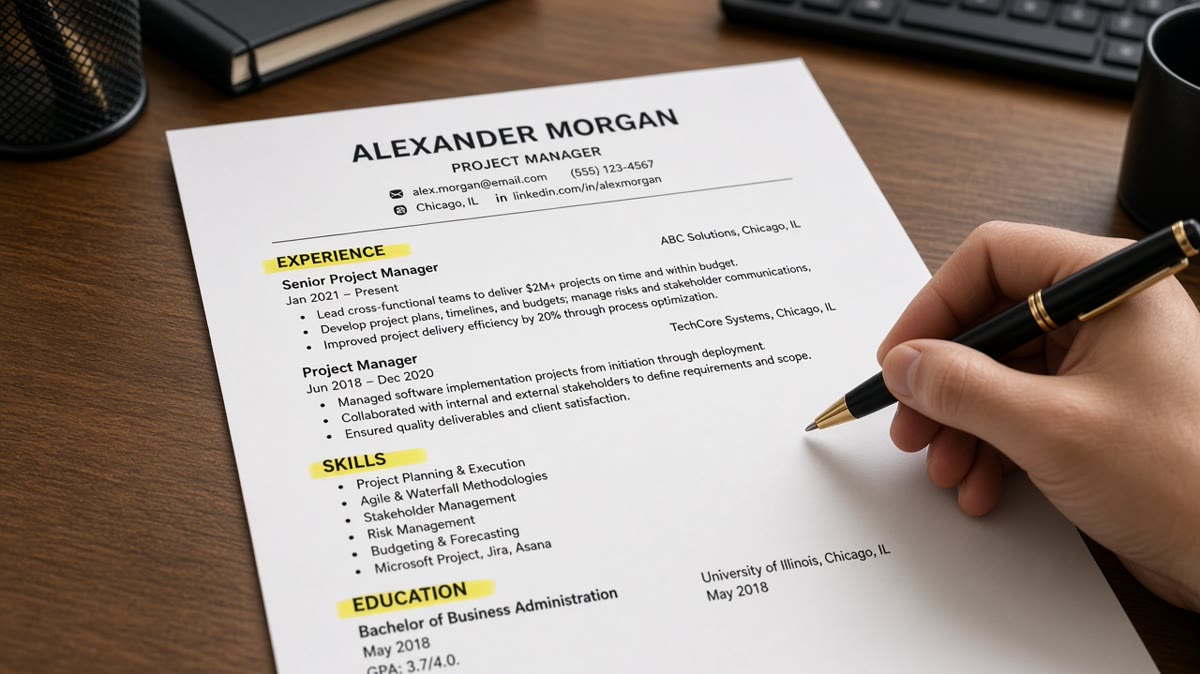
Resume headings affect ranking because ATS parsers assign bullets to labeled buckets like Experience and Skills. Use those standard labels on plain lines. Creative titles such as Career Journey often dump your best bullets into unlabeled fields recruiters never filter on. That's the answer. The rest of this page covers why parsers behave that way, when exceptions apply, and what to change before you upload again.
You're not dumbing down your brand. You're making sure the file imports into Workday with your roles in the Experience pane, not in a misc field below the fold. Before you rename another section, check your resume for free and read which headings survived the paste test.
Job searching is hard enough without guessing why a qualified file goes quiet. And if you're between roles, you don't need a lecture on design trends. You need headings boring enough for software and clear enough for a six-second human scan.
When the posting asks for a letter, generate a cover letter that references the same job titles under your Experience heading. Don't call yourself a revenue architect in the letter while the resume hides roles under Where I Delivered Results.
Quick Wins
- Rename creative headings to Experience, Education, Skills.
- Put each heading on its own line, left margin, no text boxes.
- Paste the export into Notepad and confirm section order.
- Keep Summary under six lines so it does not swallow keywords.
Why resume headings affect ranking in Workday previews
ATS software does not read your resume the way you designed it in a template shop. It segments the file into fields: contact block, summary, experience history, education, skills, certifications. The segmenter keys off heading text it has seen millions of times.
Standard headings map to searchable buckets. Creative headings map to nowhere useful. When Experience imports correctly, recruiters filter on title, employer, and dates inside that bucket. When your roles sit under Professional Story, the parser may still capture the text, but keyword filters and preview panes often weight the Experience bucket first.
Greenhouse and Lever behave similarly. Bullets detached from a recognized Experience label can appear as plain text blocks without employer linkage. That breaks tenure math and pushes must-have keywords below roles the matcher can count.
Humans follow the same scan path. A hiring manager opening forty files after lunch looks for Experience, then the current title, then Skills. A heading that sounds clever on Canva does not speed that scan. It adds a translation step you do not get in a stack ranking.
Resume headings affect ranking indirectly, not because the ATS awards points for the word Experience. They affect ranking because mislabeled sections change which lines enter filters, previews, and recruiter search. A bullet that never lands in Experience may as well not exist for the first screen.
Two-column layouts make this worse. Sidebars labeled Core Competencies sometimes import before Experience or merge into contact fields. Single-column boring headings beat a designed sidebar that shuffles order on upload.
Contact blocks suffer the same rule. Put phone and email under your name at the top. A heading called Reach Me or Let's Connect does not map to a contact field in most parsers. Recruiters still find you when the basics sit on line one without decoration.
Volunteer work and board seats belong under Experience when they are recent and relevant. A separate Giving Back heading often parses like a hobby block. If the posting cares about nonprofit leadership, date those roles like any other job.
Awards and speaking gigs can sit under Certifications or a short Honors line under Education. Do not create a Trophy Case section that sits between Skills and Experience. Anything between work history and education can reorder on import.
For file format while you fix labels, read how resume file type impacts screening . DOCX and PDF both work when headings are plain text on the main column.
Rename and test headings before you upload again
Open your master file and list every section title. Anything that is not Experience, Education, Skills, Certifications, or a short Summary gets renamed or merged tonight.
Step 1: Swap creative labels for parser-friendly ones
Before: Career Journey as the main roles heading, with employers listed underneath.
After: Experience as the heading, same employers and Month Year dates unchanged underneath.
Step 2: Collapse redundant skill sections
Before: Technical Toolbox, Platforms I Love, and Skills spread across a sidebar and footer.
After: One Skills section on the main column with comma-separated tools grouped by category if needed.
Step 3: Keep Summary short and separate
Professional Summary is fine when it stays under six lines and does not repeat every keyword from Skills. Long summaries swallow lines the parser could attach to dated roles.
Before: Executive Narrative spanning half a page before any employer name.
After: Professional Summary with three lines, then Experience with the first bullet proving the same claim with a date attached.
Step 4: Run the plain-text paste test
Export PDF or DOCX, copy all text into Notepad. Experience should appear as a word on its own line before the first employer. Skills should follow Experience and Education, not interleave with job bullets. If headings disappear or merge, flatten tables and text boxes.
Copy-paste block: ATS-safe heading layout
[Name]
[City, ST] | [phone] | [email] | [LinkedIn URL]

Professional Summary
[Three lines max: title, years, domain, one outcome]

Experience
[Employer Name], [City]
[Job Title] | [Month Year] to [Month Year]
• [Bullet with verb, object, metric]
• [Bullet tied to posting keyword]

Education
[Degree], [University], [Year]

Skills
[Tool], [Tool], [Tool], [Method], [Certification name]

Certifications
[Cert name], [Issuer], [Year]
Step 5: Match heading spelling to the posting when it matters
If the ad says Work Experience, use Work Experience instead of Experience. Most parsers treat them alike, but mirroring the req reduces edge-case imports in older Taleo builds.
Repeat must-have tools once in Skills and again inside a dated Experience bullet. Headings do not replace keyword proof. They only make sure proof lands where filters look first.
Step 6: Re-export as single-column PDF or DOCX
After renames, save a fresh export. Do not send the old PDF with hidden layers from a design tool. Word and Google Docs produce the cleanest heading hierarchy for most corporate uploads.
Before: Canva resume with icon bullets before every heading and a coloured sidebar for Skills.
After: Google Doc with left-aligned Experience, Education, Skills in black 11-point Calibri, no icons, one column.
Edge case: federal USAJOBS resumes use their own section order. Private-sector heading rules do not transfer. Follow the occupational series template even when it feels redundant.
Edge case: academic CVs list Publications and Grants as standard in higher ed. Industry resumes still use Experience for corporate applications. Do not paste a full CV into a Greenhouse req for a product manager role.
For parser errors after headings look correct, see why ATS filters out most applicants when the issue is layout rather than labels alone.
When standard labels are not enough
Boring headings fix most import problems. These exceptions still need a different approach without returning to creative titles.
Career change with unrelated job titles. Keep Experience as the heading. Use a one-line context note under the employer if needed: Relevant project work toward data analytics. Do not rename the section to Transition Story.
Contract-heavy timelines. Each client stays under Experience with Contract in the title line. A separate Engagements heading fragments tenure the same way Career Journey does.
Creative portfolios for design roles. Portfolio links belong in contact lines or a Projects subsection under Experience with dates. A Gallery heading without dates does not replace dated role proof.
International CV conventions. Some countries label sections Personal Details or Profile. US corporate uploads to Workday still favor Experience and Education in English. Adapt when applying abroad, not when the req is US-based.
Before: Skills listed only in a sidebar inside a two-column Canva template.
After: Skills on the main column after Experience, sidebar removed, same tools repeated once in a bullet under the current job.
Mistake: thinking keywords in a footer compensate for mislabeled Experience. Footer text parses last and filters weakly. Put must-have tools in Skills and prove them again under a dated title.
Mistake: stacking six micro-headings for every project. More headings mean more segmentation errors. Three to five section labels are enough for most corporate files.
Mistake: hiding employment gaps behind a Career Break heading without dates. Month Year boundaries on a sabbatical or caregiving line under Experience parse more cleanly than a narrative block with no range.
Mistake: merging Education and Certifications into one mashup label. Degree lines and cert lines carry different filter weight. Keep them separate when you hold both.
I've screened stacks where the candidate's metrics were strong but roles imported under Additional Information. Keyword search on SQL never surfaced them because recruiters filtered Experience, not misc fields.
This won't fix applying without the years of experience the posting requires. It stops qualified files from hiding their own bullets behind headings the parser does not treat as work history.
Score the file after you fix labels
After you rename headings, upload the single-column PDF or DOCX with the job description to HireFlow's free ATS resume checker and confirm Experience, Education, and Skills imported as separate blocks with employers still attached to dates.
Then run score your job match on the same pair. You're checking whether keywords now appear under dated roles, not only under a creative heading the recruiter will not open.
Do this now: Rename headings, paste into Notepad, fix order, upload once, read the preview before Submit.
What to do now
Resume headings affect ranking because parsers and recruiters both route work history through standard labels. Rename creative sections to Experience, Education, and Skills, then prove your strongest keywords again inside dated bullets.
- List every heading in your current file.
- Replace creative titles with Experience or Skills.
- Move sidebar content into the main column.
- Paste into Notepad and confirm section order.
- Upload and read the Workday preview before Submit.
Open the req you're targeting tonight. Run a free ATS check , confirm your roles landed under Experience, and send one file that does not make recruiters decode your section names.
Read more
Frequently asked questions
Yes. Parsers in Workday, Greenhouse, Lever, Taleo, and iCIMS look for standard labels like Experience, Education, and Skills. Headings such as Career Journey or Where I've Made Impact often land in an unlabeled or Other bucket. Recruiters filter on Experience first. Bullets sitting outside that bucket may never surface in keyword search or preview panes.
Experience, Education, Skills, and Certifications cover most corporate roles. Summary or Professional Summary is acceptable when it stays short. Use plain text headings on their own line, not inside tables or text boxes. Match the spelling in the posting when the ad says Work Experience instead of Experience.
Only when the posting is skill-heavy and your recent Experience bullets already prove those tools. Parsers still read both sections. Recruiters usually scan Experience first. A long Skills list above dated roles can look like hiding thin tenure. Put must-have tools in Skills and prove them again in Experience bullets.
Avoid two-column layouts for section labels. Sidebars often import Skills and Contact into the wrong order. Single-column headings on the left margin parse most reliably. If you use columns for design, paste the export into Notepad and confirm Experience still precedes Education in plain text.
Bold and caps are usually fine when the word itself is standard. Fancy fonts and icon bullets before the heading are not. The parser reads characters, not design intent. EXPERIENCE in caps still maps better than a trophy emoji plus My Path. Keep headings boring and literal.