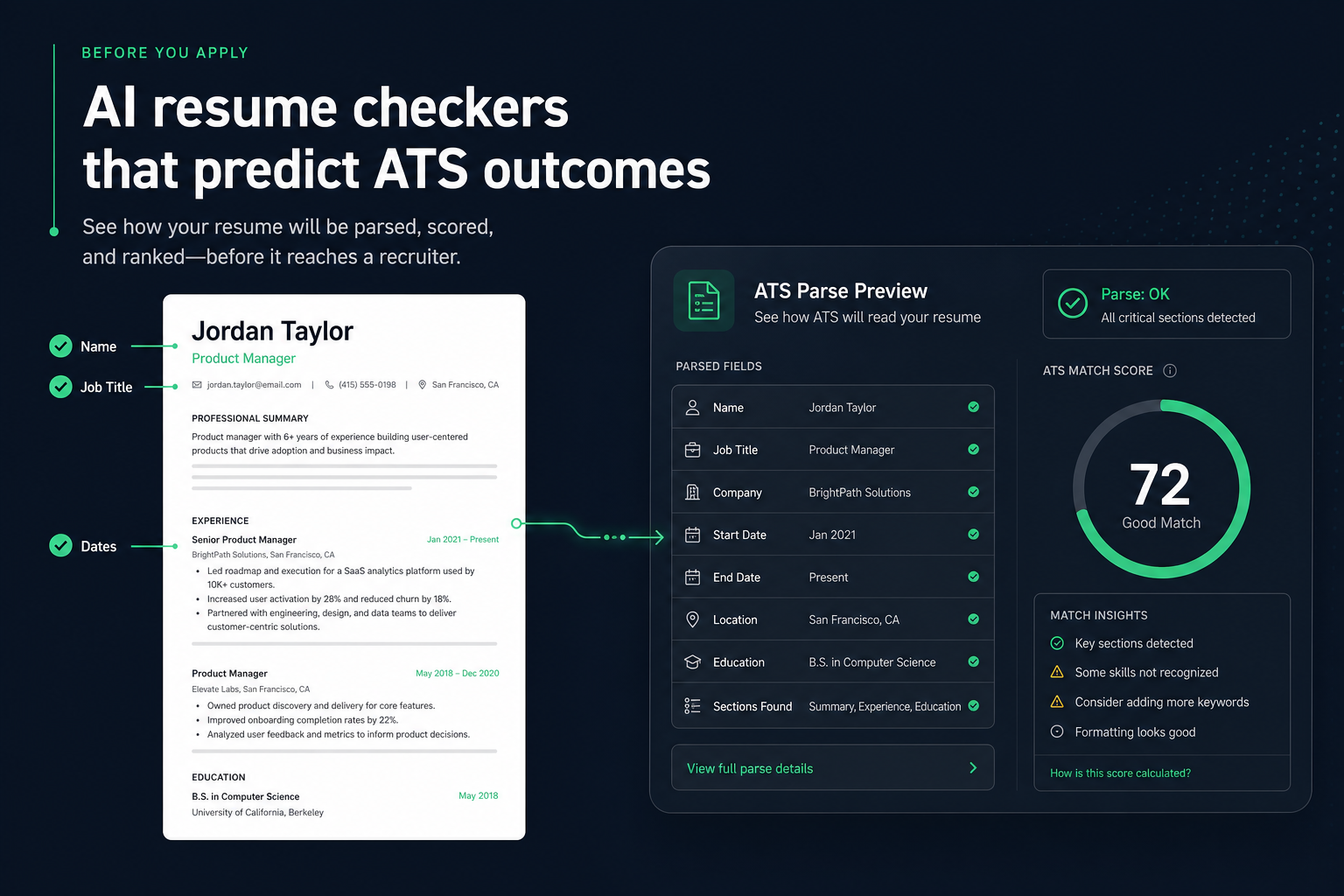
An AI resume checker does not predict whether you will get hired. It predicts two quieter outcomes that decide whether your application is even readable: whether an ATS can parse your file correctly, and how closely your resume text overlaps a specific job description. Run those checks before you apply, fix what they flag, then submit—instead of discovering a blank Workday title field after 40 silent applications.
Most people treat a checker score like a weather forecast for interviews. That is the wrong mental model. The useful prediction is mechanical: will Greenhouse extract your dates in order, will contact fields land in the right profile slots, and does the posting's required skill language appear in your Experience and Skills sections in a form a human can still defend. This guide shows how to use that prediction without chasing a vanity percentage.
- What an AI checker can and cannot forecast
- Parse risk vs keyword match—two different failure modes
- ATS-specific parse behaviors (Workday, Greenhouse, and similar)
- Before/After fixes for layout and bullets
- A pre-apply workflow you can finish in one sitting
Key Takeaways
- Checkers predict parse readiness and job-text overlap—not interview offers.
- Fix structure first; keyword tailoring on an unreadable file wastes every application that follows.
- Workday and Greenhouse fail differently: blank titles vs reordered sidebar text are both parse problems a checker can surface.
- Use Before/After edits that keep claims honest and measurable—not stuffed phrases copied from the posting.
- One clean base scan plus light per-job match passes beat endless re-scoring.
What an AI resume checker actually predicts
Key Takeaway
Treat the tool as a preflight for machine readability and posting overlap—not as a hiring oracle.
When marketers say a checker "predicts ATS outcomes," they usually mean one of three outputs. Only the first two are reliable enough to act on before you click Apply.
| Predicted signal | What it means | Act on it? |
|---|---|---|
| Parse / format risk | Can the ATS extract name, email, titles, employers, and dates cleanly? | Yes—fix before any volume apply |
| Job match / keyword overlap | Which required skills and phrases from the posting appear in your text? | Yes—add only honest, backed terms |
| Interview or hire probability | Will a recruiter call you or will you get the job? | No—checkers do not know this |
A strong checker walks the same path an ATS importer does: open the file, pull text in reading order, map fields into a candidate profile, then optionally compare that text to a job description. The "prediction" is whether that path will succeed with your current layout and wording. It is not a forecast of recruiter taste, team chemistry, or how many other applicants already know the hiring manager.
Expert tip: If a tool only returns a single percentage with no ranked parse flags, you are looking at a keyword overlap toy, not a full ATS outcome preview. Ask whether it can tell you when a title or date field would come back empty.
Parse risk vs match score: two outcomes, two fixes
Key Takeaway
A high match score on a broken layout still fails; fix parse first, then tailor wording.
Job seekers often optimize the wrong dial. They paste a posting into a matcher, climb from 64% to 91%, and still hear nothing—because the ATS never stored their current job title. Match scores measure text overlap. Parse checks measure whether the machine can build a profile from your file at all.
Symptoms that point to parse failure
- Many applications, almost no replies, and no personalized rejection notes
- You built the resume in Canva, InDesign, or a two-column Word template
- Contact info lives in a header, footer, sidebar, or logo graphic
- Dates sit in a separate table column beside each role
Symptoms that point to a match gap
- You already get some callbacks, but want a higher hit rate on stretch roles
- The posting lists named tools you used but never wrote down literally
- Your summary describes "data work" while the role asks for SQL and Tableau
- A format check already passed and the file is single-column
If you cannot tell which failure mode you have, assume parse risk until a structural scan clears it. Keyword work done on an unreadable PDF does not compound—it evaporates.
ATS parse specifics checkers are trying to simulate
Key Takeaway
Workday often blanks titles when dates live in table columns; Greenhouse usually keeps linear text but can reorder left-sidebar skills ahead of Experience.
No public checker is a perfect clone of every employer's stack. The value is in catching failure patterns that show up again and again across common platforms. Two specifics are worth memorizing before you apply at volume.
Workday: title and date extraction
Workday's candidate-profile importer commonly blanks or mis-assigns job titles when dates sit in a separate table column beside the role block. To a human, the layout looks tidy. To the importer, the reading order may treat the date column as its own stream, so "Senior Analyst" never lands in the title field. A checker that flags tables, multi-column role rows, and header contact blocks is approximating this failure—not inventing a scare story.
Greenhouse: reading order and sidebars
Greenhouse usually keeps linear, single-column text intact, which is why a plain PDF often sails through. The common break is a left-sidebar skills column: the parser may read that column first and push Experience later in the extracted text. Your skills still exist, but the narrative order recruiters see in the ATS view can look scrambled. Similar sidebar and text-box issues appear in Lever and iCIMS imports when designers place critical content outside the main flow.
When you run HireFlow before applying, start with the structural parse check. Confirm name, email, phone, employer names, titles, and date ranges extract in a sensible order. Only after that passes should you open the job match score against a specific posting.
Before/After: three fixes that change ATS outcomes
Key Takeaway
Small structural and wording edits beat chasing a higher score with the same broken layout.
1) Contact and layout
Before: Name and email sit in a colored header bar; phone and LinkedIn live in a two-column footer; skills fill a left sidebar next to Experience.
After: Name, city, phone, email, and LinkedIn appear as plain text at the top of a single column. Skills move under a standard Skills heading below Experience. No tables for role dates—each job is Employer, Title, dates on one or two stacked lines, then bullets.
Why it matters: this is the difference between a blank phone field in Workday and a complete candidate profile. A checker that flags headers, footers, and columns is predicting that profile outcome before you apply.
2) Role bullet for a data analyst posting
Before: Responsible for analyzing data and creating reports for leadership.
After: Built SQL queries and Tableau dashboards that cut weekly reporting time from 6 hours to 90 minutes for a 12-person ops team.
Why it matters: the posting asked for SQL and Tableau. The before line only implies them. The after line states the tools and adds a measurable outcome a human can ask about. Match score rises for the right reason—evidence, not stuffing.
3) Skills line vs buried synonyms
Before: Skills: Cloud platforms, automation, agile delivery (job asks for AWS, CI/CD, Scrum).
After: Skills: AWS, CI/CD (GitHub Actions), Scrum, Python, Terraform—each term also appears once inside a real Experience bullet.
Why it matters: semantic systems may connect "cloud platforms" to AWS, but hard filters and many keyword checkers still look for the literal string. Naming the tool once in Skills and once in context is usually enough; repeating it five times does not improve parse outcomes and can hurt human trust.
A pre-apply workflow: predict, fix, then submit
Key Takeaway
One structure pass on the base resume, then a short match pass per role family, is enough for most searches.
- Upload the base file. Use a text-based PDF or DOCX. Skip image-only exports. Run a structural ATS check first—no job description yet.
- Clear every parse flag that would blank a field. Columns, tables for dates, text boxes, icon-only contact rows, and non-standard section headings. Rebuild in a free resume builder if the layout is too tangled to patch in Word.
- Add one job description. Run a job match score against a real posting you plan to apply to this week.
- Add missing terms you can defend. Prefer tools, certifications, and methods you actually used. Skip soft-skill spam lists.
- Re-scan once. Confirm parse stayed clean after edits. Stop when flags are gone and the match list no longer shows must-have skills you truly have.
- Apply. Save the tailored version with a clear file name (Lastname_Role_Company.pdf). Move on—do not burn the evening chasing 95%.
Mid-search reminder: if you have not cleared parse risk yet, pause the apply sprint and run a free HireFlow scan first. Predicting ATS outcomes only helps when you act on the structural prediction before volume sending.
How to read scores without fooling yourself
Key Takeaway
A score is a checklist summary. Investigate the flags; do not worship the number.
Percentages feel decisive. They are not. Two resumes can share an 82% match for different reasons—one because the core tools are present with evidence, another because soft phrases were pasted into Skills. Prefer tools that show ranked issues: missing contact extract, date inconsistency, absent section headings, and a short list of posting terms you still lack.
- Parse clean + moderate match: Ready to apply if bullets are honest and specific.
- Parse dirty + high match: Not ready. Fix structure; the match number is misleading.
- Parse clean + low match on a stretch role: Decide whether the gap is real missing experience or missing vocabulary. Only vocabulary is a checker fix.
- Very high match after heavy copying: Slow down. If a recruiter reads the bullets aloud and they sound like the job ad, rewrite in your own outcomes.
Also remember: employer ATS settings differ. One company may hard-filter on a certification; another may rank semantically and ignore exact skill checkboxes. Your checker is a rehearsal stage, not a copy of every recruiter's configuration.
Mistakes that make "predictions" useless
Key Takeaway
Most wasted time comes from treating the score as a goal instead of treating parse flags as blockers.
- Chasing the percentage after the file is already clean. Once must-have skills you actually have are present, more scans rarely change outcomes.
- Ignoring parse flags because the PDF looks pretty. Visual quality and ATS extractability are different properties.
- Stuffing every missing keyword into Skills. Unbacked tools show up in interviews as credibility gaps.
- Skipping the job description when you care about match. A structure-only scan will not tell you which posting terms you omitted.
- Running three checkers and averaging the scores. Pick one primary tool for iteration; use a second opinion only when flags wildly disagree.
- Assuming a clean scan replaces a human read. Ask a peer in your field to scan for narrative and seniority once structure is solid.
When to re-scan (and when to stop)
Key Takeaway
Re-scan after layout changes or a new role family—not after every tiny wording tweak.
| Situation | Re-scan? |
|---|---|
| You rebuilt from a two-column template | Yes—full structure check |
| New role family (e.g., analyst → product ops) | Yes—match against a sample posting |
| Same base resume, fifth similar job this week | Optional light match only |
| Changed one metric in an existing bullet | No—apply and move on |
| Exported again from design software | Yes—parse risk returned |
Prediction tools earn their keep when they prevent silent parse failures and obvious keyword misses. They stop earning it when they become a daily habit that delays applications. Use the checker as a gate before a batch of applies, not as a replacement for the batch.
Predicting ATS outcomes before you apply is useful when you define the outcome correctly: a parseable profile and honest overlap with the posting—not a promise of interviews. Clear structural risk once, tailor lightly per role, and spend the time you save on applications, referrals, and interview prep.
Ready to preview how an ATS will read your file? Scan your resume free on HireFlow —start with the parse check, add a job match when you have a real posting, and apply only after the blockers are gone.
Frequently asked questions
No. A checker predicts technical inputs—whether an ATS can parse your file and how closely your text overlaps a posting. Interviews depend on role fit, competition, referrals, timing, and human judgment. Treat the score as a preflight checklist, not a hiring forecast.
Two outcomes matter most: parse risk (will Workday, Greenhouse, Lever, or similar systems extract your name, titles, dates, and contact fields correctly) and job-match overlap (which required skills and phrases appear in your resume versus the posting). Some tools also flag missing sections and weak bullet structure.
Human screens and ATS parsers read differently. Multi-column layouts, tables holding dates, text boxes, graphics-based headers, and contact details in headers/footers often look polished on screen while leaving employer, title, or email fields blank in the ATS candidate profile. That gap is exactly what a structural parse check is built to catch.
Run a full structure check once on your base resume, then re-check after major layout changes. For each new posting, a lighter job-match pass is usually enough—add missing role terms that you can honestly support, then stop. Re-scanning the same clean file for a higher percentage wastes time that belongs in applications and outreach.
A clean parse plus solid keyword coverage means your file is ready to enter the system—it does not mean you are the strongest candidate. Confirm every matched skill is backed by a real bullet, keep the document readable for a human, and only then submit. A high score with vague achievements still underperforms in recruiter review.
For parse and formatting checks, no—the file alone is enough to see whether contact fields, dates, and sections extract cleanly. For predicting job-match fit, yes: paste or upload the posting so the tool can compare required skills and phrases against your resume. Structure first, then match.
Prefer a text-based PDF or a DOCX with a single-column layout and standard headings (Experience, Education, Skills). Avoid flattened design exports and image-only PDFs. If a checker flags parse errors after a Canva or designer export, rebuild in a plain structure and scan again before applying.