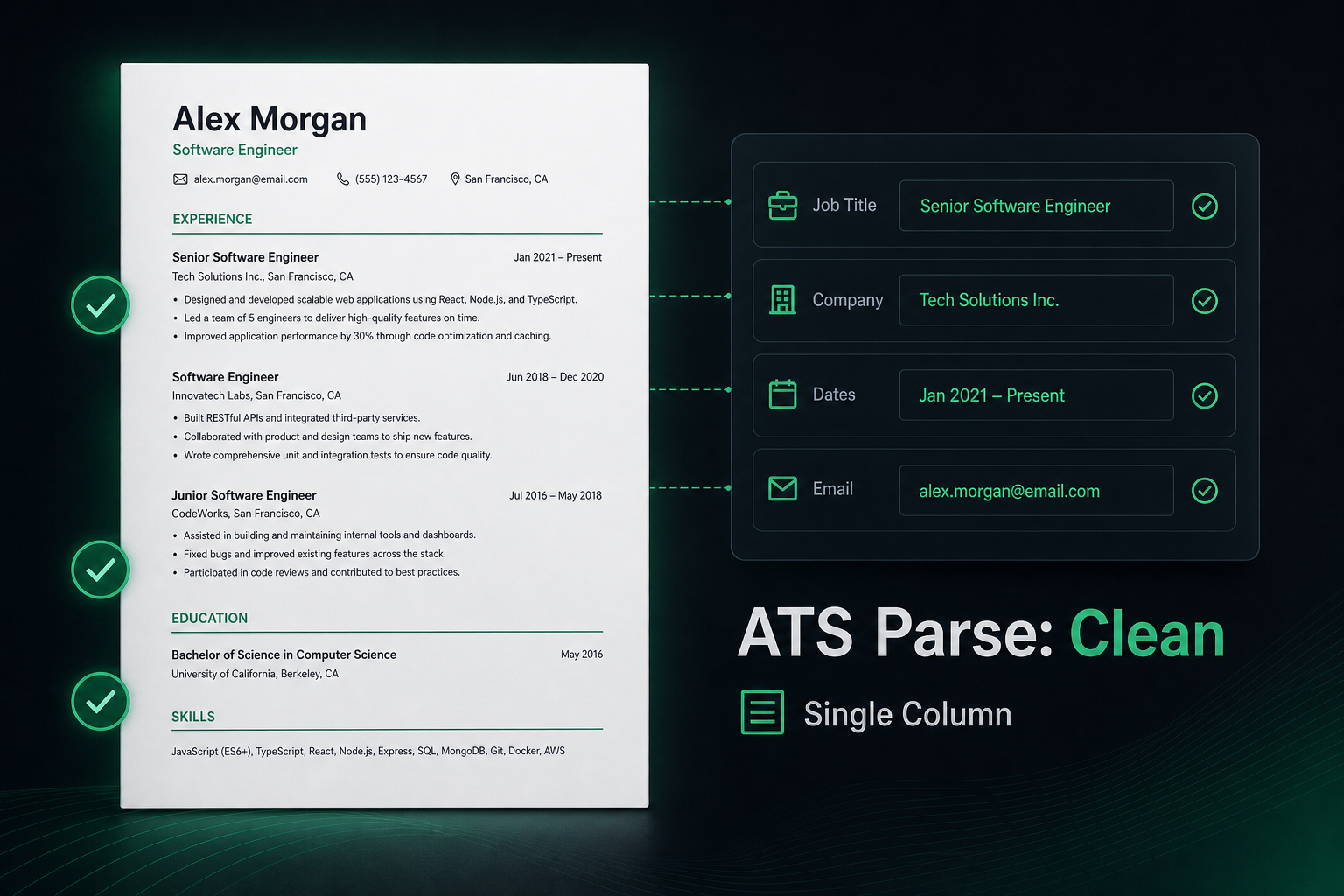
Direct answer: build an ATS-compliant resume from scratch as a single-column, text-based document with standard headings (Experience, Education, Skills), contact details in the body—not the header—and dates written inline with each job. Skip columns, tables, text boxes, and design-tool PDFs. That structure is what systems like Workday and Greenhouse can extract into candidate fields; pretty templates that look fine on screen often fail that extraction silently.
Most people start with a template they like, then try to “make it ATS-friendly” later. That order is backwards. Parsers read reading order and field boundaries first; design is secondary. If you are starting over—or should be—this guide walks through the build decisions that matter before you write a single achievement bullet.
You will get a from-scratch build order, platform-specific parse notes for Workday and Greenhouse, three before/after rewrites, a testing checklist, and a clear path to verify the file before you apply.
- What “ATS-compliant” means mechanically (not marketing language)
- The exact build order: structure → headings → jobs → keywords
- How Workday and Greenhouse mishandle columns and sidebars differently
- Three before/after examples you can copy as patterns
- A paste-and-search test sequence before you hit submit
Key Takeaways
- Start from a blank single-column file—do not “ATS-fix” a multi-column design template.
- Put contact info in the body; headers and footers are skipped by some parsers.
- Workday blanks titles/dates when they sit in separate table cells; Greenhouse often reorders left-sidebar skills ahead of Experience.
- Keywords belong in summary, bullets, and skills only when they match real work.
- Always paste-test and run a structural check before keyword tailoring.
What ATS-compliant actually means when you build from scratch
Key Takeaway
Compliance means extractable fields and a stable reading order—not a magic percentage or a “certified” template badge.
An applicant tracking system does not “read” your resume the way a recruiter does. It converts the file into text, then tries to assign chunks to fields: name, email, phone, job title, employer, start date, end date, school, degree. A resume is ATS-compliant when that extraction is mostly correct. Visual polish that does not survive that pipeline is wasted effort at the application stage.
That is why starting from scratch helps. You control reading order from the first line. You never inherit invisible Word tables, Canva text boxes, or a skills sidebar that the parser visits before Experience. Rebuild once into a parser-safe base, then tailor wording per job—not the other way around.
Expert tip: Treat ATS compliance as a binary gate for structure (can the system extract your history?) and a separate dial for relevance (do your bullets match the posting?). Mixing those two problems into one “score” is how people optimize keywords on a file the ATS never parsed correctly.
Build order: structure before wording
Key Takeaway
Lock layout, headings, and job blocks first; write achievement language only after the skeleton parses cleanly.
Use this sequence every time you create a new base resume. Skipping steps is how “advanced” resumes still fail basic import.
- Blank single-column canvas. New Word/Google Docs file or an ATS-safe builder . No two-column starter, no “modern” sidebar template.
- Body contact block. Name on line one; phone, email, city, LinkedIn URL on the next lines as plain text.
- Standard headings only. Professional Summary → Experience → Education → Skills. Optional Certifications after Education. Avoid creative labels like “My Journey” or “Where I’ve Made Impact.”
- Stacked job blocks. Title, company, location, dates on one or two lines; then bullets. One role ends before the next begins—no overlapping columns.
- Skills as a simple list. Comma-separated or one per line. No skill bars, icons, or rating graphics.
- Then write content. Summary, bullets, and skill selection come after the skeleton is stable.
Fonts: stick to Calibri, Arial, Georgia, or Times New Roman at 10–12 pt for body text. Fancy display fonts are fine for a personal website; they are a liability in an uploaded application file.
Section names and reading order parsers expect
Key Takeaway
Use predictable headings and a top-to-bottom order so the parser can map sections without guessing.
Parsers rely on heading labels as landmarks. “Work Experience,” “Professional Experience,” or “Experience” all map cleanly. “Career Story” does not. Keep every heading at the same visual level (one style for H2-equivalent section titles) so the document outline is unambiguous.
| Use these headings | Avoid these labels |
|---|---|
| Professional Summary / Summary | About Me, Profile Narrative |
| Experience / Work Experience | Where I've Been, Career Path |
| Education | Learning Journey, Academia |
| Skills | Superpowers, Toolkit (icon grid) |
| Certifications | Badges (as images only) |
Recommended order for most U.S. professional roles: contact → summary → experience → education → skills → certifications. Early-career candidates may put education above experience. Do not put a dense skills sidebar before experience if you care about how Greenhouse-style linear parsers present the file to a recruiter.
Workday vs Greenhouse: parse specifics that change how you build
Key Takeaway
One clean single-column file satisfies both—but each platform fails different layout tricks, so design for the stricter importer.
Building “for ATS” in the abstract is vague. Building for how real platforms extract fields is concrete. Two systems you will meet often in 2026 behave differently enough that their failure modes should shape your from-scratch layout.
Workday: structured field importer
Workday’s candidate-profile importer tries to auto-fill title, company, location, and dates into form fields. When dates sit in a separate table column on the right side of the page, that importer commonly blanks the title or date field—or attaches the date to the wrong role. Text boxes and multi-column layouts make the problem worse because the importer’s reading path is no longer top-to-bottom.
Practical rule for a from-scratch Workday-safe file: write Job Title — Company — City, ST — Mon YYYY – Mon YYYY as plain inline text, then bullets underneath. No date column. No header-only contact block. Prefer DOCX on older-looking enterprise portals; a text-selectable PDF is usually fine on newer career sites.
Greenhouse: linear text, sidebar risk
Greenhouse typically keeps linear body text intact better than Workday’s rigid importer, which is why a clean PDF often works. The common failure mode is the left-sidebar skills column: the parser may read the sidebar before Experience, so the stored text order becomes Skills → Education → Experience (or similar), even though the visual design shows experience first. Recruiters searching inside the ATS then see a scrambled narrative.
Practical rule: put Skills after Experience as a simple list. Do not use a sidebar. Avoid putting your phone number only in a header bar graphic—Greenhouse configurations vary on header extraction, and body placement removes the risk.
| Layout choice | Workday risk | Greenhouse risk |
|---|---|---|
| Dates in right-hand table column | High — blank or wrong date/title fields | Medium — order can still jumble |
| Left skills sidebar | High — mixed field mapping | High — skills text before Experience |
| Contact only in header | High — missing contact on import | Medium — config-dependent |
| Single-column, inline dates | Low — preferred pattern | Low — preferred pattern |
Before you tailor keywords for a specific posting, confirm the base file extracts cleanly with HireFlow's free ATS checker . A structural pass here saves you from polishing bullets on a layout neither Workday nor Greenhouse will map correctly.
Keywords after structure: place them where they are true
Key Takeaway
Mirror job-post language in summary, bullets, and skills—never as a hidden dump or a keyword wall that a human would reject.
Once the skeleton parses, open the target job description and pull hard skills, tools, and role phrases that match work you actually did. Put the highest-signal terms in three places: one sentence in the summary, one or two bullets under the most relevant jobs, and the skills list. That redundancy helps both keyword matchers and human skimmers without looking stuffed.
Do not white-text keywords, do not paste the entire requirements section into Skills, and do not rename every past title to match the posting if the title was different. Honest alignment beats keyword theater—recruiters and screening agents both notice when every bullet is a near-copy of the ad.
Before and after: three from-scratch fixes
Key Takeaway
Most “advanced” ATS wins are boring layout corrections—inline dates, body contact, and stacked job blocks.
1. Contact block and header trap
Before: Name and email live in a styled header; phone sits in a footer. The PDF looks branded. Workday import returns empty email/phone fields.
After:
Jordan Lee
(555) 014-8821 · [email protected] · Austin, TX
linkedin.com/in/jordanlee
Same information, body text only. Parsers that skip headers still capture the contact fields.
2. Dates in a table column
Before: Job title and company on the left; 01/2022 – Present in a right-aligned table cell. Workday blanks the title or attaches the dates to the wrong employer.
After:
Operations Analyst — Northline Logistics — Austin, TX
January 2022 – Present
• Built weekly inventory exception reports in SQL that cut stockout escalations by 18% over two quarters
• Coordinated carrier SLA reviews with three regional teams; documented root causes in Confluence
Title, company, location, and dates stay in one reading path. Bullets carry measurable work plus tools the posting cares about (SQL, Confluence) without a separate keyword dump.
3. Sidebar skills vs stacked skills
Before: Two-column layout: skills icons on the left, experience on the right. Greenhouse-stored text often lists skills first; Experience appears later in the extract.
After: Full-width Experience section, then:
Skills
SQL, Excel, Tableau, inventory planning, SLA management, Confluence, stakeholder reporting
Recruiters still see skills; parsers see them after the jobs they support. That order matches how most humans evaluate candidates anyway.
File format, length, and what never belongs in the base file
Key Takeaway
Prefer text-selectable DOCX or PDF, one to two pages, and zero graphics used as information carriers.
- DOCX vs PDF: Both work when text is selectable. Use DOCX for older Workday-style portals; clean PDF is fine for many Greenhouse boards. Never submit a scanned image PDF.
- Length: One page for most early-career roles; two pages is fine for experienced professionals with substantive bullets—not filler.
- Never as the only carrier of meaning: headshots, skill meters, icons instead of words, charts of “impact,” or logos for every employer.
-
File name:
Firstname-Lastname-Resume.docxbeatsfinal_FINAL_v7.pdf.
If a design tool was involved at any point, export is not enough—rebuild. Flattened design PDFs are a frequent reason a resume “looks perfect” and still fails import.
Test the build before you apply anywhere
Key Takeaway
Four quick tests—paste, search, gridlines, ATS check—catch almost every structural failure before a real application does.
- Copy-paste test. Select all → paste into a plain-text editor. Order should match the page. If skills or dates jump around, fix layout.
- Search test. In the PDF, search for your phone, email, and each job title. If search finds nothing, the file is not text-based.
- Gridline test. In Word, show gridlines/formatting marks. Hidden tables around dates or skills mean rebuild that section as stacked text.
- Structural ATS check. Upload to HireFlow for parse/format feedback, then tailor keywords to a specific posting only after the base passes.
Expert tip: If paste order is clean but callbacks are still rare, switch focus from formatting to role match and bullet proof—structure was not the remaining bottleneck.
Mistakes that undo a from-scratch ATS build
Key Takeaway
The fastest way to break a clean resume is reintroducing columns, headers, or template chrome after the hard part is done.
- Decorating after the parse test. Adding a sidebar “for visual balance” reintroduces the Greenhouse reorder problem you just fixed.
- Moving contact back into a header because a template looks empty at the top—put a one-line summary under the contact block instead.
- Chasing a keyword percentage on a file that still fails paste order. Fix extraction first.
- Using images for certification logos without also naming the credential in text.
- Submitting a Canva PDF after rebuilding in Word “just for the look.” Keep the parser-safe file as the application file.
Building an ATS-compliant resume from scratch is less about clever wording and more about refusing layout that breaks extraction. Single column, body contact, standard headings, inline dates, skills after experience—then keywords that match real work. That base survives Workday’s field importer and Greenhouse’s linear parse better than any decorated template you “fix later.”
When the skeleton is ready, run it through HireFlow's free ATS resume checker to confirm what a parser extracts, then tailor bullets for each posting with confidence that the file itself is not the silent failure point.
Frequently asked questions
An ATS-compliant resume is a text-based document with a linear reading order, standard section headings, and no layout tricks that break parsers—so systems like Workday and Greenhouse can extract your name, contact details, job titles, employers, and dates into structured fields. It is about machine readability first, then human polish.
If your file uses columns, tables, text boxes, or a design-tool export, rebuild from a clean single-column base. Patching a broken template usually leaves hidden tables or floating text that still fail on upload. A blank DOCX or an ATS-safe builder is faster than debugging Canva or InDesign leftovers.
Both can work if the text is selectable and the layout is single-column. Many older Workday portals prefer DOCX; Greenhouse usually handles clean PDFs well. When a posting does not specify a format, submit DOCX for enterprise portals and a text-based PDF for modern career sites—and always verify text selection before you apply.
Workday’s candidate-profile importer tries to map your file into rigid fields (title, company, dates). Dates in separate table columns often blank out. Greenhouse keeps linear text more intact but can reorder left-sidebar skills ahead of Experience, so recruiters may see skills before your work history. Both reward a simple stacked layout.
Place role-relevant terms in your professional summary, experience bullets, and skills list—only where you can defend them in an interview. Mirror phrasing from the job description when it matches real work, but do not paste a keyword dump. Parsers index text; humans still judge whether the bullets sound credible.
Yes. Some ATS configurations skip header and footer regions entirely. If your email and phone live only in the header, the imported candidate profile can show blank contact fields even though the PDF looks fine on screen. Put name, phone, email, and location in the main body at the top of page one.
Paste the full resume into a plain-text editor and check reading order, search the PDF for your phone and each job title, open the file in Word with gridlines on to catch hidden tables, then run a structural ATS check. If fields scramble or go missing, rebuild the layout before you spend time on keyword tailoring.